

A guest checks out, but the PIN they used may still unlock the door. For Australian hosts, temporary codes for smart lock Airbnb stays are useful only when the lock can set access times and end them reliably.
It’s understandable to want check-in to run smoothly without being nearby, while making sure a previous guest can’t reuse their code. Smart locks differ in how they handle timed access, remote code changes and automatic expiry. A PIN may need to be deleted manually, even if you intended it for one stay.
This guide explains how to match an access method to your lock and property, set clear start and end points for guest access, and plan for digital entry problems. You’ll compare PINs, app access and connected management options, with practical checks for the full code lifecycle. Asthome Smart Electrical Supplies offers smart door locks and a broad range of smart-home products, all SAA certified for the Australian market.
Key Takeaways
- Choose temporary codes for smart lock Airbnb stays only when the exact lock model supports the access controls you need.
- Keep guest credentials separate from household access, and decide how each code will be removed or changed after checkout.
- Compare PINs, app access, recurring codes and physical keys for guest convenience, access control and backup options.
- Use a repeatable routine: confirm booking dates, test entry before arrival and send clear instructions through your usual booking channel.
- Match the hardware to your code-management needs. Asthome offers smart door locks and other SAA-certified smart-home products for the Australian market.
Temporary codes for Airbnb smart locks: what hosts need to know
A temporary access code is a guest credential with limited use or access for a set period, provided the lock and its connected system support those controls. It lets a guest enter without using the household or owner PIN. A code isn’t temporary simply because you send it to a guest for a short stay. Its actual limits depend on the lock’s settings.
Airbnb booking details and a lock’s code-management system are separate unless a supported integration connects them. A reservation won’t automatically create a guest code or make it expire. Hosts may need to create, share and retire access through the lock’s app or management system, then send entry instructions through Airbnb messages. For general background on smart-lock components and operation, see What is a Smart Lock?
What makes a smart-lock code temporary?
A permanent household PIN remains available until someone changes or deletes it. A guest credential is temporary only when its use or access period is limited. The limits can work in different ways: a one-time code may allow a single entry, an expiry setting may end access at a set time, and scheduled access may allow entry only during specified periods. These are distinct capabilities, not interchangeable labels.
Check the exact lock model and connected system to understand which controls they support. Some setups require you to remove a code manually rather than letting it expire automatically. Describe guest access accurately, and don’t promise timed expiry, one-time use or scheduled access unless the system provides that function.
Why separate guest access from everyday access?
Sharing your everyday PIN can make access harder to manage. If a guest knows the same code as the household, changing it may affect everyone who uses it. A separate credential gives you a distinct point of control, so you can retire guest access without changing the everyday entry code.
It also makes your routine easier to track. For each stay, record which credential is assigned and what action is needed after checkout. If the lock allows deletion, remove the guest credential. If it doesn’t, change it or use the access-management option the system provides. Don’t assume the app keeps an access history. A digital audit trail is available only if the lock or connected system provides one.
When choosing hardware, compare the code-management process on the specific model with the routine you want to follow. Asthome supplies smart door locks and a broad range of smart-home products. All products are SAA certified for the Australian market.
How temporary smart-lock codes work from booking to checkout
A reliable process has two parts: managing the credential in the lock’s app or connected system, and communicating entry details to the guest through your usual booking channel. Airbnb reservation information won’t automatically update a lock unless a supported integration connects them. Treat these as separate actions, and don’t assume that a booking date has created or scheduled a code.
Guest-code lifecycle: Check the lock’s capabilities, create a booking-specific credential, apply supported access limits, share and test the entry instructions, then remove or disable access after checkout where the system allows.
Set up a guest code before check-in
Start with the exact lock model and its code-management method. Confirm whether it supports a separate guest PIN, scheduled access, an expiry setting or another control you plan to use. Features vary by model, so don’t assume a function is available just because it appears in another lock’s app or product description.
- Check the reservation: Use the confirmed arrival and departure details to plan access.
- Create a credential: In the lock’s app or management system, make a distinct guest code if supported. Avoid reusing the household PIN.
- Set available limits: Apply start and end times only if the system provides them. A code that stays active until you change or delete it isn’t scheduled access, even if you intend to use it for one stay.
For temporary codes for smart lock Airbnb stays, distinguish between the dates you communicate and the limits the lock actually enforces. A message saying “valid until checkout” won’t make a PIN expire if the lock has no expiry control.
Share, test and retire access
Once the credential is set up, send clear entry instructions through your usual booking communication process. Explain how to use the keypad or supported app, and what to do if entry doesn’t work. Share only the access details the guest needs, and make sure your instructions reflect how the lock actually works.
Test the guest journey before relying on it. Check that the code is entered as intended, the lock responds and any app-based step works. If access is scheduled, confirm the setting in the lock system rather than treating your guest message as proof. Test without leaving the property unsecured.
After checkout, review the credential in the lock’s app. Remove or disable it if that option is available. If access can’t be individually revoked, use the code-management method supported by the system. Asthome offers smart door locks and other SAA-certified smart-home hardware for the Australian market. Explore Asthome smart door locks when planning your property’s access setup.
Temporary codes vs app access, recurring PINs and physical keys
Not every smart lock supports guest codes that expire. Access options vary by model and connected system, so compare how each method works with your setup rather than assuming one is automatically best. The table summarises the main trade-offs.
| Access method | Setup effort | Guest familiarity | Access-change control | Model or system dependence |
|---|---|---|---|---|
| Temporary code | Create a separate guest credential and configure any available limits. | Often straightforward if the guest knows how to use the keypad. | Can be easy to manage if the code can be changed, removed or scheduled to expire. | High. Separate codes and expiry controls depend on the lock and its system. |
| Recurring PIN | Set up a PIN for repeated access. | Familiar for guests comfortable with a keypad. | May need manual changes or removal. Recurrence doesn’t make it booking-specific. | Depends on the lock’s code options and management system. |
| App-based entry | Set up access through the supported app or system. | Varies. Guests may need to use an app or follow digital entry steps. | May allow access changes through the system, depending on its functions. | Requires compatibility with the lock and the guest’s access method. |
| Physical-key arrangement | Arrange key handover or access to a key stored for collection. | Familiar, but collection and return need clear instructions. | Changing access may mean retrieving or replacing the key. | Depends on the property’s lock and key arrangement. |
A recurring PIN isn’t automatically temporary or tied to a particular booking. If it remains active until you change or delete it, checkout won’t switch it off. Likewise, a code described as temporary may have no automatic expiry. For temporary codes for smart lock Airbnb stays, confirm the controls available on the specific lock and system.
When a temporary code suits a short stay
A separate guest code can simplify access changes between bookings without sharing the household PIN. If the lock supports scheduled expiry, it may reduce the need for a manual step after checkout. That benefit applies only when the feature exists and is configured correctly. Otherwise, plan to remove or change the code yourself.
When another access method may be more practical
App access may suit a host and guest who are comfortable using the supported app. A physical key can provide a separate fallback, but don’t assume every smart lock includes a keyway or that a spare key is available. Consider the guest’s likely comfort, your management routine and the lock’s supported functions together. Asthome’s range includes smart door locks and other SAA-certified smart-home products for the Australian market.
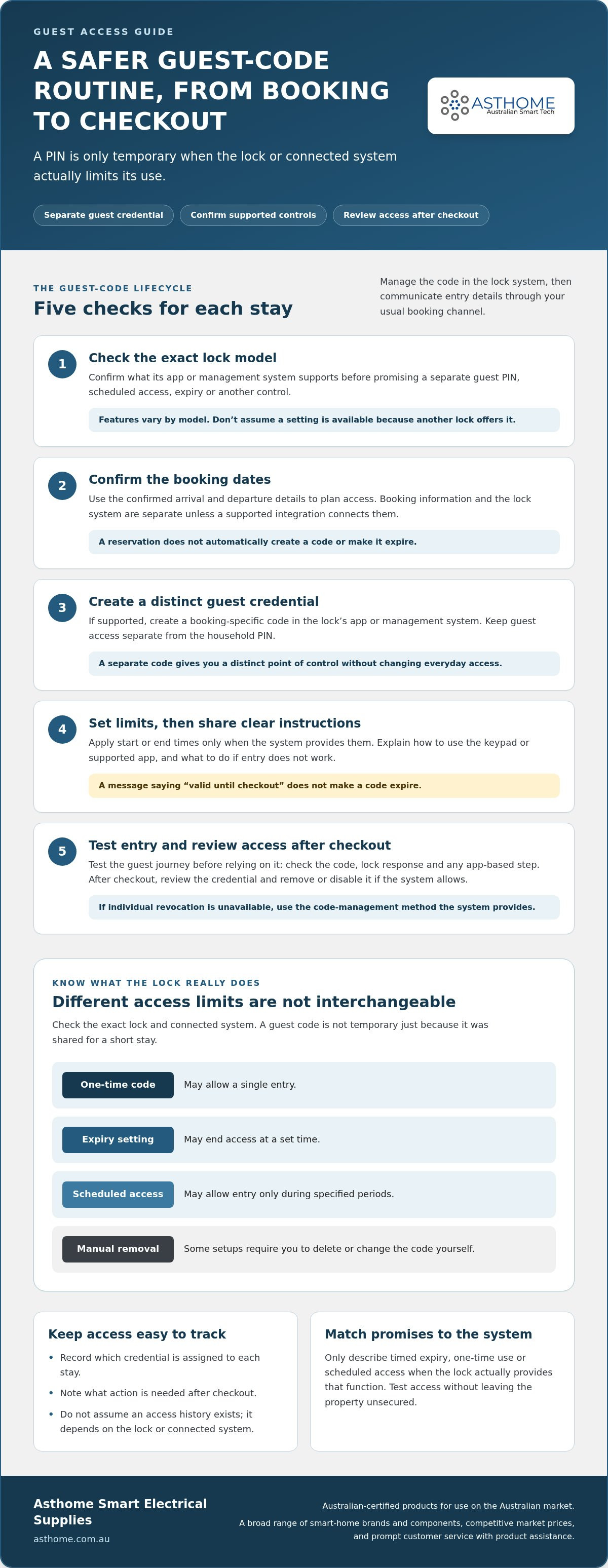
How to set up a safer guest-code routine for each Airbnb stay
A repeatable routine helps prevent a reservation change or missed checkout task from leaving guest access active. Keep the reservation details, lock settings and guest message aligned, but treat them as separate parts of the handover. Follow the same process for each booking, including back-to-back stays.
Prepare access before the guest arrives
Start with the confirmed check-in and checkout details. In the lock’s app or supported management system, create a distinct guest credential if available. Keep owner access separate where the lock supports multiple credentials. Set the permitted period to match the planned stay only if the lock offers start and end controls. Otherwise, note the manual action needed to change or remove access after checkout.
- Check the access method: Confirm that the credential, keypad or supported app works as intended. Don’t assume a feature shown in another model’s instructions applies to your lock.
- Test before arrival: Follow the guest steps yourself, including any app instructions. Confirm that the keypad responds or the supported digital entry process works before relying on it.
- Keep the message clear: Send concise instructions through your usual booking communication channel. Explain how to enter and what to do if the method fails, sharing only the details the guest needs.
Decide in advance how the guest can get help if the keypad, app or code doesn’t work. This could be a separately arranged key or another access plan you know is available for the property. Don’t assume the lock has a key override, remote access or another backup feature. Make sure the guest knows what to do and who to contact through your established booking process.
Close out access after checkout
After the guest leaves, review the lock’s supported controls and remove, disable or change the guest credential as appropriate. If access is scheduled to end automatically, check the setting rather than relying only on the checkout time in the booking. Keep the everyday owner credential separate where possible.
Some locks or connected systems provide access history; others may not. Confirm whether yours records activity before relying on it to review entry. Then record the completed access change in your own booking-management process. A simple note that the credential was removed or updated can help keep the next handover organised, without implying that the lock itself maintains an audit trail.
Choose access hardware around the routine you need, not a feature you hope it has. Explore Asthome smart door locks as you plan your guest-access setup. Asthome’s products are SAA certified for the Australian market.
Choosing smart-lock hardware for temporary guest access
Choose a lock around the access routine you need, not a feature you assume every smart lock includes. Decide who will manage guest access, how you’ll handle booking changes and what you’ll do if digital entry fails. Then compare those needs with the exact lock model and its connected system.
Match the lock’s functions to the hosting routine
Check the model’s instructions for the controls that matter to your stays. PIN creation, code limits, scheduled expiry and remote management are distinct functions. A lock may support one without supporting the others. If you need access to end automatically at checkout, look for that specific control rather than relying on a general claim that the lock offers guest codes.
Consider who will manage access. A host handling every booking may prefer a straightforward app workflow, while a co-host may need access to the same management system. Plan for date changes, cancellations and entry problems. Treat Airbnb integration as a separate capability: an app, PINs or remote management don’t prove the lock connects to Airbnb or receives booking updates.
For temporary codes for smart lock Airbnb stays, plan a fallback that doesn’t depend on an unverified digital function. This could be a separately arranged key, if the property has one, or a known person who can assist with entry. Make sure the plan is practical and that guests know what to do.
Explore Australian smart-home hardware options
Hardware choice involves more than code management. Consider whether the lock suits the property’s door and how it fits your wider smart-home setup. Asthome is an Australian online retailer offering smart door locks alongside a broad selection of smart-home brands, products and components. All Asthome products are SAA certified for the Australian market.
Match the features you need to the exact model before building your guest-access routine around them. Asthome offers a broad range of smart-home products and components, with prompt customer service and product assistance. Explore Asthome smart-home products as you consider your access setup.
Make your next guest handover more predictable
Reliable access depends on managing a guest credential from setup through checkout. Choose a method that suits your property and guests, keep owner access separate where possible, and don’t assume a booking automatically creates or expires a code. The features available for temporary codes for smart lock Airbnb stays depend on the exact lock and its connected system.
Before each arrival, confirm the reservation dates, configure only the access limits your lock supports, and test the guest entry steps. After checkout, remove, disable or change the credential using the available controls. A clear fallback plan helps if the keypad or supported app doesn’t work.
When comparing hardware, match the model’s code controls and management method to your hosting routine. Asthome is an Australian smart-home retailer with a broad range of brands, smart door locks and other components. All products are SAA certified for the Australian market, and the team provides prompt customer service and product assistance. Explore Asthome smart-home products to find smart-home hardware for your access setup.
Frequently Asked Questions
Can Airbnb guests use a temporary code on any smart lock?
No. The lock must support guest credentials, such as a separate PIN, and the controls you need depend on its exact model and connected system. Some locks may let you create codes but not schedule access or set automatic expiry. Check the model’s instructions and test the guest entry method before relying on it for a booking.
How do I create a temporary code for an Airbnb guest?
Create a distinct guest credential in the lock’s app or management system, if the model supports it. Set a start or end time only if those controls are available. Then send clear entry instructions through your usual Airbnb communication process. Test the code and instructions before arrival, and note how you’ll remove or change access after checkout.
Can a smart-lock code expire automatically after checkout?
Only if the lock and its connected system support an expiry or scheduled-access function and it’s configured correctly. A code intended for one stay may remain active until you delete or change it. Check the actual setting in the lock’s system. Don’t treat the checkout time in your Airbnb booking or guest message as an automatic lock setting.
Is a temporary PIN safer than giving guests a physical key?
Neither option is automatically safer in every setup. A separate PIN can be easier to change or remove if the lock supports those controls. A physical key avoids relying on a keypad or app, but needs a clear handover and return plan. Consider the property, guest needs and available fallback. Keep guest access separate from everyday owner access where possible.
What should I do if an Airbnb guest’s smart-lock code does not work?
Check that the guest has the correct code and entry instructions, and that any scheduled access is active at the time they’re trying to enter. Confirm the keypad or supported app is being used as intended. If digital entry still fails, follow the fallback plan arranged before arrival, such as a separately available key or another known way to assist. Don’t rely on an untested backup.
Can Airbnb automatically send a booking-specific code to a smart lock?
Not by default for every lock or host. Automatic code creation depends on a supported connection between Airbnb, a property management system and the lock’s platform. Some hosts use a property management system as a bridge for automated access workflows. Check the exact systems involved before assuming a booking will generate, send or expire a lock code automatically.
Should I change the smart-lock code after every Airbnb guest?
Manage or retire guest access after each stay, but whether you need to change a code depends on how the lock handles credentials. If you can remove an individual guest PIN, you may not need to change the owner code. If a shared or guest code can’t be individually disabled, change it using the lock’s supported controls so the previous guest’s access doesn’t remain usable.