

What if a more capable Alexa routine starts with fewer actions, not more? If you’re creating advanced routines in Amazon Alexa, it’s easy to get stuck deciding which triggers and devices can work together, especially when connectivity standards and hubs enter the mix. Start with a clear outcome, then build a routine around what your devices can actually do.
Alexa+ began rolling out in Australia on 6 August 2026 through an invitation-based Early Access programme, bringing voice-led routine creation to eligible users. But whether you build a routine by voice or in the Alexa app, compatibility still matters. A routine can only control devices that are connected and supported in your setup.
This guide shows you how to plan a trigger and action sequence, choose compatible devices, then test and refine the result without adding needless complexity. You’ll also learn where Wi-Fi, Zigbee, Matter and hubs fit into routine design. Asthome offers a broad range of smart switches and connected-home components, with a focus on products certified for the Australian market. Review each product’s specifications to understand its compatibility and controls.
Key Takeaways
- Plan a routine around one clear outcome, then choose a trigger and supported actions that achieve it.
- Separate triggers, conditions and actions so you can see where a routine depends on a particular device or setup.
- When creating advanced routines in amazon alexa, check the device’s stated compatibility and available controls, not just whether it uses Matter, Zigbee or Wi-Fi.
- Test each part of a routine and simplify any sequence that behaves inconsistently.
- Choose connected electrical hardware with clear specifications and Australian certification, and use product assistance if you need help understanding the details.
What makes an Amazon Alexa routine advanced, and when is it useful?
An Alexa routine is more than a longer voice command. It’s an automation that links a trigger to one or more actions supported by Alexa and the connected devices in your setup. The routine might start when you speak, at a set time, or when a compatible device reports an event. That simple logic is the foundation of a home automation system, where connected components work together to manage everyday tasks.
“Advanced” doesn’t have to mean complicated. A routine becomes useful when it handles a repeated task without you having to request each action separately. For example, a motion sensor could trigger hallway lights to switch on. This depends on the sensor being available as a trigger, the lights being controllable through Alexa, and your setup supporting those actions. Check device specifications and Alexa compatibility rather than assuming every connected product can join every routine.
How is an Alexa routine different from a voice command?
A voice command responds to what you say at that moment, such as asking Alexa to turn on a light. A routine follows logic you’ve configured in advance. One trigger can start a sequence of compatible actions, such as turning on a light and adjusting another connected device. Available triggers and actions depend on the current Alexa app options and the devices linked to your account.
What should you decide before automating a task?
Start with a household task you repeat, then define the result you want. For example: “At bedtime, make the bedroom ready for sleep.” Next, identify the devices that need to take part and how each connects to Alexa. A smart switch might control the lighting as one action, depending on its stated compatibility and how it’s integrated into your system.
In practical terms, an Alexa routine is a configured automation that uses a trigger to run one or more supported actions. Keep the design grounded: the trigger starts the routine, and each action must be available for the relevant connected device. When creating advanced routines in amazon alexa, begin with the simplest sequence that achieves your intended result. Then review the product specifications, including Australian certification for connected electrical hardware, before building around a device. Asthome’s smart-home range and responsive product assistance can help you understand product details as you plan your setup.
How do triggers, conditions and actions shape advanced Alexa routines?
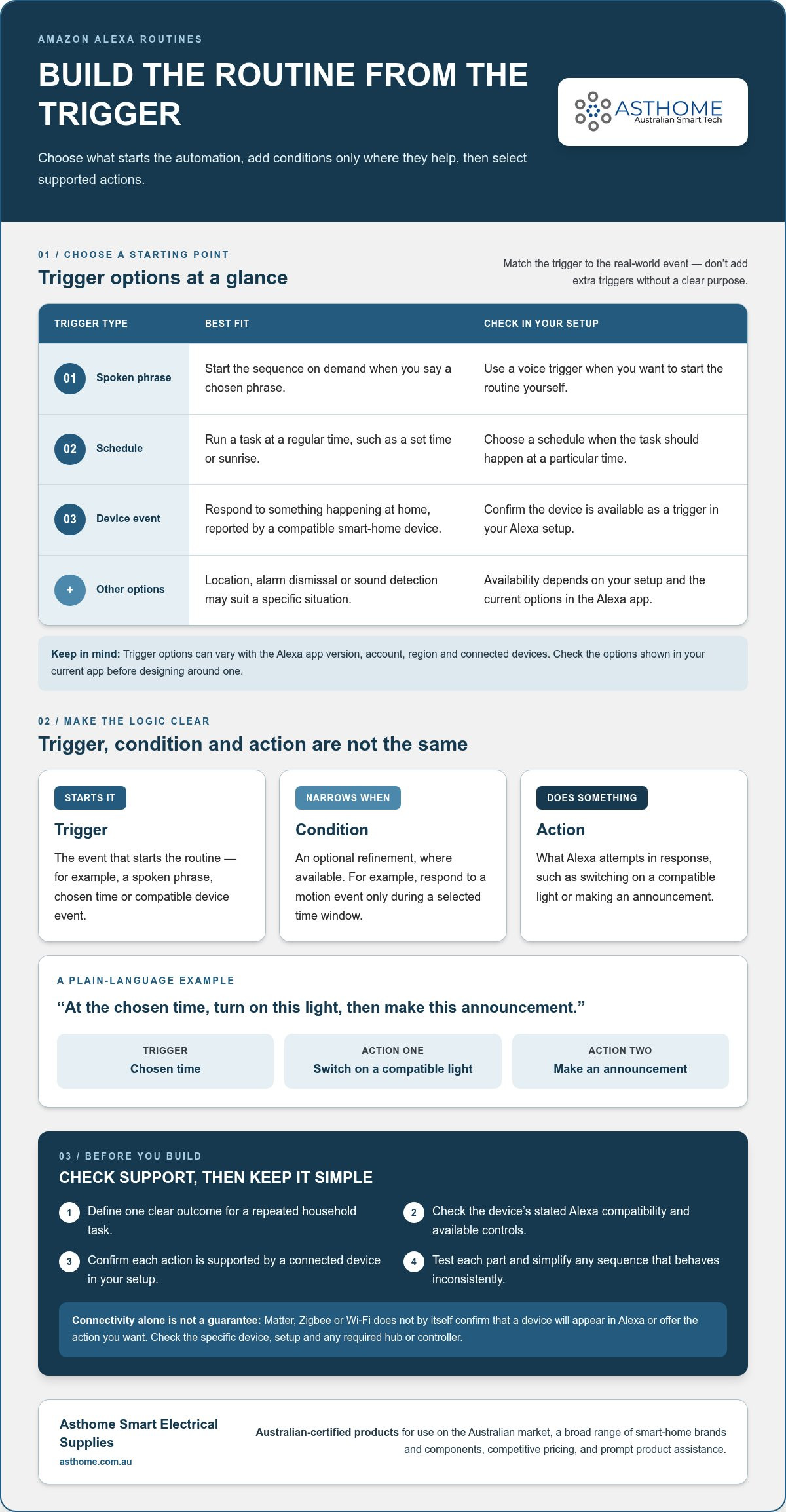
A routine follows a simple sequence: choose what starts it, add any supported conditions, then select the actions Alexa should run. Building it in that order makes the logic easier to follow and troubleshoot. Options can vary with the Alexa app version, account, region and connected devices, so use the controls shown in your current app as the guide to what your setup can do.
Which Alexa routine triggers can start an automation?
Choose a trigger that matches when the task should happen. Common categories include a spoken phrase, a schedule such as a set time or sunrise, and an event reported by a compatible smart-home device. Depending on your setup and current app options, location, alarm dismissal or sound detection may also be available. Review the routine options in the Alexa app before designing around a particular trigger.
A schedule suits a task that should happen at a regular time. A device event is a better fit when the automation should respond to something happening at home. A voice trigger works when you want to start the sequence on demand. Match the trigger to the real-world event rather than adding extra triggers without a clear purpose.
How should you combine conditions and actions?
Where Alexa offers conditions, use them to narrow down when a routine should run. For example, a routine might respond to a motion event only during a selected time window, if those options are available in your setup. Conditions don’t create device compatibility; they refine the logic around supported triggers and actions.
A trigger starts a routine; an action is something Alexa attempts to do in response. Keep actions in a sensible order and make the expected result clear. A scheduled morning routine might switch on a compatible light, then make an announcement through an Alexa-enabled device. Each action depends on the relevant device being connected and supported. Avoid designing around complex branching or delays unless the current app offers the function you need.
Write the sequence in plain language before setting it up: “At the chosen time, turn on this light, then make this announcement.” That makes it easier to spot unnecessary steps. For a practical app walkthrough, PCMag explains how to create Alexa routines; menu names and available options can change, so follow the current Alexa app.
If a smart switch is part of your plan, review its stated compatibility and specifications before relying on it as an action. Asthome supplies products certified for the Australian market and provides product assistance across its smart-home range. Explore smart-home switches and components as you plan a routine for your setup.
How do Matter, Zigbee and Wi-Fi affect Alexa routine compatibility?
Matter, Zigbee and Wi-Fi describe how smart-home devices communicate. They don’t, by themselves, confirm that a device will appear in Alexa or provide the action you want to use in a routine. Compatibility depends on the specific device, its setup, any required hub or controller, and the support available through Alexa and the manufacturer’s platform.
| Standard | Connection method | Alexa routine considerations |
|---|---|---|
| Matter | Devices communicate using a supported home network. | Check the product’s Matter and Alexa support, setup requirements, and which controls Alexa can use. |
| Zigbee | Devices communicate over a Zigbee network, commonly through a compatible hub or gateway. | Confirm the device and hub can work with your Alexa setup, then check which device functions are available to Alexa. |
| Wi-Fi | A device connects to your home Wi-Fi network. | Alexa control depends on the device’s supported integration and account setup, not Wi-Fi alone. |
Does Matter automatically make a device available to Alexa routines?
No. Matter is designed to support interoperability, but that doesn’t mean every Matter device offers identical features across platforms. Device type, setup and Alexa support all affect whether it appears and what Alexa can do with it. For example, a Matter light might be available as a routine action in a compatible setup, while a particular adjustment or status may not be available. Review current product specifications and platform information before planning a routine around a specific function.
What changes when a device uses Zigbee or Wi-Fi?
A Zigbee device may need a compatible hub or gateway to join your smart-home setup. Some Alexa devices include a smart-home hub, but support varies by model, so confirm your equipment’s capabilities. Asthome offers a Zigbee Gateway Hub and Zigbee modules. Review their product specifications for compatibility before building them into an Alexa routine.
Wi-Fi devices usually connect through the home network, but Alexa control may still depend on the manufacturer’s integration and a linked account. A device appearing in its own app doesn’t automatically mean Alexa can control it. For a broader view of routine setup and triggers, CNET explains how to program Alexa to automate everyday tasks.
When creating advanced routines in amazon alexa, check the exact device model, connection requirements and supported actions. Australian certification is also an important consideration when selecting connected electrical hardware for use in Australia. Asthome’s products are SAA certified for the Australian market, and its product assistance can help you understand specifications. A clear compatibility match is more useful than choosing a device based on its connection standard alone.
How to create, test and troubleshoot an advanced Alexa routine
Build the routine in stages. A clear trigger and a small set of verified actions are easier to test than a long sequence with several possible failure points. Alexa app labels and menus can change between versions, so use the current options shown in your app rather than relying on a fixed menu path.
What is a practical routine-building workflow?
- Define the outcome. Write down what you want to happen and when. Keep the first version focused on one household task.
- Check your devices. Confirm each device is set up and appears in the Alexa app. Review its specifications and integration details to understand which controls are supported.
- Name the routine clearly. Use a name that makes its purpose easy to recognise later, such as “Hallway at night”.
- Choose one trigger. Select the available voice, schedule or device-event trigger that best matches the intended behaviour. Add supported conditions only if they help define when it should run.
- Add the necessary actions. Choose the compatible devices and actions, then save the routine. Run a controlled test and check each result before adding more steps.
For example, a motion event could be set to switch on a hallway light, provided the sensor is available as a trigger and Alexa can control the light in your setup. Test the sensor and light separately first. For connected electrical hardware, review product specifications and Australian certification before relying on it as part of your routine.
How can you diagnose a routine that does not run?
Start at the beginning of the sequence and work through it one part at a time. Confirm the routine is enabled, then check whether its trigger occurred. If the trigger was a device event, check that the device is online and visible in Alexa. If it was a schedule, review the selected time and settings.
- Trigger: Did the voice phrase, schedule or device event match the configured trigger?
- Device: Is the device connected and showing the expected status in Alexa?
- Integration: Does the device’s current integration provide the specific action you selected?
- Routine settings: Are the right devices, conditions and actions selected, and is the routine enabled?
Change one setting at a time, save, then retest. If a device can’t be controlled directly in Alexa, adding it to more routines won’t resolve the underlying integration issue. When creating advanced routines in amazon alexa, keep a simple working version before expanding the sequence.
Need help understanding connected-device specifications? Explore Asthome’s smart-home products, all SAA certified for the Australian market, with responsive product assistance.
Where can smart switches fit into an advanced Alexa routine?
A compatible smart switch can make lighting one action in a broader routine. For example, a schedule could trigger Alexa to switch on a connected light circuit as part of an evening sequence. The exact control available depends on the switch, its integration with Alexa and your home setup. A connection standard by itself doesn’t guarantee that a particular switch will appear in the app or provide the action you want.
What can a compatible smart switch add to a routine?
A switch module can give Alexa control of a supported lighting circuit, letting you include that circuit in a routine alongside other available actions. Keep the sequence practical: choose a clear trigger, add the lighting action, then test it before expanding the routine. Confirm the switch appears in Alexa and that the required control is available. For more on choosing a switch for your setup, explore a guide to Australian smart light switches.
How should you choose electrical hardware for smart-home use?
Start with the product specifications. Check the stated connection method, required hub or gateway, Alexa integration and supported controls. Also prioritise products certified for the Australian market, particularly for connected electrical hardware. Certification and a familiar protocol are useful considerations, but neither replaces checking the specific product’s capabilities.
Then match the option to your existing ecosystem. A Matter switch may suit a home already organised around compatible Matter devices, while a Zigbee option may fit a setup with an appropriate Zigbee hub or gateway. These are starting points, not blanket compatibility claims. Review product information and current platform details before relying on either switch in a routine.
Asthome offers a wide range of smart-home brands and components, including a Matter Smart Switch Module and a Zigbee 3.0 Smart Switch Module, at the best prices across the market. The suitability of any module for an Alexa routine depends on its stated compatibility and your system configuration. Asthome’s products are SAA certified for the Australian market, and its responsive product assistance can help clarify specifications. If you’re creating advanced routines in amazon alexa, choosing hardware around a defined task and verified device support can keep the setup useful without making it unnecessarily complex.
Build a routine that works with your setup
Reliable Alexa routines begin with a clear outcome, a suitable trigger and actions your connected devices actually support. Matter, Zigbee and Wi-Fi describe connection methods, but the specific device, integration and hub can affect what Alexa can control. Start with a simple sequence, test each part, then add complexity only when it improves the result.
As you continue creating advanced routines in amazon alexa, review product specifications and current Alexa compatibility before choosing electrical hardware. Asthome offers a broad range of smart-home brands and components, including Matter and Zigbee smart switch modules, at the best prices across the market. Its products are SAA certified for Australia, and its responsive product assistance can help you understand product details as you plan your setup.
Explore Asthome’s smart home products to compare options for your setup. Start small, verify compatibility and build a routine that makes everyday tasks easier.
Frequently Asked Questions
Can Alexa routines use more than one trigger?
Alexa routines may support more than one trigger in some setups, but availability can vary by app version, account and connected device. Open the routine’s current settings and review the trigger options before designing around a combination. If the app only lets you select one trigger, consider whether separate routines suit the task without creating conflicting actions. Test the setup with your devices before relying on it.
How do I create an Alexa routine with multiple actions?
Choose a trigger in the Alexa app, add each supported action, then save the routine. Put actions in an order that suits the intended result, such as turning on a compatible light before making an announcement. When creating advanced routines in Amazon Alexa, start with a short sequence and run a controlled test. Add steps only as needed. Menu labels, action order and available controls can vary between app versions and devices.
Can Alexa routines work with Matter devices?
Matter can help compatible smart-home devices interoperate, but it doesn’t guarantee that every device feature will appear in Alexa or be available as a routine action. Check the specific device’s Matter and Alexa support, how it’s set up in your home, and current platform compatibility details. Confirm the exact control you need, such as switching a light on, before designing a routine around that function.
Do Zigbee devices need a hub to work with Alexa routines?
Many Zigbee setups use a compatible hub or gateway to connect devices with a smart-home platform. Whether a hub is needed, and whether Alexa can control a device through it, depends on the device and your Alexa configuration. Some Echo devices include a hub, but don’t assume yours does or that every Zigbee product connects directly. Review the device instructions and platform details before adding it to a routine.
Why is my Alexa routine not working?
Start by checking whether the trigger occurred and whether the routine is enabled. Then confirm the device appears connected in Alexa and that its integration supports the selected action. Review any conditions or schedule settings, too. Change one setting at a time and test again to isolate the cause, rather than rebuilding everything. A device or integration issue can prevent an action even when the routine is saved correctly.
Can Alexa routines control smart light switches in Australia?
Alexa routines can control a smart light switch if that specific switch supports Alexa, is set up correctly and provides the required action in the app. Review its product specifications and current compatibility information rather than relying on Wi-Fi, Zigbee or Matter alone. In Australia, choose electrical products certified for the local market. Asthome supplies SAA-certified products for Australia and offers product assistance with specifications.
Can an Alexa routine run without saying a voice command?
Yes. A routine can run without a spoken command if your Alexa setup offers a supported schedule or device-event trigger. For example, a schedule may start an action at a selected time, while a compatible sensor event may trigger one when detected. Available options depend on the current Alexa app, account and connected devices. Review the trigger settings in your app and test the routine before relying on it.