

What if the reset sequence that fixes one Zigbee switch leaves another harder to pair? If you’re working out how to factory reset a zigbee switch, don’t treat reset steps as universal. The right procedure depends on the make and model, and a reset may remove the switch’s Zigbee network connection or saved settings.
It’s understandable to reach for a reset when a switch is offline or unresponsive, but it isn’t always the first step to try. Start with basic checks, then follow the manufacturer’s instructions for your specific switch rather than guessing at button presses or timings. This guide explains when a factory reset may be appropriate, what it can change, and how to reconnect and test the switch afterwards.
If you need replacement hardware, Asthome supplies Zigbee 3.0 smart switch modules and other smart-home products. Its products are SAA certified for the Australian market. For hardwired switches, leave electrical work to a licensed electrician.
Key Takeaways
- Check for persistent faults after basic troubleshooting before deciding a factory reset is the right next step.
- Review possible effects on local configuration and hub automations before removing a switch from its network.
- Learn how to factory reset a zigbee switch by following its exact model instructions, not a generic button sequence.
- Use the documented pairing process to rejoin the switch to its intended Zigbee network, then check its status.
- Keep setup details handy and investigate recurring connection issues instead of relying on repeated resets.
When should you factory reset a Zigbee switch?
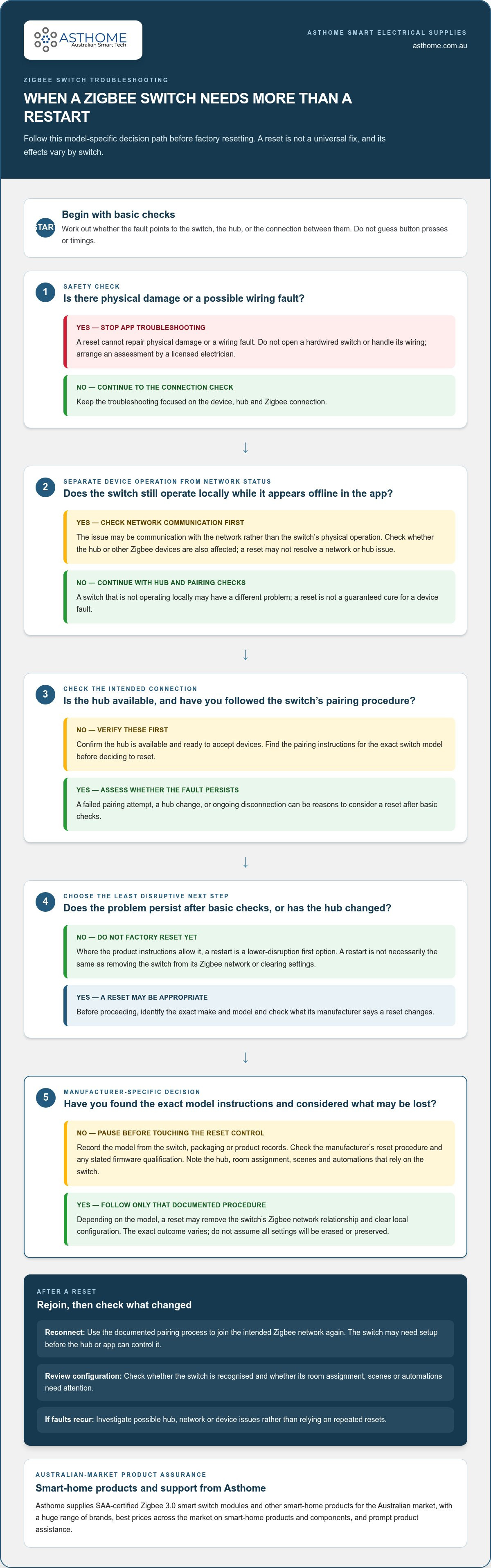
A failed pairing attempt, a change of hub, or a switch that stays unresponsive after basic checks can make a factory reset seem like the obvious fix. It may be appropriate, but it isn’t a universal cure. First work out whether the issue is with the switch, the hub, or the connection between them. If the switch still operates locally but appears offline in the app, for example, the problem may be network communication rather than the switch’s physical operation.
A factory reset returns a device to its reset state. What that means depends on the exact switch: the procedure may remove its existing Zigbee network relationship and clear some local configuration, but different models can retain or erase different information. Zigbee describes the networking technology, not one reset method. The Zigbee technology overview gives background on the protocol, while reset and pairing instructions must come from the switch manufacturer.
Factory reset, restart, or re-pair: which action fits?
A restart is a lower-disruption first option where the product instructions allow it. It refreshes the device’s operation, but it isn’t necessarily the same as removing the switch from a Zigbee network or clearing its settings. Re-pairing means joining the intended network again. Depending on the device and situation, that may involve a reset, but the terms aren’t interchangeable. Before deciding how to factory reset a zigbee switch, identify its make and model. Try basic checks first, then reset only if the issue calls for it.
What clues suggest a reset may be needed?
A reset may be worth considering if the switch won’t join the hub after you’ve confirmed the hub is available and followed the manufacturer’s pairing procedure. It may also be relevant after a hub change, particularly if the switch remains associated with its previous network. Persistent disconnection in the app or hub can be another clue, but resetting won’t necessarily resolve a weak or unstable network, a hub issue, or a device fault.
- Failed pairing: Confirm the hub is ready to accept devices and that you’re using the correct model-specific instructions.
- Hub change: Check whether the switch needs to leave its former network before it can join the new one.
- Ongoing disconnection: Note whether local operation still works and whether other Zigbee devices are also affected.
Stop troubleshooting through the app if there are signs of physical damage or a possible wiring fault. A reset cannot repair either issue. Don’t open a hardwired switch or handle its wiring. Arrange a safe assessment by a licensed electrician. Separating connection problems from electrical or physical faults helps you choose the next step without resetting unnecessarily.
What does a factory reset change on a Zigbee switch?
A factory reset can affect more than the switch’s visibility in an app. Depending on the model, it may remove the device’s existing Zigbee network membership and clear local configuration. The switch may then need to be set up again before the hub or app can control it. The exact effect varies, so don’t assume that a reset erases every setting or preserves any particular one.
Think about the switch’s role in your smart-home setup before proceeding. If a hub automation or scene refers to it, that routine may no longer control the intended light or function while the switch is disconnected. It may need attention after reconnection, especially if the device appears as a new entry or the hub doesn’t restore its previous associations. The NIST overview of Zigbee mesh network and security considerations provides context on Zigbee networks and their role in building automation.
Which settings and connections might be lost?
Possible changes include removal from the current Zigbee network and loss of device-specific configuration. The precise outcome depends on the manufacturer’s reset design. A hub may retain a routine that refers to the switch even after the device has been reset, but that routine may not work as intended until the switch is rejoined and recognised. Check the exact model’s documentation to understand what the reset clears and what you may need to restore.
Before deciding how to factory reset a zigbee switch, note any setup details that would be inconvenient to recreate. Record which hub manages the switch, which room or function it’s assigned to, and which scenes or automations rely on it. This preparation makes it easier to identify what needs attention after the reset.
What to check before touching the reset control
Start with identification, not button presses. Find the brand and model on the device, packaging or available product records. If the instructions specify a firmware version, use the guidance that matches it. Don’t rely on another model from the same brand looking similar: reset controls and outcomes can differ.
- Record the model: Save the exact name or number and any other identifying details shown on the device or packaging.
- Find the instructions: Locate the manufacturer’s procedure for that model, including any stated firmware qualification.
- Note the setup: Write down the hub, room assignment and relevant routines so you can check them afterwards.
Reset outcomes are manufacturer-specific. Use the model’s documentation as the authority, and prepare for possible changes to both its network membership and local configuration. If replacement is the better option, Asthome’s Zigbee smart switch modules are SAA certified for the Australian market.
How to factory reset a Zigbee switch safely
Use a controlled process, and let the manufacturer’s instructions for your exact switch guide every reset action. The Zigbee label alone doesn’t identify the correct button, power sequence or status signal. Before you begin, make sure you can identify the device and are ready to reconnect it to the intended hub afterwards.
- Identify the switch. Record its brand and exact model from the product, packaging or setup records. Similar-looking switches can use different reset procedures.
- Read the model-specific instructions. Check the manufacturer’s guidance, including any firmware detail it specifies. Don’t substitute a sequence from another model or an online post that doesn’t match your device.
- Prepare the hub. Confirm that the intended Zigbee hub is available and that you can start its pairing process when required. Keep your notes about the switch’s role or setup handy.
- Follow the stated reset method. Use only the controls and actions described for that product. Don’t add button presses, power cycles or extra steps based on guesswork.
- Verify the result. Check for the confirmation described in the instructions, then follow the manufacturer’s reconnection guidance. Don’t infer a reset from an indicator unless the manual says what it means.
Follow the manufacturer’s reset sequence, not a generic shortcut
Reset instructions can differ even between products that use Zigbee. Button presses, power cycling and status indicators are model-dependent, so there’s no safe universal hold time or light pattern to apply. If you can’t find the correct instructions, pause rather than improvise. Asthome provides product assistance with prompt responses. Have the brand and model details ready so the guidance can address your specific product.
That pause matters. A guessed sequence may trigger a different function, fail to reset the switch or leave you unsure what state it’s in. If the manufacturer describes a particular control or confirmation, follow that wording closely. Don’t keep repeating a sequence when the expected result doesn’t occur. Review the instructions before taking another step.
Keep hardwired switch troubleshooting within safe limits
For a hardwired switch, limit your actions to normal external controls and documented reset steps that don’t require access to wiring. Don’t remove covers or wall plates, expose conductors, test live wiring or alter connections as part of a reset. A factory reset is a device procedure, not an electrical fault-finding method.
If the switch shows physical damage, behaves erratically in a way that suggests an electrical fault, or needs installation or wiring work, stop and arrange assessment by a licensed electrician. Keep the work within safe limits. The purpose of learning how to factory reset a zigbee switch is to follow its documented device procedure, not to open or modify a hardwired fitting.
How to reconnect and test your Zigbee switch after resetting
After a factory reset, a Zigbee switch generally needs to join its intended network again before the hub or app can control it. The exact pairing steps depend on the switch and hub, so keep both sets of instructions available. Follow the switch manufacturer’s guidance for the device procedure, and the hub or coordinator’s guidance for opening its network to pairing.
Pair the switch with its Zigbee hub again
Use this order, adapting each action to the instructions for your equipment:
- Prepare the hub. Enable pairing mode using the hub or coordinator’s documented controls. Check that you’ve selected the intended Zigbee network if you manage more than one.
- Start the switch procedure. Carry out the manufacturer’s documented pairing method for the exact switch model. Don’t use a generic Zigbee sequence or assume another model’s button presses apply.
- Check for the device. Look in the hub’s device list or app for the switch, following the product guidance to interpret any status message or indicator.
Allow the process to finish as described in the instructions. App menus and labels vary between platforms, so use the hub’s documented method to find the device rather than expecting a particular screen or button name. A device appearing in the list is a useful sign, but check that it’s associated with the intended network and available for control.
Confirm a successful reset only by checking the indicators and status described in the product’s own instructions. Don’t treat an unfamiliar light pattern, brief response or app message as proof unless the manufacturer identifies it that way.
Confirm the switch works in everyday use
Once the hub recognises the switch, test its normal operation. If it has an external physical control, check that it operates as expected. Then test control through the app or hub, if those features are configured. A response from one control method but not another can help narrow down whether the remaining issue is with the device, its network connection or the smart-home setup.
- Test direct operation: Check the switch’s normal physical control without opening the fitting or accessing wiring.
- Test connected control: Confirm the hub or app can operate the switch and shows its status as expected.
- Review routines: Run any relevant scene or automation. If it doesn’t control the switch, check whether the routine needs the reconnected device selected again.
If pairing doesn’t complete, check the hub’s device list and review both manufacturers’ instructions before trying another reset. If other devices are also disconnecting, consider the broader Zigbee network rather than repeatedly resetting this switch. For guidance on the module and its setup context, see the Zigbee 3.0 smart switch modules information. If you’re exploring replacement hardware, browse Asthome’s Zigbee smart switch range. Asthome supplies products SAA certified for the Australian market.
How to avoid repeat Zigbee switch resets and choose suitable hardware
A reset can get a switch back to a clean starting point, but repeating it whenever pairing fails can hide the real cause. If the same device keeps dropping off the hub, look for a recurring setup or network issue instead of starting over each time. Keeping accurate notes makes it easier to see what changed and avoid repeating steps that didn’t help.
Reduce avoidable pairing and setup problems
Keep the exact model instructions with your smart-home setup details. Record which hub manages the switch, how its pairing mode is started, and any device-specific setup information you may need after a hub or network change. Save these notes somewhere you can access without relying on the switch’s connection.
Change one setup variable at a time. For example, if you’re troubleshooting after changing a hub, first follow the documented process for connecting the switch to that hub. Avoid changing several settings or resetting other devices at the same time. If the result improves or worsens, you’ll have a clearer idea of what affected the connection.
- Keep a setup record: Note the switch model, hub and manufacturer instructions.
- Track each change: Record what you adjusted and whether the switch stayed connected.
- Look beyond the switch: If other Zigbee devices also disconnect, investigate the wider network rather than repeatedly resetting one device.
If you’re planning a replacement or reviewing a retrofit, compare the switch type and installation context with the device’s published information. Reset steps won’t resolve a mismatch between a product and the setup it needs to operate in. For more context on switch types and retrofit considerations, read a guide to Zigbee 3.0 smart switch modules in Australia.
Choose Australian-certified smart switch products
A replacement should suit the intended setup, not just share the Zigbee name. Before choosing hardware, consider the hub and platform you use, the switch’s published specifications, and its intended application. Don’t assume products from different brands or models have identical compatibility or setup requirements. Follow the product documentation, and keep it available for future changes.
Asthome supplies Zigbee 3.0 smart switch modules as part of a broad range of smart-home brands and components, with competitive prices across the market. Compare published product details with your setup rather than assuming every module suits every switch location or hub. Asthome’s products are SAA certified for the Australian market.
Explore Asthome’s Zigbee switch range and smart-home products, or use its product assistance for prompt help understanding product information.
Make your next smart-home change with confidence
Use a reset as a prompt to make your next smart-home change more deliberate. Before replacing a hub, changing a network or swapping a switch, review the device documentation and consider how the switch fits into your routines. A little preparation can make troubleshooting more controlled and help you avoid treating a reset as the default fix.
Keep a concise record of the switch model and setup decisions so you have a useful reference later. If a device continues to disconnect after setup, investigate the underlying connection or hardware issue instead of repeating the same reset steps. Knowing how to factory reset a zigbee switch is most useful when you have a clear reason, the right instructions and a plan for what to do afterwards.
If you’re planning a replacement or expanding your Zigbee setup, explore Asthome’s Zigbee smart switch range. Asthome supplies smart-home products that are SAA certified for the Australian market. Browse the range or get in touch for product assistance.
Frequently Asked Questions
Can I factory reset a Zigbee switch without its hub?
Often, a switch can be reset using its own documented controls, but the exact method depends on its make and model. Without the hub, you may be able to clear the switch locally, but you won’t be able to confirm that it has joined a network again until a compatible hub is available. Check the manufacturer’s instructions before starting, especially if the switch is still connected to a network you intend to keep using.
Can I reset a Zigbee switch from Home Assistant?
Home Assistant may let you remove or manage a device in its integration, but that isn’t necessarily the same as performing a factory reset on the switch. The available options depend on the coordinator, integration and device. For example, removing a device entry may change how Home Assistant tracks it without clearing the switch’s own configuration. Check the device and integration guidance before choosing an action, and don’t assume a software command replaces the manufacturer’s reset procedure.
How can I tell whether my Zigbee switch has reset successfully?
Use the confirmation method documented for your exact switch, such as a specified status indication or a change shown during setup. There isn’t one indicator pattern that proves every model has reset. After following the procedure, check whether the hub can discover the switch during pairing. If the expected confirmation doesn’t appear, pause and consult the instructions rather than repeating button presses or interpreting an unfamiliar light pattern as success.
Will factory resetting a Zigbee switch delete my automations?
Not necessarily. Automations are generally managed by the hub or smart-home platform, while a reset acts on the switch itself. However, an automation may stop working if it refers to a device entry that changes or disappears during reconnection. For example, a scheduled light routine might still exist but no longer control the switch. After pairing, review the routine’s selected device or control target and test it separately.
Why do factory reset instructions differ between Zigbee switches?
Zigbee defines shared communication technology, but manufacturers can implement different controls, firmware and setup processes in their products. That’s why knowing how to factory reset a zigbee switch means finding instructions for its exact model, not relying on a sequence that worked on another device. Even products from one brand can differ. Check the model label and use the matching documentation before acting.
Is it safe to factory reset a hardwired Zigbee switch myself?
It may be appropriate to use a documented reset control that’s accessible without opening the fitting, provided you follow the product instructions. Don’t remove a cover or wall plate, expose conductors, or alter wiring to reach a control or troubleshoot the connection. If the switch appears damaged, has a wiring fault, or needs electrical work, stop and have it assessed by a licensed electrician. A reset cannot correct an electrical fault.