

What if a smart-home upgrade could start with the wiring behind your existing switches, rather than a full rewire? If you’re asking how to integrate smart tech with existing wiring, begin by checking what’s already in place. The switch wiring, including whether a neutral wire is available, can affect which retrofit options are suitable. You may not need to replace all your wiring, but work on 240V wiring must be handled by a licensed electrician.
This guide explains which wiring details matter, how to compare smart modules and switches with your home setup, and what to discuss with an electrician before buying. It also covers how Matter, Zigbee and Wi-Fi differ, so you can weigh up connectivity alongside your wiring and smart-home plans.
Asthome supplies smart-home products for the Australian market, including Matter and Zigbee 3.0 smart switch modules, Zigbee dimmer modules and Wi-Fi light switches. Asthome states its products are SAA certified for Australia. Check the current product listing for certification information and suitability. With a clear plan, you can compare options and discuss the next steps with your electrician.
Key Takeaways
- To understand how to integrate smart tech with existing wiring, have a licensed electrician check the existing control, connected load and wiring details.
- Compare in-wall modules with replacement smart switches, then confirm dimensions, wiring requirements and load compatibility in the product documentation.
- Choose between Matter, Zigbee and Wi-Fi based on your connectivity preferences and intended smart-home setup.
- Photograph existing controls for your electrician, but don’t remove covers or touch wiring.
- Asthome offers Matter and Zigbee 3.0 modules and Wi-Fi switches, and states its products are SAA certified for the Australian market. Check the current listing for certification information and suitability.
How to Integrate Smart Tech with Existing Wiring: Start with What You Have
Some smart controls can be added to an existing electrical setup if the wiring and product are compatible. A retrofit smart module is fitted by an electrician into the existing setup, allowing a light or other suitable load to be controlled through smart functions and, where supported, the existing switch.
However, a module that physically fits into a wall box or light fitting isn’t automatically electrically or functionally suitable. The wiring arrangement, connected load, module requirements and intended controls all need to match. That’s the practical starting point for how to integrate smart tech with existing wiring: note what you can observe safely, then ask a licensed electrician to assess the wiring before you choose a product.
What existing wiring details affect a smart home retrofit?
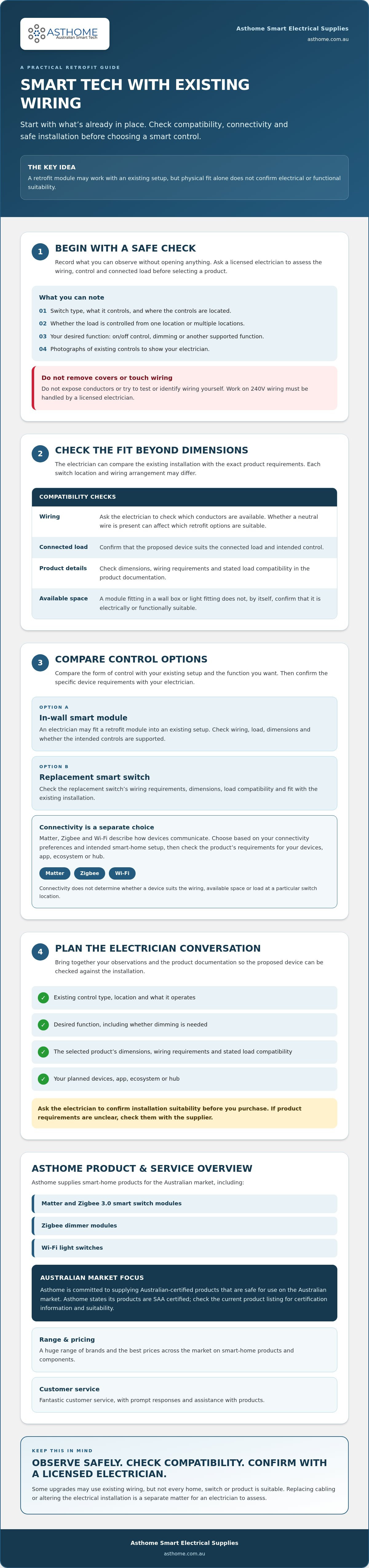
Start with observations, not electrical work. Note the type of switch, what it controls and where the controls are located. For example, a light controlled from more than one location may need a different solution from one operated by a single switch. Also decide whether you want on/off control, dimming or another function.
Wiring arrangements can differ between homes and between switch locations in the same home. Don’t remove a switch plate or try to identify conductors yourself. Ask a licensed electrician to check which conductors are available and whether the module you’re considering suits that arrangement and the connected load. Check the product’s dimensions too, but remember that fitting in the available space doesn’t confirm electrical compatibility.
Can smart technology be added without rewiring?
Sometimes. Some retrofit products are designed for existing installations, but that doesn’t mean every home or switch is suitable, or that no electrical work will be needed. A module may be fitted into an existing setup; replacing cabling or altering the electrical installation is a separate matter. Ask a licensed electrician to determine what the job involves and carry out any work on 240V wiring.
Keep the wider purpose in view: Home automation connects controls and devices to make everyday functions easier to manage, but each installation has practical limits. For an overview of wall-switch options, see Asthome’s Australian smart light switch guide.
Asthome supplies Matter and Zigbee 3.0 smart switch modules, Zigbee dimmer modules and smart Wi-Fi light switches. Asthome states its products are SAA certified for the Australian market. Check the current listing for the specific product’s certification information and suitability, then confirm the match with your electrician before purchasing.
Check Wiring, Loads and Connectivity Before Choosing Smart Controls
Before comparing devices, separate two questions: will the control suit the existing electrical installation, and will its connectivity suit your smart-home setup? Matter, Zigbee and Wi-Fi describe how devices communicate. They don’t establish whether a module matches the wiring, available space or load at a particular switch location.
Use this checklist to organise the details for your electrician:
- Existing control: note the switch type and what it operates, such as a light or dimmable fitting.
- Control locations: record whether the load is operated from one switch or multiple locations.
- Desired functions: decide whether you want on/off control, dimming or another supported function.
- Product documentation: check the module’s dimensions, wiring requirements and stated load compatibility.
- Smart-home setup: identify the devices, app, ecosystem or hub you intend to use, then check the product’s requirements.
Have a licensed electrician confirm installation suitability before you purchase. Don’t remove switch plates, expose conductors or try to test wiring yourself.
What should an electrician check at the switch location?
The electrician should assess the wiring arrangement and proposed installation point, then compare them with the selected device’s documentation. They can confirm whether the available wiring and connected load suit that specific module or switch. If a product’s requirements are unclear, check them with the supplier before buying. Advertised functions or physical fit alone don’t confirm suitability for your installation.
How do Matter, Zigbee and Wi-Fi fit into a wired retrofit?
Consider connectivity after checking the electrical fit. Matter is designed to support interoperability across compatible smart-home ecosystems. Zigbee devices may need a compatible gateway or hub, while Wi-Fi products follow their stated network and setup requirements. Check each product’s documentation, as requirements vary. None of these protocols confirms that a device suits the wiring or load.
For more on ecosystem considerations, read Asthome’s Matter smart switch guide. Once your electrician has confirmed the requirements, compare Asthome’s Matter and Zigbee 3.0 smart switch modules, Zigbee dimmer modules and smart Wi-Fi light switches. Asthome states its products are SAA certified for the Australian market, so check the current listing for the specific product’s certification information and suitability. You can also browse smart switch options and contact Asthome with product enquiries.
Compare Smart Modules and Switches for Your Existing Wiring
Once an electrician has assessed the installation, compare the product format as well as its connectivity. A module is designed to be fitted within an existing electrical setup, while a smart light switch replaces the wall control. Neither option is right for every home. Your wiring, preferred way to operate the light and the product’s documented requirements all matter when deciding how to integrate smart tech with existing wiring.
| What to compare | Smart module | Replacement smart switch |
|---|---|---|
| Installation approach | Fitted within an existing setup. The electrician confirms the proposed location and suitability. | Replaces the existing wall switch, subject to the product’s requirements and the installation. |
| Wall control | May suit a plan to retain existing switch hardware. Confirm how the existing control will operate with the selected module. | Provides a smart switch as the wall control. Check that its functions suit how you want to use the switch. |
| Connectivity | Compare the specific module’s Matter, Zigbee 3.0 or other stated connectivity requirements. | Check the switch’s stated protocol and any required hub, controller or ecosystem. |
| Suitability | The electrician checks the wiring, available space and product documentation. | The electrician checks the wiring and confirms the chosen switch is suitable for the installation. |
When might a smart switch module suit an existing installation?
A module may be worth discussing if keeping the current wall-switch hardware is a priority. Asthome offers Matter and Zigbee 3.0 smart switch modules, as well as a Zigbee dimmer module. These are product categories, not a promise of compatibility. Ask the electrician to confirm the available space, wiring and suitability of the particular product. For more on this category, read the Zigbee 3.0 retrofit guide.
When should you compare a complete smart light switch instead?
Consider a complete smart switch if you’d prefer to replace the wall control itself. Compare its physical control style and smart-home ecosystem with your needs, then check the current product listing for features, specifications and connectivity requirements. Asthome offers smart Wi-Fi light switches, alongside Matter and Zigbee options. Matter, Zigbee 3.0 and Wi-Fi don’t guarantee wiring compatibility. An electrician still needs to confirm the product suits the installation.
Asthome states its products are SAA certified for the Australian market. Check the individual listing for current certification information and product details, and ask a licensed electrician to confirm wiring and installation suitability before choosing.
Plan a Smart Wiring Retrofit with a Licensed Electrician
A clear brief helps your electrician assess the installation and lets you compare products without guessing. For how to integrate smart tech with existing wiring, keep the process in order: decide what you want to control, gather safe observations, then confirm the exact product with the electrician before buying. If your project extends beyond basic retrofits into broader power management, you can explore Residential and Commercial Electrical & Solar Installations to see how qualified contractors approach comprehensive property solutions.
- List the controls you want to add. Note each room, the light or device involved, the current switch arrangement and the result you want, such as app control or dimming.
- Record what you can see safely. Photograph the existing switch fronts and surrounding area. Don’t remove covers, expose conductors or touch wiring. Note if a light is operated from more than one location.
- Share your smart-home preferences. If you’ve chosen Matter, Zigbee or Wi-Fi, tell the electrician. Include the ecosystem or hub you plan to use, if known, and the functions you expect.
- Ask what information is needed. The electrician can assess the installation point and advise which wiring or product details are needed to determine suitability.
- Confirm the product before purchasing. Match the exact model’s documented requirements to the assessed wiring, intended load and planned functions. If the electrician recommends a different format, compare the alternatives before deciding.
What information should you prepare before seeking advice?
A short room-by-room list is useful. For example: “Kitchen, ceiling lights, two control locations, want app control and dimming.” Add a photo of the switch face and the name of your preferred smart-home ecosystem. Ask the electrician what else they need to assess the setup. These observations help frame the conversation, but they don’t replace an inspection of the wiring.
What should you confirm before buying retrofit equipment?
Once you have the electrician’s requirements, compare Asthome’s smart switch modules and light switches. Check the current listing for certification information and suitability of the specific product you’re considering.
Choose Australian-Certified Smart Tech and Take the Next Step
A sensible product choice follows a clear sequence: have the existing wiring assessed, confirm the exact product suits the installation, compare connectivity requirements, then select the device. This keeps electrical fit separate from preferences such as Matter, Zigbee or Wi-Fi. It’s a practical way to approach how to integrate smart tech with existing wiring without relying on a product label or protocol alone.
Australian certification is another important part of your checks. Certification doesn’t prove that a particular device suits every home, switch location or connected load. Check the details for the specific model and have a licensed electrician assess whether it suits your installation.
How can you check a product is suitable for your project?
Start with the current product listing and manufacturer’s installation documentation. Check the stated features, wiring requirements and certification information, then share the documentation with your electrician. Ask them to confirm that the exact model matches the wiring and intended use they’ve assessed. If the listing doesn’t answer a product question, seek clarification before ordering rather than assuming another model in the same category has identical requirements.
What should you do before ordering smart electrical products?
Match the product category and connectivity to the requirements your electrician has confirmed. For example, compare a Matter smart switch module, Zigbee 3.0 smart switch module, Zigbee dimmer module or smart Wi-Fi light switch only after checking the relevant product information and your planned smart-home setup. If you’re weighing up Matter, Asthome’s Matter smart switch guide offers further ecosystem context.
Still unsure about a product detail? Contact Asthome with product enquiries before ordering. Asthome is an Australian online retailer specialising in smart-home technology and electrical components, with smart switch and module options to compare. Browse the current listings, check the details for the specific model and take installation questions to your licensed electrician.
Make Your Smart Retrofit Plan Practical
A successful retrofit starts with the wiring already in place. Note what each switch controls and the functions you want, then have a licensed electrician assess the installation and confirm which products are suitable. After that, compare connectivity options and choose between a module and a replacement smart switch.
That’s the practical approach to how to integrate smart tech with existing wiring: match the device to your home rather than assuming every product suits every setup. Check the current listing for model details and certification information. Asthome states its products are SAA certified for the Australian market, and its range includes Matter and Zigbee 3.0 smart switch modules.
Ready to compare options? Browse Asthome’s smart electrical products and contact the team with product enquiries. For wiring and installation questions, speak with your licensed electrician. With the right checks in place, you can choose an option that fits your plans.
Frequently Asked Questions
Can I add smart technology to existing wiring without rewiring?
Sometimes, yes. A smart module or replacement switch may suit an existing installation, but the answer depends on the wiring arrangement, connected load, device requirements and available space. To work out how to integrate smart tech with existing wiring, ask a licensed electrician to assess the specific switch location before you buy. A product designed for retrofits isn’t automatically suitable for every home or control point.
Does a smart switch module need a neutral wire?
It depends on the specific module. Wiring requirements vary between products, so check the exact model’s documentation rather than relying on a general rule. Ask a licensed electrician to identify the wiring at the proposed installation point and confirm whether the module is suitable. Don’t remove a switch, expose conductors or inspect the wiring yourself. Confirm the match before ordering, even if a product appears to fit.
Can I install a smart switch myself in Australia?
Don’t attempt electrical wiring or installation yourself. Ask a licensed electrician to assess the work and install the product if it’s suitable for your setup. Before seeking advice, note which light or load the switch controls and identify the product you’re considering. Asthome sells smart-home products but doesn’t provide electrical installation services. For professional help with residential wiring and electrical maintenance, licensed teams like Synergy Trades Group can assist. Your electrician can confirm the installation requirements and answer questions about the work at your home.
What is the difference between a smart module and a smart switch?
A smart module is a separate device category intended to add smart control within an existing electrical setup. A smart switch is a wall-switch product with smart functionality. They differ in format, and their installation requirements and suitability can vary by model and wiring arrangement. Compare the product documentation and the wall-control experience you prefer, then ask a licensed electrician which option suits your home.
Can Matter or Zigbee smart products work with existing wiring?
Matter and Zigbee describe connectivity, not whether a device suits the wiring at a particular switch. Check the product information for ecosystem requirements and whether a hub or controller is needed for your setup. Then have a licensed electrician assess the electrical installation and confirm the specific product is suitable. Treat smart-home connectivity and wiring compatibility as related but separate decisions.
How do I know whether a smart electrical product is suitable for Australia?
Check the current product listing and manufacturer’s documentation for certification information relevant to the Australian market. Asthome states its products are SAA certified, but certification alone doesn’t confirm a model suits your home’s wiring or intended use. Ask a licensed electrician to assess the proposed installation, and contact Asthome if you need product information. Check the details for the exact model before ordering.