

What if your power points could pay for themselves by automatically timing your appliances to run during free electricity windows? With the Solar Sharer program launching in New South Wales, South Australia, and South-East Queensland on July 1, 2026, the hardware you install today determines your savings tomorrow. Many homeowners find the transition to smart power points australia confusing, especially when weighing up Zigbee 3.0 against Matter 1.5 or worrying if a new GPO will fit into existing wall brackets. You want a sleek, modern look without risking your home insurance on non-SAA compliant gear.
We provide the trade-level clarity you need to upgrade your home with confidence. This guide will help you select the perfect SAA-certified smart power points to future-proof your property with energy monitoring and stable remote control. We will break down the March 2026 Cyber Security Rules, explain which protocols offer the best mesh stability, and show you how to turn your wall outlets into active money-saving tools.
Key Takeaways
- Determine whether Zigbee 3.0 or Wi-Fi is the right backbone for your home automation to avoid future connectivity headaches and signal dropouts.
- Learn how to spot authentic SAA-certified smart power points australia to ensure your installation meets strict AS/NZS 3000 safety standards and protects your insurance.
- Unlock the secrets to lowering your power bills by aligning your appliance usage with the 2026 Solar Sharer free electricity windows.
- Understand the impact of the March 2026 Cyber Security Rules on your hardware choices and how to stay protected against digital vulnerabilities.
- Prepare for a smooth installation by checking bracket compatibility and coordinating correctly with your licensed sparky to ensure a compliant setup.
Why Upgrade to Smart Power Points in Your Australian Home?
A General Purpose Outlet (GPO) is no longer just a passive point on your wall. By installing smart power points australia homeowners are effectively upgrading their electrical backbone into a data-driven management system. Unlike bulky plug-in adapters that protrude from the wall and clutter your kitchen benchtop, an integrated smart GPO replaces the entire socket. This results in a sleek, slimline finish, often featuring premium glass faces that match modern Australian interiors. It is a foundational step in home automation, allowing you to control and monitor every connected device through a single interface without the aesthetic compromise of plastic adapters.
The Benefits of Energy Monitoring and Automation
Identifying "vampire" appliances is the first step toward lowering your quarterly energy bills. In the typical Australian kitchen, devices like older kettles or microwave displays constantly draw small amounts of power even when not in use. Smart GPOs provide real-time tracking, so you can see exactly where your money is going via your smartphone. You can also set automated schedules to ensure heaters only run during off-peak hours or have the coffee machine ready the moment you wake up. Safety is another major driver for this upgrade. "Auto-off" timers provide peace of mind by ensuring high-heat items like hair straighteners or irons never stay on for longer than 30 minutes, significantly reducing fire risks.
Future-Proofing Your Home Infrastructure
Smart infrastructure is quickly becoming a standard requirement for new builds in suburbs like Point Cook and throughout Victorian renovation projects. Integrating these sockets into your wall brackets creates a permanent upgrade that increases property resale value. These outlets work seamlessly with a broader smart light switch ecosystem, creating a unified home network that responds to your presence.
With the Solar Sharer program launching on July 1, 2026, having automated GPOs allows you to capture free electricity during peak solar hours without lifting a finger. It moves your home from a reactive state to a proactive one. Every unit we offer is SAA-certified and fully compliant with AS/NZS 3000 standards. This ensures that your investment is not only technologically advanced but also meets the strict safety regulations required by Australian law and insurance providers. As cybersecurity becomes a priority following the March 4, 2026 regulations, choosing hardware with dedicated update support is essential for long-term security.
Choosing the Right Protocol: Zigbee vs. Wi-Fi Smart GPOs
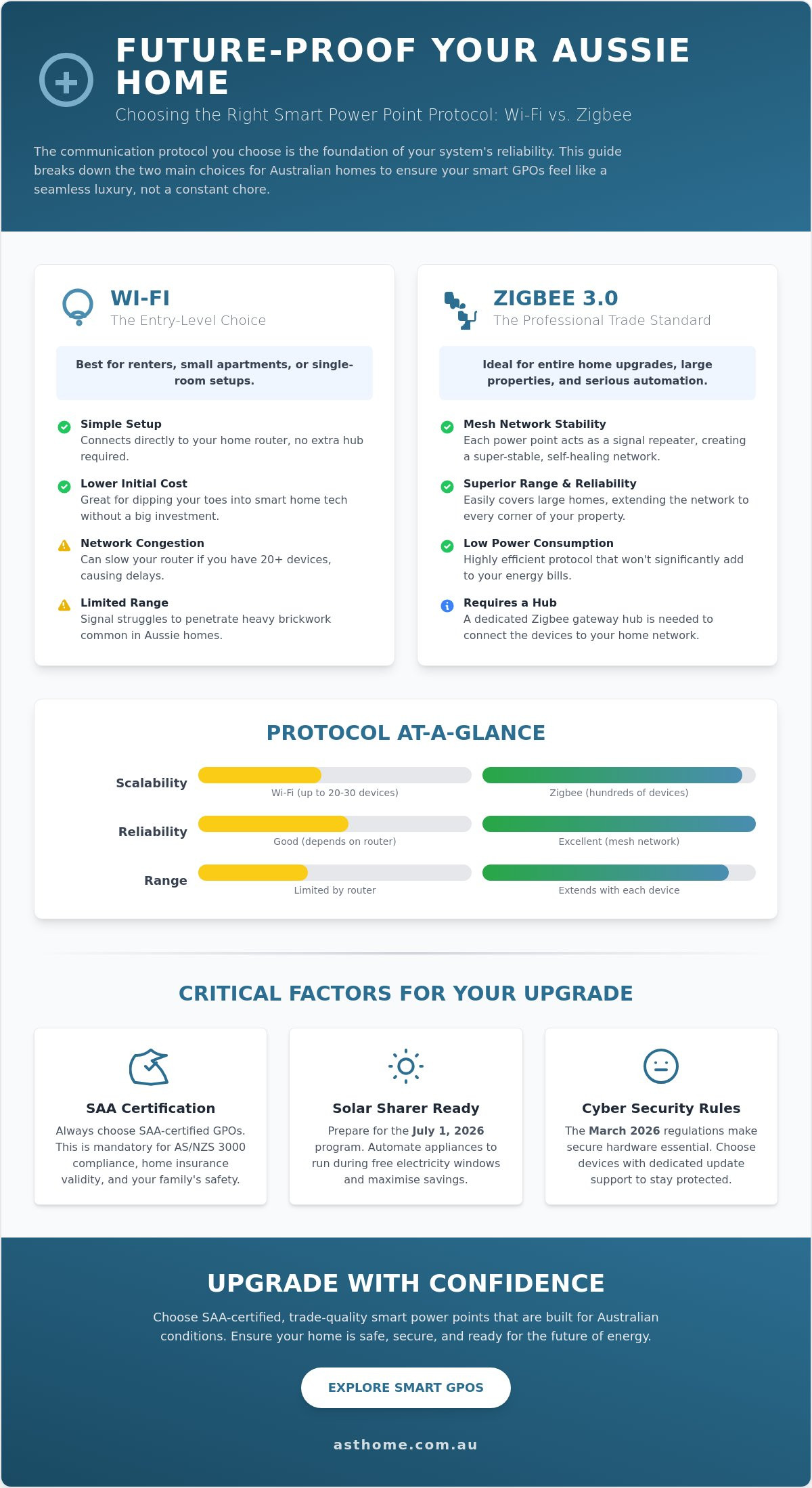
The communication protocol you choose is the foundation of your system's reliability. It determines how your phone, voice assistant, or hub talks to your wall outlets. In the Australian market, the decision usually boils down to Wi-Fi or Zigbee 3.0. While both have their place, the choice dictates whether your smart home feels like a seamless luxury or a constant troubleshooting chore. High-quality smart power points australia are designed to integrate with major platforms like Home Assistant and Apple Home, allowing you to save you energy and money through sophisticated automation routines.
Wi-Fi Smart Sockets: The Entry-Level Choice
Wi-Fi smart sockets are often the first choice for renters or those testing the waters. The primary advantage is that they connect directly to your home router without requiring a dedicated gateway hub. This simplifies the initial setup and lowers the entry cost for a small apartment or a single room. However, professional installers often advise caution. Standard home routers have a limited capacity for concurrent connections. If you plan to install 20 or more smart devices, your network may become congested. This leads to frustrating delays when you try to turn off a light or check your energy usage. Wi-Fi signals also struggle to penetrate the heavy brickwork common in many Australian builds, leading to shorter effective ranges.
Zigbee 3.0: The Professional Trade Standard
Zigbee 3.0 is the preferred choice for serious home automation enthusiasts and trade professionals. This protocol uses mesh networking technology. Instead of every device fighting for a direct connection to the router, each smart GPO acts as a signal repeater. This effectively extends the range of your network to every corner of the property. It is incredibly stable and consumes very little power compared to Wi-Fi. For those building a future-proof ecosystem, check out our Matter smart switch overview to see how Zigbee hardware will bridge into the new Matter 1.5 standard. Zigbee remains the most reliable option for large homes with internal brick walls where Wi-Fi often falters.
Selecting the right protocol today prevents a costly "rip and replace" scenario in three years. Whether you need the simplicity of Wi-Fi for a home office or the robust mesh of Zigbee for a full-scale renovation, you can browse our trade-quality smart GPO collection to secure the right hardware for your floor plan. Ensuring your devices speak the same language is the secret to a stable, responsive smart home.
Essential Features to Look for in a Smart GPO
When sourcing smart power points australia, look beyond the app interface. The physical build quality determines how well the unit integrates with your existing home. The hardware must fit seamlessly into standard Australian wall brackets to avoid expensive plaster repairs during installation. While remote control is a headline feature, a professional-grade GPO must include tactile overrides. Physical buttons provide a backup for manual operation if your network is offline or you don't have your phone nearby. We are also seeing a major trend toward "Glass Face" designs in high-end Australian renovations. These plates offer a premium, scratch-resistant surface that stays looking new for years, unlike traditional plastic which can yellow over time.
Integrated USB-C Charging and Power Delivery
Integrating charging ports directly into the wall plate is a game-changer for bedside and kitchen zones. The Trend Zigbee Double GPO with USB C 20W is a standout choice here. Unlike older USB-A ports that charge at a crawl, the 20W Power Delivery (PD) specification allows for rapid charging of modern devices. This high-wattage output means you can ditch the bulky charging bricks that usually hog your power outlets. It leaves the primary sockets free for larger appliances like lamps or kettles while your phone charges at full speed. This reduces clutter and ensures your devices are ready to go when you are.
SAA Certification and Australian Safety Standards
Every electrical component installed in your home must carry SAA certification. This is a legal requirement in Australia, not a suggestion. Non-compliant gear often lacks the internal thermal protection needed to prevent house fires. Using uncertified products can also void your home insurance policy entirely. Our range is fully tested to withstand the specific conditions of the Australian power grid. This level of compliance gives you the confidence to automate your home to save you energy and money without compromising on safety. You can easily identify the SAA mark on all Asthome products, providing peace of mind for both you and your electrician.
NDIS SDA Compliance for Accessibility
Accessibility is a core pillar of modern smart home infrastructure. For Specialist Disability Accommodation (SDA), the physical interface is just as important as the software. The Large Dolly Double Powerpoint for NDIS SDA Homes (A$17.95) addresses this by offering significantly larger contact points. These "Large Dolly" switches are easier to toggle for users with limited fine motor skills. They provide clear tactile feedback that standard switches lack. When you combine these physical accessibility features with smart sensors and voice control, you create a home that supports independent living for all Australians. This makes them an essential choice for NDIS-compliant builds or any home catering to mobility-impaired residents.
Top-Rated Smart Power Points for Every Australian Room
Selecting the right hardware depends on the specific demands of each space. A kitchen requires easy-to-clean surfaces, while a hallway benefits from subtle orientation lighting. Choosing smart power points australia requires a strategic approach to ensure every room is optimised for both performance and aesthetics. You can browse the full range of smart power points to see how different models suit your specific floor plan.
The Best All-Rounder: Zigbee Double GPO with RGB
The ZIGBEE RGB Selectable Smart Socket (A$ 54.95) is our top recommendation for high-traffic areas. The premium glass face is not just about aesthetics; it is incredibly easy to wipe clean, making it ideal for kitchen splashbacks where grease or flour might settle. A standout feature is the customisable RGB backlight. You can set a soft glow for the hallway or kids' rooms, making it easy to find the switch in the dark without turning on the main lights. Because it uses the Zigbee protocol, it provides the mesh stability needed for a reliable whole-home system that won't drop out when you need it most.
The Budget-Friendly Retrofit: Wi-Fi Smart Double GPO
If you are starting small or don't want to invest in a gateway hub yet, the WIFI Smart Socket GPO (A$ 43.95 to A$ 49.95) is a versatile choice. It connects directly to your existing 2.4GHz network, making it a straightforward solution for DIY-minded homeowners. These units come in sleek black and white variants to match any interior colour scheme. They are perfect for bedrooms or home offices where you only need to automate a few specific appliances like a desk lamp or a heater. It is a cost-effective way to introduce smart power points australia into your home without a large upfront investment in infrastructure.
Outdoor and Heavy Duty: Weatherproof GPOs
Outdoor entertaining areas require hardware that can handle the elements. The Double External Weatherproof Powerpoint IP53 (A$ 9.95) is built for patios, pergolas, and garages. The IP53 rating ensures the internal components are protected against dust and water splashes common in Australian backyards. While this is a standard GPO, it is designed to be paired with our smart modules. This allows you to bring your outdoor lighting or water pumps into your automation ecosystem without compromising on weather resistance.
Investing in the right hardware for each room ensures your home automation is both practical and cost-effective. Whether you need the high-end finish of a glass-face Zigbee unit or the simplicity of a Wi-Fi retrofit, you can find the perfect smart GPO for your Australian home in our curated collection.
Installation and Safety: Getting Your Smart GPOs Up and Running
Safety is the priority when upgrading your home infrastructure. In Australia, it's a legal requirement that a licensed electrician performs all GPO installations. Attempting to DIY your electrical work is illegal and will void your home insurance. Before your sparky arrives, ensure your home network is ready for the new hardware. If you've opted for a professional mesh setup, place your Zigbee Gateway Hub (A$ 54.95) in a central location. This ensures the best possible signal distribution across your smart power points australia network. Trade professionals should also sign up for a trade account to access bulk pricing and specialized technical support for large-scale projects.
Working with Your Electrician
Asthome hardware is designed by practitioners for practitioners. We understand that time on site is money. Our units feature high-quality brass tunnel terminals. These allow for a more secure connection and faster wiring during the fit-out. We also ship our GPOs with backed-out screws. This small detail saves significant time when installing dozens of points across a new build. One critical check for your electrician is the depth of the wall box. Because smart power points australia contain internal relays and communication modules, they require slightly more cavity space than traditional "dumb" sockets. Ensuring your wall brackets or blocks are deep enough prevents issues during the final fix.
Setting Up Your Smart Life App and Automations
Once the hardware is live, pairing is a straightforward process. Open the Smart Life or Tuya app on your smartphone and put the GPO into pairing mode by holding the physical override button. The app will automatically detect the device. From here, you can name each outlet based on its room and function. Integrating with Google Home or Alexa is the final step for a truly hands-free experience. Simply link your Smart Life account within your preferred voice assistant app. You can then use commands like "Hey Google, turn off the iron" or "Alexa, start the coffee machine." To begin your home transformation, Shop the Asthome Power Point collection and secure your SAA-certified hardware today.
Future-Proof Your Australian Home Today
Upgrading your home’s electrical infrastructure is a long-term investment in daily efficiency and safety. You now have the technical roadmap to distinguish between entry-level Wi-Fi setups and the professional mesh stability of Zigbee 3.0. Selecting the right communication standard ensures your smart power points australia network remains responsive as your automation needs grow. It's essential to always prioritise SAA Australian Approved products. This guarantees your installation meets local regulatory standards and protects your home insurance status. Whether you are installing premium glass-face plates or specialised NDIS SDA compliant hardware for accessibility, the right foundation makes all the difference.
We provide trade-led expertise and support to ensure your project succeeds from the first bracket to the final pairing. As practitioners, we've designed our range to meet the rigorous demands of the local trade industry while remaining accessible for every homeowner. Upgrade your home with Australia’s best SAA-certified smart power points here and take control of your energy future. You're now ready to build a smarter, safer, and more efficient Australian home.
Frequently Asked Questions
Do I need a special hub for smart power points in Australia?
It depends on the protocol you choose. Wi-Fi models connect directly to your home router, so no extra hardware is required for a small setup. If you're installing multiple smart power points australia throughout a large home, we recommend a Zigbee Gateway Hub. This hub manages the mesh network, reducing the load on your router and ensuring your devices stay responsive even if the internet drops out.
Can I install a smart power point myself if I am handy?
No, you cannot perform any fixed electrical wiring in Australia yourself. All GPO installations must be carried out by a licensed electrician to comply with AS/NZS 3000 safety standards. DIY electrical work is illegal and will void your home insurance. Your sparky will ensure the point is earthed correctly and provides a certificate of electrical safety once the installation is complete.
Will smart GPOs fit in my existing Australian wall brackets?
Most smart GPOs are designed to fit standard Australian mounting hardware. However, the internal smart modules and relays make these units deeper than traditional "dumb" outlets. You should ensure your wall cavity or mounting block has at least 35mm of depth. This prevents the cables from being crushed behind the unit, which is a common issue in older homes with shallow brackets.
What happens to my smart power point if the Wi-Fi goes down?
Your smart power point will continue to work as a standard manual outlet. You can use the physical tactile buttons on the faceplate to switch the power on or off at any time. While you'll lose remote app control and voice commands until the connection is restored, locally stored schedules on Zigbee systems often continue to function without an active internet connection.
Are smart power points safe to use with high-draw appliances like heaters?
Yes, provided the appliance doesn't exceed the GPO's rated capacity. Most smart power points australia are rated for 10 Amps, which handles up to 2400 Watts. This is sufficient for standard domestic heaters, kettles, and toasters. Always check the compliance plate on your appliance before plugging it in. Our SAA-certified hardware includes thermal protection to handle these loads safely under normal operating conditions.
Do smart power points use electricity while they are turned off?
Smart GPOs draw a very small amount of standby power to keep the Zigbee or Wi-Fi module active. This consumption is typically less than 1 Watt, which is significantly lower than the "vampire" drain of many older appliances. The energy monitoring features allow you to identify and cut off larger power-hungry devices, easily offsetting the tiny amount of electricity the smart socket uses to stay connected.
Can I monitor my energy usage through the app with all models?
Energy monitoring is a premium feature and isn't included in every model. While many of our Zigbee and Wi-Fi variants provide real-time voltage and current tracking, some entry-level units focus purely on switching functionality. You should check the technical specifications for "Power Metering" or "Energy Monitoring" before purchasing if tracking your power bills is a priority for your home automation project.
What is the difference between a 10A and 15A smart power point?
The rating indicates the maximum current the outlet can safely draw. A 10A GPO is the standard for almost all household appliances. A 15A outlet features a larger earth pin and is reserved for heavy-duty equipment like large workshop tools or dedicated air conditioning units. You can't plug a 15A appliance into a 10A smart socket because the larger pin won't physically fit into the terminal.