

Smart locks can be safe in Australia when they’re properly installed and set up, and the model suits your door and security needs. Whether smart locks are safe in Australia also depends on how you manage access and keep connected features secure. Australia’s mandatory cyber security standard for connected smart locks commenced on 4 March 2026 under the Cyber Security (Security Standards for Smart Devices) Rules 2025.
It makes sense to weigh the convenience of keyless entry against concerns about batteries, phone access and digital security. A smart lock still relies on the door and lock hardware for physical security, while its app, PIN or fingerprint adds ways to control entry. Australia’s smart-device cyber security rules include requirements for manufacturers and suppliers, such as not using universal default passwords, publishing a way to report security issues and being transparent about product support periods.
This guide explains how phones, PINs, fingerprints and connected devices operate smart locks, and what to expect if Wi-Fi or household power is unavailable. It also covers installation, practical security checks and how smart locks compare with traditional locks, so you can weigh the trade-offs before choosing a setup for your home.
Key Takeaways
- Compare access options such as PINs, fingerprints and phone apps to find a method that suits your household.
- Door type and existing hardware affect whether a smart lock is a straightforward DIY fit.
- Understand which features rely on Wi-Fi and what entry methods remain available when the connection is down.
- Keep access credentials private and linked apps and lock firmware up to date to support security.
- Weigh connected convenience against the simplicity of a traditional lock when deciding what works best for your home.
How do smart locks work?
A smart lock moves a door’s bolt or latch after accepting an authorised credential. Depending on the model, that credential could be a fingerprint, PIN, phone or another access method.
Biometric and PIN access
Biometric access checks a physical feature, such as a fingerprint or face, while a PIN uses a keypad code. The best method depends on what household members find convenient: a fingerprint reader means there’s no key to carry, while a PIN can give a guest access without an app. Facial recognition is available only on models designed for it, so compare the supported entry methods rather than assuming every lock offers the same options.
Codes, guest access and notifications
Access codes let an owner give someone a PIN instead of a physical key. Some models let owners add or remove codes, or set schedules for approved users, which can suit a visitor or cleaner who needs limited access. Some locks also send entry or lock-status notifications, creating a record of activity. These features vary by model and connected setup.
App controls and activity logs
An app can manage approved users and, on connected models, control the lock remotely. Activity logs may show events such as a code being used or the door being locked. Logs are useful only if credentials are assigned carefully and app access is protected. Encryption helps protect data transmitted between a lock and a device.
For Australian accessibility planning, consider how a person reaches and operates the lock, reads feedback and enters if a phone is unavailable. Assess the placement and usability of controls against the project’s AS1428.1 and Disability Discrimination Act (DDA) accessibility needs. A digital credential alone does not establish that a doorway or lock setup is accessible; door hardware and the user’s requirements matter too.
Which brands and models are recommended in Australia? No single brand or model suits every home. Compare door compatibility, entry methods, security features and ongoing product support instead of choosing by brand name alone.
What do smart locks cost in Australia, including installation? The total depends on the lock, any door preparation and the labour involved. The product and installation are separate parts of the cost.
Does home insurance cover a property with a smart lock? The lock alone doesn’t determine whether a claim is covered. The policy wording and circumstances of a loss matter, so don’t treat a smart lock as a substitute for meeting your policy’s security conditions.
Australia’s mandatory cyber security standard for connected smart locks commenced on 4 March 2026 under the Cyber Security (Security Standards for Smart Devices) Rules 2025. Requirements include no universal default passwords, a published means to report security issues and transparency about the product’s support period.
Can I install it myself?
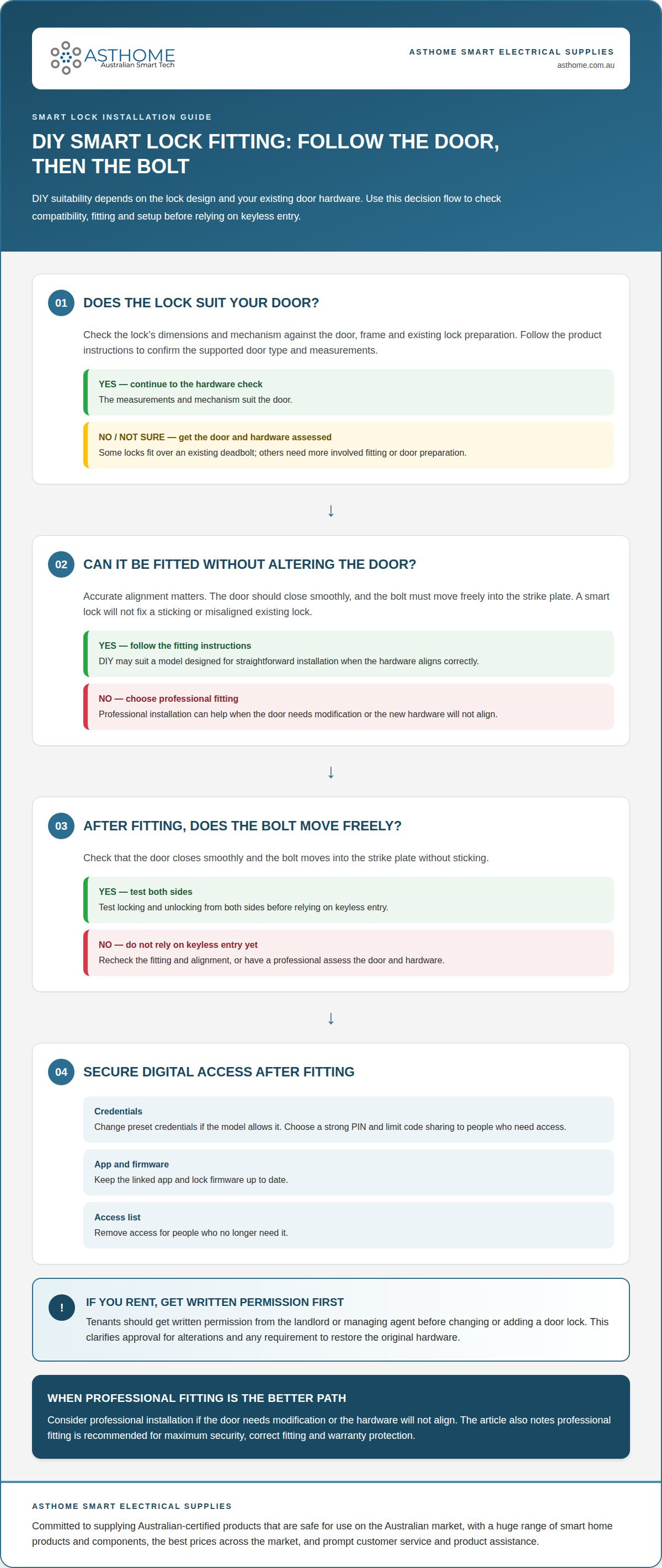
DIY installation depends on the lock design and your existing door hardware. Accurate alignment matters: a bolt that doesn’t line up properly can affect both locking and everyday operation.
Door compatibility and fitting
Check that the lock’s dimensions and mechanism suit the door, frame and existing lock preparation. Some models fit over an existing deadbolt and are designed for straightforward installation, while others need more involved fitting. Follow the product instructions to confirm the supported door type and measurements. If fitting requires altering the door or aligning new hardware, professional installation can help ensure it operates correctly.
DIY-friendly models commonly include step-by-step instructions, but tool skills aren’t the only consideration. The door must close smoothly, and the bolt must move freely into the strike plate. A smart lock won’t fix an existing lock that sticks or sits out of alignment. A professional installer can assess the door and hardware before fitting.
Secure installation and configuration
Secure installation starts with correct physical fitting, followed by careful setup of digital access. Follow the model’s instructions, then test locking and unlocking from both sides before relying on keyless entry. During setup, change preset credentials if the model allows it, choose a strong PIN and limit code sharing to people who need access.
Keep the linked app and lock firmware up to date, and remove access for people who no longer need it. These steps help protect digital access after installation, but don’t replace checking that the door and bolt work properly.
How can Australians install and configure a smart lock securely? Match the lock to the door, follow its fitting instructions, test the bolt and latch, then secure app access and PINs. Choose professional fitting if the door needs modification or the hardware won’t align.
Can tenants install smart locks in Australian rental properties, and what permission is needed? Tenants should get written permission from the landlord or managing agent before changing or adding a door lock. This clarifies approval for alterations and any requirement to restore the original hardware.
- Compare the lock’s installation instructions with your door type and existing hardware.
- Check that the door closes and the bolt moves freely after fitting.
- Set secure credentials, restrict code sharing and keep the app and firmware current.
Some smart locks are designed for DIY fitting, while professional installation is recommended for maximum security, correct fitting and warranty protection. If you’d like to explore smart-home components alongside a door upgrade, browse Australian-market smart-home products.
How smart locks operate using phones, codes, fingerprints and connected devices
A smart lock checks a credential, then operates its bolt or latch. Its connection type determines whether you can control it nearby, remotely or both.
Phone, code and device operation
A phone can unlock a smart lock through Bluetooth nearby or an internet-connected app for remote control. A PIN is entered on the lock’s keypad, while a fingerprint reader checks stored biometric data locally or through the lock’s control system. Facial recognition is available on some models, not every smart door lock.
Connected devices can extend control beyond the door. For example, an approved voice assistant may trigger a lock command where the model supports it. Encryption protects data sent between a phone and lock. Some locks use 128-bit encryption; CHOICE advises checking whether the manufacturer specifies a standard such as AES-256 bit.
Internet, Bluetooth and Wi-Fi connections
Bluetooth connects a phone directly to a lock over a short-range wireless link. A smart lock’s Bluetooth signal can have a clear-line-of-sight range of up to 240 metres, depending on the Bluetooth version installed. Walls, doors and other obstacles can affect practical connection range.
Wi-Fi lets an internet-connected lock, or a lock paired with an optional Wi-Fi Gateway, be controlled remotely through an app. Without Wi-Fi, entry may still work by PIN, fingerprint, Bluetooth or physical key, depending on the model. Remote control and phone alerts may be unavailable during an internet outage.
Australia’s smart-device cyber security rules require manufacturers and suppliers to retain statements of compliance for at least five years. They also require a published way for users to report security issues and transparency about the product’s support period. This information helps buyers understand how a connected lock is supported after installation.
Connectivity affects convenience, but not necessarily every unlocking method. For example, a lock with Bluetooth and keypad entry may still accept a PIN if the home internet goes down. A Wi-Fi model may lose remote app control while local credentials keep working, depending on its design.
Do smart locks meet Australian rental, strata and fire-safety requirements? A smart lock doesn’t automatically meet rental, strata or fire-safety requirements. Suitability depends on the property’s rules and the door’s function. A connected feature alone doesn’t establish fire-door compliance.
Keyless entry methods
Keyless entry offers alternatives to using a conventional key. For reliable access, understand what each method requires and which backup options remain available.
Fingerprint and keyless entry
Fingerprint recognition, PINs, RFID cards and phone apps provide different keyless entry methods. These options let household members unlock smart door locks without carrying a key. Some models offer anti-peep PIN entry, which lets you enter extra digits before or after the correct code to make it harder for someone watching the keypad to see it.
Some smart locks block further PIN attempts after too many incorrect entries. This can limit repeated guessing, but a mistyped code may also temporarily prevent keypad entry. Choose a method household members can use reliably, and keep an alternative credential available.
Malfunctions and alternative entry
A malfunction may affect one entry method without disabling the others. For example, a phone connection may fail while PIN or fingerprint access still works, depending on the model. Some smart door locks also provide real-time access logs, which can help show whether the lock recorded an entry or attempted access.
Set up an alternative before you need it. If the lock has a mechanical key override, keep its key somewhere accessible outside the locked home. If it supports an emergency USB-C power-bank connection, learn where the port is and how to use it.
Battery power and emergency access
Battery life depends on the lock and its connection type. Under normal use, smart-lock batteries are stated to last 8-12 months; Bluetooth models can last around one to two years, while Wi-Fi models can last up to three months. Treat these as model-dependent expectations, not a substitute for battery warnings or regular checks.
A battery-powered lock usually keeps working during a power outage if its batteries still have charge. A depleted battery is a separate issue: use the specified emergency power connection or mechanical override. Replace batteries as directed by the manufacturer and keep a backup method ready.
Backup keys and entry options
A physical key provides another way inside if the keypad, fingerprint reader or electronic system fails. Some smart door locks have a mechanical key override; others use an emergency power connection. Before choosing a lock, identify its backup method and learn how it works.
Keep a backup key secure but reachable, and avoid relying on a single phone or PIN. A household member could have another authorised method, such as a separate PIN or RFID card. This reduces reliance on one credential if a phone is lost or a card is unavailable.
Anti-peep PIN entry, incorrect-attempt lockouts and access logs address different risks. PIN privacy makes codes harder to observe, lockouts restrict repeated guessing, and logs record activity where supported. Pair these features with a usable backup method and maintain battery power to keep keyless entry practical.
Smart locks compared with traditional locks
Are smart locks safe in Australia? They can be when correctly fitted and configured, but still depend on sound mechanical hardware. A traditional lock uses a physical key; a smart model may add PIN, fingerprint or app access. Weigh the convenience of digital entry against the extra account and battery management it requires.
Smart locks can offer more flexible access management than traditional locks, but that doesn’t make every model more secure. The result depends on the lock, door and setup. Digital access can make changing credentials easier, while a lost or copied physical key may require a different response. With either type, manage who can enter and remove access when it’s no longer needed.
Are smart locks safe in Australia compared with traditional deadbolts? Either can be suitable when the hardware fits the door and is properly installed. Consider how a smart deadbolt will work with the existing door furniture. The bolt must engage the frame cleanly; a metal strike plate secured with long screws can make the door harder to kick in or pry open.
Ratings offer one way to assess mechanical performance. ANSI/BHMA grades are recommended for Australian homeowners seeking locks tested for strength and durability. Under AS4145.2:2008, grade D8 represents a mechanical durability test of 500,000 cycles. These measures describe testing, not whether a particular lock fits your door or suits its location.
Maintenance is another practical difference. A traditional lock relies on mechanical parts and key control. A smart lock also needs power and secure digital credentials. If an electronic feature fails, backup access depends on the model, such as a mechanical key override. Consider whether everyone in the household can use the chosen entry method and its backup.
Choose based on your household’s routine. A traditional lock may suit people who prefer a key and fewer connected features. A smart model may suit households that value keyless entry or easier credential changes. Neither makes up for a weak door or frame. Prioritise suitable mechanical hardware, correct fitting and an entry method everyone can use.
For a connected alternative to a key-operated lock, explore smart lock options alongside the mechanical security needs of your door.
Asthome Smart Electrical Supplies: Smart Door Lock
Asthome Smart Electrical Supplies offers a Smart Door Lock for households considering keyless access. Its range focuses on smart-home products for the Australian market, with SAA-certified products for local use.
Explore a broad selection of brands and smart-home components, with Asthome’s commitment to the best prices across the market. The team also provides prompt product assistance and customer service, helping you make sense of the options. Other available products include the Wi-Fi Smart Switch Module, Zigbee 3.0 Smart Switch Module and Smart Zigbee Dimmer Module.
Explore Asthome Smart Electrical Supplies’ Smart Door Lock and smart-home products online to find components for your setup.
Plan a smarter entryway that fits your home
Whether smart locks are safe in Australia depends on how a lock fits your door, household and everyday access needs. Before choosing, consider who needs entry, how you’ll manage access changes and which connected features will genuinely help. A suitable setup should work for the people using it, not just look modern on the door.
If you’re planning a broader smart-home setup, Asthome Smart Electrical Supplies offers the Matter Smart Switch Module, Zigbee 3.0 Smart Switch Module and Smart Zigbee Dimmer Module alongside its Smart Door Lock. These options can help you consider entry and other home controls as part of one connected plan.
Contact Asthome Smart Electrical Supplies to discuss product options and take the next step towards a setup that suits your home.
Frequently Asked Questions
Can I unlock my door remotely?
Yes, if the lock has built-in Wi-Fi or connects through an optional Wi-Fi Gateway. Remote operation also requires internet access for the lock and your phone. Bluetooth-only control works nearby, not over the internet from anywhere. Before relying on remote access, understand which connection the lock uses and what controls remain available if your home internet or gateway stops working.
How Do You Choose a Trustworthy Smart Lock for Your Home?
Choose a lock that suits your door, has a clearly stated support period and offers entry methods your household can use. Review the manufacturer’s security information, including its encryption standard, and look for a way to report security issues. Consider physical strength as well as digital features: ANSI/BHMA grades measure tested lock strength and durability. A suitable model should also have a practical backup entry method.
What unlock methods are available?
Depending on the model, you may unlock a smart lock with a phone app, PIN, fingerprint, RFID card or fob, mechanical key, or voice assistant. Some models also offer facial recognition. Choose based on who uses the door and what happens if one credential is unavailable. For example, a household might use fingerprints daily and keep a separate PIN or key for backup access.
How secure are smart locks compared with traditional deadbolts?
A correctly fitted and configured smart lock can offer more flexible access management than a traditional deadbolt, but digital features also add security considerations. A traditional lock relies on key control; a connected lock adds app accounts, credentials and software support. For either type, the door, frame, bolt and strike plate affect physical security. Treat the lock as one part of the entryway, not the whole security setup.
What security standards or certifications apply to smart locks in Australia?
Australia’s Cyber Security (Security Standards for Smart Devices) Rules 2025 commenced on 4 March 2026. Requirements include no universal default passwords, a published means to report security issues and transparency about product support periods. Stock manufactured before 4 March 2026 isn’t required to carry a statement of compliance under this regime. These cyber security rules address connected-device security, not every aspect of a door’s physical strength.
Are smart locks vulnerable to hacking, Bluetooth attacks, or Wi-Fi breaches?
Connected locks can face digital risks, as with other devices using wireless connections or apps. Reduce exposure by setting a strong, unique password, limiting credential sharing and installing current app and lock firmware updates. Check the manufacturer’s stated encryption standard; CHOICE advises looking for a named standard such as AES-256 bit. No connection type removes the need to secure accounts and manage who has access.
What happens if a smart lock loses power, internet, or phone connectivity?
The outcome depends on the model and what has failed. A battery-powered lock may keep working during a household power outage if its batteries still have charge. Without Wi-Fi, remote control and phone alerts may stop, while a local PIN, fingerprint, Bluetooth connection or key may still work. If your phone is unavailable, use another credential supported by the lock.
Can Australian smart locks be opened with a key or emergency override?
Some models include a mechanical key override; others provide an emergency USB-C power-bank connection. These are different backup methods, and the option depends on the lock. If the battery is depleted, an external power connection may restore access on supported models. Keep the override accessible and learn how it works before an outage or malfunction, rather than relying only on the app.