

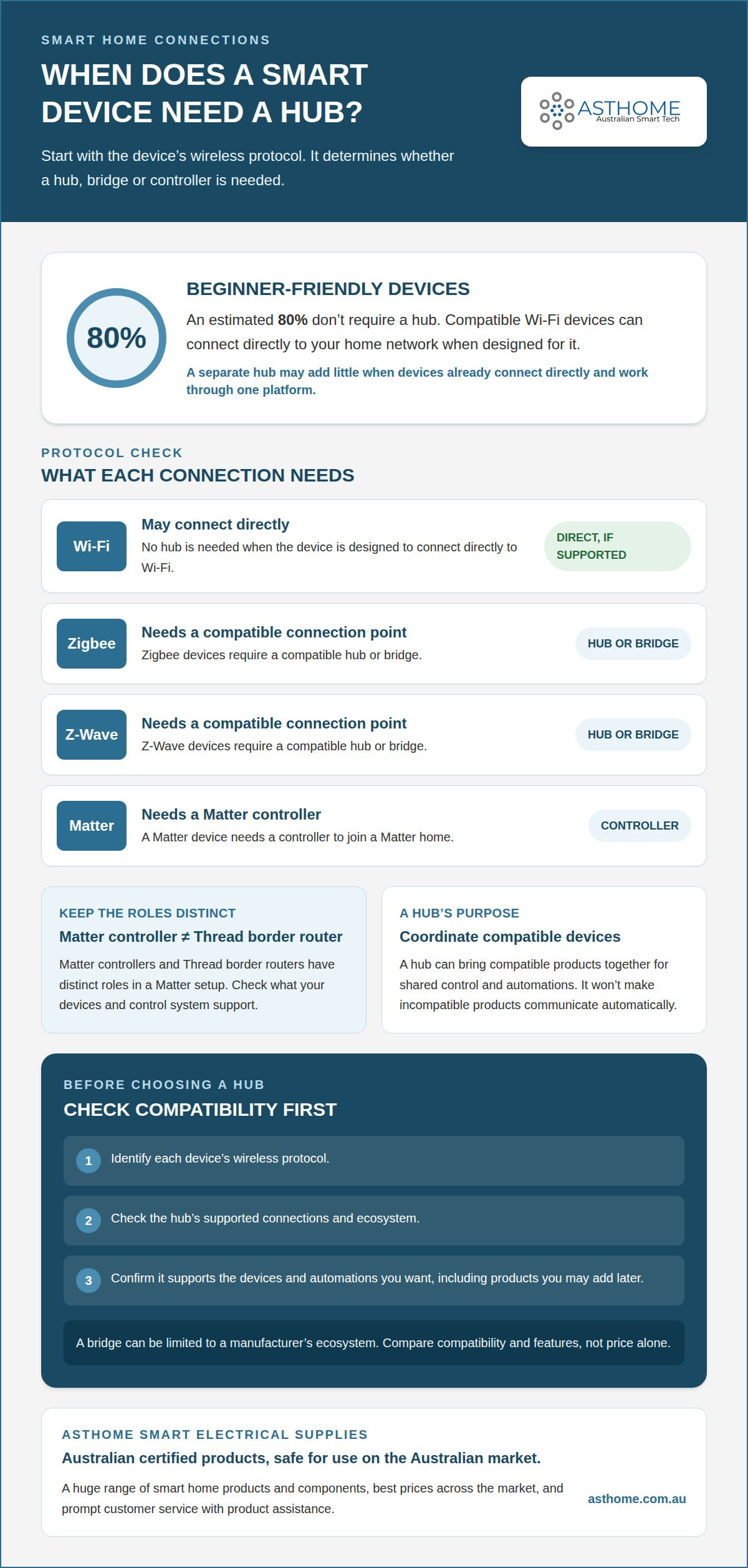
You don’t need a hub for every smart device. Wi-Fi devices can connect directly when designed for it, while Zigbee and Z-Wave devices require a compatible hub or bridge. Matter devices need a Matter controller to join a Matter home.
It’s easy to assume one app or hub will connect everything, but devices use different wireless protocols and may not communicate natively. The right setup depends on the devices you choose and the control or automation you want.
This guide explains what a hub does, when you need one and how it can bring compatible devices together. It also covers what Matter, Thread, Zigbee and Z-Wave require, so you can understand each technology’s role before building your smart home.
Key Takeaways
- Identify each device’s wireless protocol first; it determines whether you need a hub, bridge or controller.
- A hub can bring compatible devices together for shared control and automations, rather than simply adding another box.
- Matter controllers and Thread border routers have distinct roles in a Matter setup.
- Check how a hub works with your existing devices and the ones you may add later, as bridges can be limited to a manufacturer’s ecosystem.
- For a Matter-compatible switching option, Asthome Smart Electrical Supplies offers a Matter Smart Switch Module.
What Is a Smart Home Hub?
A smart home hub coordinates compatible devices so they can be controlled together. Whether you need one depends on the devices’ protocols, the ecosystem and the automations you want.
In Australia, smart home hub costs depend on the unit’s functions and supported connections. A basic bridge and a device that also handles broader control serve different roles, so compare compatibility and features rather than price alone.
The role of a smart home hub
A home hub acts as a central coordinator, connecting compatible devices and passing commands between them. This is useful when lights and other devices use different wireless technologies or need to respond together. For example, a hub can let one control system switch on compatible lights and run an automation instead of managing each device separately. It won’t make incompatible products communicate automatically.
Hubs and smart speakers
A smart speaker is primarily a voice-control device, while a hub coordinates connections between smart home products. Some speakers also include hub or controller functions, but the terms aren’t interchangeable. Amazon Alexa, Google Home and Apple Home provide ways to control devices, while the specific speaker or hub determines which connections it supports. Understanding the difference helps you avoid buying hardware that duplicates a function you already have.
For beginners, a direct-to-Wi-Fi setup can be simpler: connect a compatible light to the home network and use its supported app or platform. An estimated 80% of beginner-friendly smart-home devices don’t require a hub. A hub becomes more useful as you add devices that need a shared control point or use protocols your existing setup can’t handle.
Alexa, Google Home and Apple Home are ecosystems, not guarantees that every device will work with every speaker. Each connects compatible products through its app and supported hardware. A voice command might turn off living-room lights, but both the device and platform must support that command. Check ecosystem and protocol details before choosing new devices.
Advanced setups often combine products from multiple brands, wireless technologies and rooms. A hub can make compatible devices easier to organise and support automations triggered by events, such as a motion sensor switching on lights. Separate apps may still control individual devices without a hub, but managing several systems can be less convenient.
Choose a hub when it solves a specific compatibility or control problem, not simply because you’re building a smart home. If your devices connect directly and work through one platform, a separate hub may add little. If you want different devices to work together, the hub’s supported protocols and ecosystem are central to your decision.
Controlling and automating connected devices
Control means sending a command to a device; automation makes a device respond to a trigger without a new command. A home hub can help manage compatible products from different manufacturers through one system. This is useful when you want a motion sensor, lights and other devices to work together.
For example, a routine could switch on a hallway light when a compatible motion sensor detects movement. In the app, select the trigger, choose the action and save the routine. The devices and control system must support that integration. A hub can coordinate compatible devices, but it can’t make unsupported products work together.
Home automation can also use time or device status as a trigger. You might schedule compatible lights to turn off at bedtime or set a routine to switch off a light after another action. The benefit is less about adding commands and more about linking actions you’d otherwise perform separately. Keep routines focused, with a clear purpose for each trigger.
Whether automation works offline depends on where the routine is processed. If a hub or device can run it locally, the action may continue during an internet outage, provided the required devices and local connection remain available. A routine that relies on a cloud service or remote server may stop working without internet access. The word “hub” alone doesn’t tell you which applies.
Remote access differs from local control. Away from home, an app may send commands through an internet connection and cloud service. For instance, you could switch off a connected light remotely. That connection also affects remote routines, so distinguish them from automations designed to run locally.
Cross-device automation links products with different functions. A compatible sensor could trigger lights, while a smart power point could control a connected appliance. The control system must support both devices and the actions in the routine. Products from different manufacturers may need integration through a shared platform or home hub.
Once you have more than a handful of connected devices from multiple manufacturers, a system such as a hub can make control easier to organise. Map each routine as trigger, condition and action. For example, movement could be the trigger, a chosen time the condition, and turning on a light the action. This makes it easier to spot compatibility gaps before building a larger home automation setup.
For a connected setup, explore smart-home components suited to the devices and control method you want to use.
Compatibility between hubs and smart devices
Compatibility depends on the device’s wireless protocol and the hub’s supported ecosystem. Compare both before choosing a control system for your smart home.
Hub options across platforms
Platform hubs organise compatible devices within an ecosystem, while some smart speakers also provide hub functions. A speaker’s voice assistant alone doesn’t tell you which wireless technologies it supports. Apple Home, Amazon Alexa, Google Home and Samsung SmartThings each provide a platform for controlling compatible devices. The specific speaker or hub determines the available connections.
A speaker can serve as a voice interface and, in some models, a connection point for devices. For example, an Alexa or Google Home command can control compatible lights, but only if the device and platform work together. Apple Home offers a similar control environment for compatible products. Don’t assume every speaker supports Zigbee or Z-Wave just because it controls smart devices.
Compatibility also depends on how a product joins the ecosystem. A device might connect directly over Wi-Fi or use a bridge to link to a platform. Samsung SmartThings, Apple Home and Google Home can bring supported devices into a shared control experience, but that doesn’t make every product interoperable. Check that both the device and platform support the relevant protocol.
Ecosystem and multi-protocol hubs
An ecosystem hub manages devices within a particular platform or manufacturer’s system; a multi-protocol hub supports more than one wireless technology. This distinction matters if your setup combines brands or protocols. A hub supporting Wi-Fi, Zigbee or Z-Wave can offer broader connection options, but each device still needs compatible support.
Bridges often connect products to their manufacturer’s ecosystem rather than acting as universal translators. For example, a bridge made for one lighting system may not operate devices from another system. Check the hub’s supported protocols and platforms against the device specifications. The word “bridge” alone doesn’t describe its full compatibility.
Imagine a Zigbee motion sensor and lights controlled through another platform. They can work together only if the hub or ecosystem supports both devices and the required integration. Different wireless technologies can’t all communicate natively, so a hub may be needed to coordinate them. Support for both protocols still doesn’t guarantee every feature will be available.
Before choosing, list your current devices and products you may add later. Note each device’s protocol, required app and supported ecosystem, then compare those details with the hub. A hub that suits today’s lights may not suit a future Z-Wave sensor. Checking current and planned compatibility helps you avoid building around a connection your next device can’t use.
Matter controllers and Thread border routers
Matter devices need a Matter controller to join a Matter smart home, while Thread devices need a Thread border router to connect their network. These are different functions, although one piece of hardware can sometimes perform both.
Control across device brands
A Matter controller lets compatible home devices from different brands join the same Matter setup. This is useful if you want one app or system to manage products from several manufacturers. Add each compatible device to the controller’s ecosystem, then manage it through the app or supported controls. Matter provides a shared standard, but each device still needs Matter support.
For example, a Matter light and sensor from different brands can be managed in a Matter setup. The controller provides the system that connects them for control and automation. This doesn’t mean every feature in each brand’s separate app will appear in every other app. Device compatibility and platform functions determine which controls are available.
Phones and routers as hubs
A smartphone can provide an app-based control interface, but a phone app alone isn’t necessarily a smart home hub or Matter controller. A Wi-Fi router connects devices to the home network, but that function alone doesn’t make it a controller. This distinction helps you identify whether your setup needs dedicated hardware with the required function.
For a Matter home, you need a Matter controller, often built into a smart speaker. You can then use a phone to operate devices through a compatible app, while the controller manages the Matter setup. Some products combine roles, so the key is whether the device supports the controller function, not simply whether it has Wi-Fi or an app.
Thread adds another requirement. A Thread border router connects Thread devices to the wider home network, allowing them to communicate beyond their Thread mesh. It doesn’t replace the Matter controller: the controller manages Matter devices, while the border router connects Thread devices to the network. Some setups use one device for both functions, but the roles remain distinct.
Consider a Matter-over-Thread sensor and a Matter-over-Wi-Fi light. The controller manages both Matter devices, while the Thread border router connects the sensor’s Thread network. The light connects through Wi-Fi. This shows why “Matter compatible” and “Thread compatible” describe different parts of a setup.
Before choosing hardware, identify how each device connects and which function it requires. A Matter device needs a controller; a Thread device also needs access to a Thread border router. Match those requirements to your existing equipment. This avoids treating a phone, router, speaker and hub as interchangeable when each may perform a different task.
Zigbee and Z-Wave device requirements
Zigbee and Z-Wave devices need a compatible hub or bridge because they use their own protocols rather than Wi-Fi. Thread devices need a Thread border router, and Matter devices need a Matter controller. Matter-over-Thread devices need both functions in the setup.
The practical difference is the connection each device uses. A Zigbee sensor won’t join a Wi-Fi network as if it were a Wi-Fi product. It needs a Zigbee-compatible gateway to connect it to the control system. The same applies to Z-Wave devices: their hub must support Z-Wave, not just another wireless protocol.
That requirement affects what you buy next. If your existing gateway supports Zigbee, look for Zigbee devices that work with its system. A Zigbee label identifies the protocol, but doesn’t mean every Zigbee device works with every gateway. The device and hub also need a compatible ecosystem and support for the control functions you want.
Z-Wave follows the same hub-first logic, but Zigbee and Z-Wave aren’t interchangeable. A Zigbee gateway won’t automatically control a Z-Wave sensor. If your setup uses both protocols, its hub or separate bridges must provide the required connections. The key question isn’t simply whether a product is wireless, but which protocol it uses and what hardware receives it.
Bluetooth is another distinct connection, not a substitute for Zigbee or Z-Wave. A Bluetooth device needs compatible Bluetooth support, while a Zigbee product needs Zigbee support. A hub can support multiple protocols, but that doesn’t mean every device will work together. Each device must be recognised by the hub and supported by its control platform.
For example, a Zigbee motion sensor and a Zigbee light may work together through a compatible gateway. The gateway connects them to the control system, where the sensor can trigger a supported lighting action. If the light uses Z-Wave instead, a Zigbee-only gateway can’t provide that connection on its own.
Before adding a device, identify its protocol, the gateway it requires and the platform used for control. Then compare those details with your current setup. This avoids buying a sensor or switch that can’t join the network you’ve already built. For a Zigbee-based setup, explore compatible smart-home components.
Asthome Smart Electrical Supplies: Matter Smart Switch Module
Asthome Smart Electrical Supplies offers the Matter Smart Switch Module for a switching setup built around Matter. Asthome is committed to supplying Australian-certified products that are safe for use on the Australian market.
Its smart-home range spans different brands and components, including the Zigbee 3.0 Smart Switch Module and Smart Zigbee Dimmer Module. Asthome aims to offer the best prices across the market, with customer service that provides prompt product responses and assistance.
For help choosing a product for your setup, contact Asthome Smart Electrical Supplies or visit asthome.com.au.
Plan your next smart-home upgrade
Before your next purchase, decide what you want to improve, such as controlling a room more easily or creating a useful routine. Whether you need a hub for every smart device depends on the role each device must play in your setup.
List the devices you already use and the outcome you want from your next addition. This gives you a practical starting point for choosing an upgrade.
Ready to explore your options? Visit Asthome Smart Electrical Supplies and take the next step towards a smart home that suits your needs.
Frequently Asked Questions
What Is Matter?
Matter is a smart-home standard that helps compatible devices from different brands work within supported platforms. A Matter device still needs a Matter controller to join a Matter home. For example, a Matter light and switch can be managed through a compatible controller. Matter support doesn’t mean every product feature appears in every app, so consider which controls you need before choosing a platform.
What about bridges and gateways?
A bridge or gateway connects devices using a particular protocol or product ecosystem to a control system. The terms are often used for similar functions, but supported devices can differ. For example, a Zigbee gateway connects Zigbee products, while a manufacturer’s bridge may focus on its own range. Check the device protocol and gateway’s supported ecosystem together rather than assuming any bridge will connect every product.
Do all smart home devices need a hub?
No. If you’re asking, “Do I need a hub for every smart device?”, the answer depends on how each product connects. Some devices connect directly to Wi-Fi and use a compatible app or platform; others need dedicated hardware. A Wi-Fi light switch can avoid a separate protocol hub if its specifications say it connects directly. Zigbee and Z-Wave devices need compatible hubs or bridges.
Which smart devices connect directly to Wi-Fi without a hub?
Wi-Fi smart devices designed for direct network connection can operate without an extra hub. Examples include some smart switches, lights and power points. They connect to home Wi-Fi and are controlled through a supported app or platform. A product name alone isn’t enough: check its connection requirements and whether it needs a separate gateway for particular functions.
Which smart home devices require a hub or bridge?
Zigbee and Z-Wave devices require a compatible hub or bridge because they use those protocols rather than connecting directly through Wi-Fi. Thread devices need a Thread border router to connect their network, and Matter devices need a Matter controller. A Matter-over-Thread product requires both functions in the setup, though one device may perform both roles.
What is the difference between a hub, bridge, gateway and smart speaker?
A hub coordinates compatible devices for shared control, while a bridge or gateway connects devices using a particular protocol or ecosystem. A smart speaker provides voice control and may also include hub or controller functions. A Wi-Fi router connects devices to the home network, but isn’t automatically a smart home hub. These labels describe different roles, so compare the hardware’s supported functions.
Can one smart home hub control devices from different brands?
Yes, if the hub and platform support the devices and their protocols. A Matter controller can bring compatible Matter products from different brands into one Matter home. A multi-protocol hub may support devices using more than one wireless technology. However, a shared control system doesn’t guarantee every brand-specific feature will be available, and some bridges work only within their manufacturer’s ecosystem.
How do I check whether a smart device is compatible with my existing hub?
To answer “Do I need a hub for every smart device?” for a specific product, start with its protocol, such as Wi-Fi, Zigbee, Z-Wave, Thread or Matter. Compare that with the protocols and platforms your hub supports. Check setup requirements, including any gateway or controller, and confirm that your preferred app supports the device. For example, a Zigbee product won’t join a hub that lacks Zigbee support.