

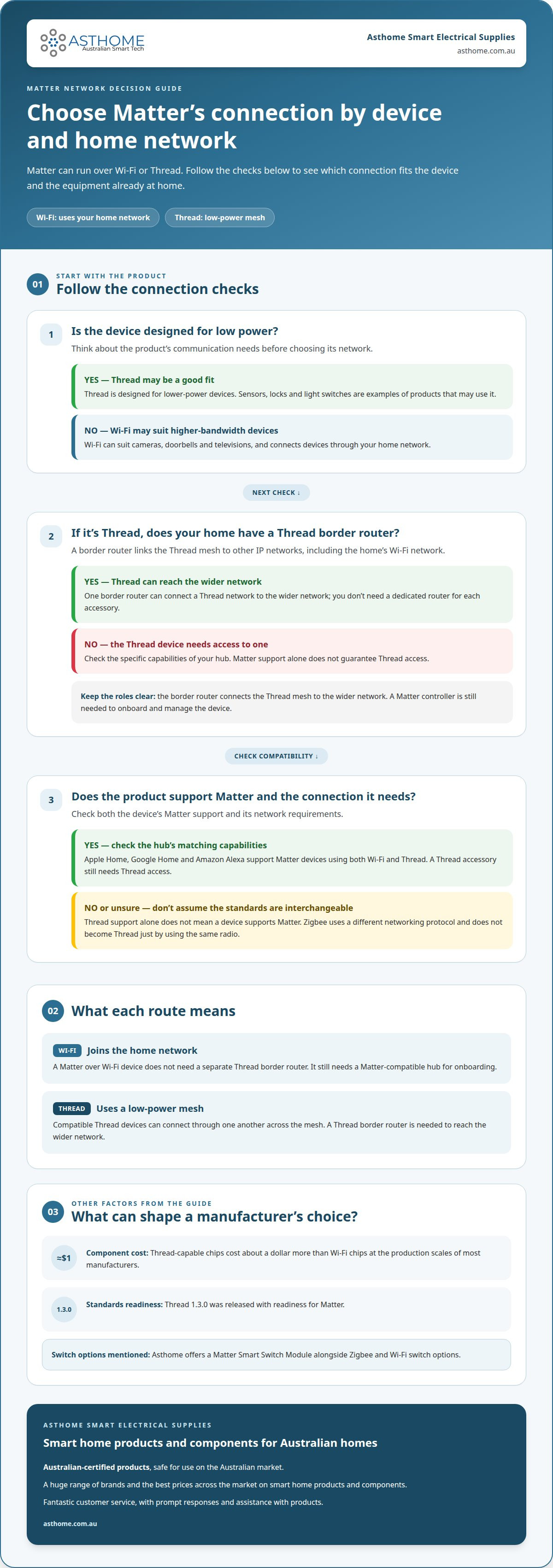
Matter over Thread vs Matter over Wi-Fi isn’t a contest between two smart home standards. Matter can use either network: Wi-Fi connects devices through your home network, while Thread forms a low-power mesh and needs a Thread border router to reach the wider network. The better fit depends on the device and the network already in your home.
It’s understandable to expect one connection type to be the obvious choice. In practice, Wi-Fi suits devices that use your existing network, while Thread is designed for lower-power devices such as sensors and switches. Both can connect compatible devices to smart home platforms.
This guide explains why manufacturers choose one connection over the other, how Thread mesh compatibility works, and what a border router does. It also explains how Matter helps devices work across platforms, so you can understand a product’s network requirements before choosing it for an Australian home.
Key Takeaways
- Choose the connection type to suit the device: Wi-Fi uses your home network, while Thread is designed for low-power devices.
- Thread devices need a border router to communicate with the wider network, but only one border router is needed in a Thread network.
- Check both the device’s Matter compatibility and its network requirements; Thread support alone doesn’t mean a device supports Matter.
- Understand how Thread’s mesh works before adding devices, as compatible devices can connect through one another across the network.
- Match your switch choice to your setup: Asthome offers a Matter Smart Switch Module alongside Zigbee and Wi-Fi switch options.
Why are manufacturers using Matter over Wi-Fi, and not Thread?
Manufacturers can build Matter devices for Wi-Fi or Thread, depending on the product and setup. Wi-Fi avoids the need for a separate Thread border router, but Matter onboarding still requires a compatible smart home hub.
Thread border router role
A Thread border router connects a Thread mesh to other IP networks, including a home’s Wi-Fi network. It lets a Thread device communicate with a Matter controller beyond the mesh. One border router can connect a Thread network to the wider network, so you don’t need a dedicated router for each accessory.
For a household, the key question is whether existing equipment can perform that role. Some compatible Apple home hubs support Thread and Matter, allowing one device to act as both a Thread border router and a Matter controller. Check the hub’s specific capabilities: an Apple hub that supports Matter but not Thread won’t provide the Thread connection.
Border router needs for Matter devices
Yes. A Matter over Thread device needs access to a Thread border router to communicate with the wider network. The router links the Thread mesh to the home network; it doesn’t replace the Matter controller needed to onboard and manage the device. This distinction explains why “Matter-compatible” alone doesn’t describe every network requirement.
By contrast, a Matter over Wi-Fi device doesn’t need a separate Thread border router. It joins the home’s Wi-Fi network, so its network requirements differ from those of a Thread device. When choosing between the two, distinguish their roles: the network carries device communication, while the controller adds the accessory to a Matter ecosystem.
The need for extra equipment can influence manufacturers. Wi-Fi devices can use a household’s existing router rather than relying on Thread coverage and a border router. For buyers without compatible Thread equipment, Wi-Fi may be the more straightforward option. Thread can still suit lower-power products, but manufacturers need to consider the user’s likely network as well as the device itself.
Manufacturing decisions also involve component selection and product purpose. Thread-capable chips cost about a dollar more than Wi-Fi chips at the production scales of most manufacturers. Even a small difference can matter across a product range, while Thread’s low-power mesh may suit sensors or switches better than a Wi-Fi design.
Onboarding is another practical difference. A compatible Apple home hub can support both the Matter controller and Thread border-router roles, while Google Home supports Wi-Fi and Thread devices. The specific hub capabilities determine whether it can commission a Thread accessory. A Wi-Fi Matter device still needs a Matter-compatible hub for onboarding, even though it doesn’t need Thread equipment.
Thread 1.3.0 was released with readiness for Matter, helping align the two technologies. The choice isn’t that manufacturers use Matter over Wi-Fi instead of Thread in every case. Wi-Fi can reduce reliance on a Thread border router; Thread offers a low-power mesh. Product requirements and the home’s existing equipment shape the better fit.
Thread interoperability and compatibility
Matter over Thread uses a Thread mesh; Matter over Wi-Fi uses your home Wi-Fi network. Compatible products need Matter support and the corresponding connection, with Apple Home, Google Home and Amazon Alexa supporting both network types.
Matter-compatible smart home hubs
A Matter-compatible smart home hub manages Matter devices, while some hubs also support Thread connectivity. This distinction matters when choosing an accessory: a Thread product needs a compatible Thread border router, while a Wi-Fi product joins your home network. Apple Home, Google Home and Amazon Alexa ecosystems support both connection types, so compatible devices can work alongside one another.
Compatibility still depends on the hub’s specific capabilities and the device’s Matter support. For example, a hub can manage a Matter over Wi-Fi accessory without providing Thread access. A Thread accessory needs a hub or border router that supports Thread, as well as Matter compatibility for Matter control.
Thread compared with Zigbee and Wi-Fi
Thread and Zigbee use the same radio, but their network protocols differ: Thread uses IPv6, while Zigbee uses its own networking protocol. That shared radio doesn’t make them directly interchangeable. A Zigbee device doesn’t become a Thread device simply by operating on the same frequency.
Wi-Fi serves a different role in a smart home. It can suit higher-bandwidth equipment such as cameras, doorbells and televisions, while Thread is designed for lower-power devices. Sensors, locks and light switches are examples of products that may use Thread. The choice of protocol reflects the device’s communication needs.
Thread products also need Matter certification to support Matter. A device that uses Thread isn’t automatically compatible with Matter ecosystems. Manufacturers must implement Matter support in the product, not just use the Thread networking protocol. That’s why it’s important to check both standards when assessing compatibility.
Compatible devices across Matter networks
Matter-compatible devices can use Thread or Wi-Fi, depending on their design. A Thread-enabled sensor and a Wi-Fi-connected television can both join Matter ecosystems, provided each product supports Matter and meets its network requirements. Apple Home, Google Home and Amazon Alexa support both types, enabling a mixed-device setup.
Existing Zigbee devices can also appear in a Matter ecosystem through a Matter bridge. The bridge exposes supported non-Matter devices as virtual Matter devices, so they can be managed alongside native Matter products. This differs from direct Thread compatibility: the Zigbee device remains on Zigbee, while the bridge provides the link.
For a practical comparison, consider a Zigbee sensor, a Matter over Thread lock and a Matter over Wi-Fi camera. The sensor needs a suitable bridge for Matter access, the lock requires Thread support, and the camera uses Wi-Fi. The Matter label describes the application standard, not one universal radio connection.
Thread mesh networks
Thread connects compatible smart home devices in a mesh, rather than relying on each device to communicate directly with a router. This structure supports low-power accessories such as sensors, locks and switches.
Thread mesh network basics
A Thread mesh is a wireless network in which compatible devices connect with one another. It can reroute communication if a device or path becomes unavailable, creating a self-healing mesh. This is useful in a home where a sensor may sit beyond the border router’s direct reach.
For example, a Thread sensor in a bedroom can communicate through another compatible device between it and the border router. The route depends on the devices and network conditions. Unlike a Wi-Fi device that connects through the home router, a Thread accessory uses the mesh to reach the wider network.
Thread operates in the 2.4 GHz band and is designed for Internet of Things devices. Amazon describes Thread as a low-power, low-latency wireless mesh networking protocol. The mesh can support up to 250 devices, although actual performance depends on the network and connected equipment.
Thread as a low-power mesh network
Thread is designed for battery-operated smart home devices, including motion sensors and door locks. Its low-power communication can help these accessories run for years on a small battery. That makes Thread useful where frequent battery changes would be inconvenient, such as for a sensor mounted in a hard-to-reach spot.
A Thread device can also help keep Wi-Fi available for other household uses. A battery-powered sensor sending small amounts of information doesn’t need the same network role as a camera streaming video. Thread’s low-power design suits sensors, locks and switches; Wi-Fi is more appropriate for higher-bandwidth equipment such as cameras and televisions.
Thread is typically faster and more reliable than Wi-Fi for low-power applications such as sensors. A motion sensor, for instance, needs to report a change promptly without maintaining a high-bandwidth connection. The mesh lets compatible devices communicate through one another rather than relying on a direct connection to the home router.
For coverage, consider where Thread devices sit in relation to one another and the border router. A sensor at the edge of a home may rely on a compatible device positioned between it and the router. Battery-powered accessories and powered switches can play different roles in a network, so their placement affects how the mesh reaches across the home.
Thread’s mesh design doesn’t remove the need for a Thread border router. It lets compatible devices communicate across the Thread network, while the border router connects that network to the wider home network. Keep the distinction in mind when planning where a lock, sensor or switch will connect.
Matter networking over Wi-Fi, Ethernet and Thread
Matter can run over Wi-Fi, Ethernet or Thread, so one smart home can combine all three. The connection determines how a device reaches the local network, not whether Matter can connect it to compatible platforms.
Choosing a network for smart lighting
For smart lighting, choose the network that suits the switch and your home’s existing setup. A Wi-Fi switch joins the home’s Wi-Fi network, while a Thread switch communicates through a Thread mesh. Both can use Matter when the product supports the standard.
Thread can suit low-power switches and other smaller accessories. Wi-Fi may be practical where the home already has suitable coverage and the device uses that network. The choice also affects the equipment needed: Thread needs a border router, while Wi-Fi lighting doesn’t need a separate Thread border router.
Ethernet is another option for Matter devices. A wired device can connect to the local network through Ethernet, while wireless lighting uses Wi-Fi or Thread. Matching the network to the device helps avoid assuming every Matter product uses the same connection.
Thread's role and scalability in Matter networks
Thread provides the mesh network for Matter devices designed to use it. A Thread network can support up to 250 devices, with a maximum of 32 routers in the mesh. A typical Thread mesh has between 16 and 24 routers.
These figures describe different parts of the network: device capacity and router count. For a home adding Thread switches or sensors, the mesh lets devices communicate through the network instead of each joining Wi-Fi directly. The border router links Thread to the wider IP network.
Network credentials also matter during setup. The first controller to commission a device determines which Thread network it joins. Multiple Matter fabrics can coexist on one Thread network, and adding another fabric doesn’t change the Thread network the device joined.
Hub needs for Matter over Wi-Fi
Matter over Wi-Fi devices don’t need a Thread border router because they connect through Wi-Fi. Matter onboarding still requires a Matter-compatible smart home hub to commission and manage the device.
Keep the two functions distinct. A Wi-Fi router provides the network connection, while the Matter-compatible hub handles Matter control. For example, an Apple Home setup needs a Matter-compatible controller for onboarding, but a Wi-Fi accessory doesn’t require Thread support from that equipment.
Thread and Wi-Fi devices in one home
Yes, Matter devices using Thread and Wi-Fi can work together in one smart home. Apple Home, Google Home and Amazon Alexa support both connection types, allowing compatible devices to share a Matter ecosystem.
For example, a Thread light switch and a Wi-Fi accessory can sit in the same Matter setup. Each still uses its own network connection, and Thread devices join the Thread network selected during commissioning. This distinction helps when adding devices: platform compatibility doesn’t mean every product uses identical network hardware.
Matter as a cross-platform smart home standard
Matter’s key contribution is a shared communication standard, not a single wireless network. A compatible device can use Wi-Fi or Thread, while Bluetooth LE is typically used during commissioning. This separation lets manufacturers build products for different network needs without tying platform compatibility to one radio technology.
Amazon, Apple and Google began Project Connected Home over IP in 2019. The project became Matter in May 2021, and the first Matter specification was released in October 2022. The Connectivity Standards Alliance was described as having over 400 companies involved. This industry collaboration aims to make compatible products work across smart home ecosystems.
For example, a Matter sensor can be commissioned into an ecosystem and then controlled through a compatible platform. Matter multi-admin lets people use different preferred smart home apps without conflicts. A device can work across multiple platforms simultaneously without being re-paired, so adding a second platform needn’t mean starting the setup again.
Each Matter fabric is a security and administration domain, not a separate network. Multiple fabrics can coexist on one Thread network. Multi-admin adds another Matter fabric but doesn’t change the Thread network the device joined. This distinction explains how Apple Home and Amazon Alexa can manage a compatible Thread device while it remains connected to the same mesh.
Matter also prioritises local control. A compatible device can respond on the local network even when the internet is down. Wikimedia Foundation describes Matter controllers as managing devices locally, reducing the need for multiple proprietary hubs for each ecosystem. That doesn’t remove all hub requirements: the controller still commissions and manages devices, while each device uses its supported network.
Shared device functions make this useful beyond basic switching. A Matter thermostat can expose its current temperature, target setpoint and heating or off modes to compatible platforms. A Thread sensor and a Wi-Fi thermostat can therefore use different network connections while presenting supported functions through Matter. The standard connects device capabilities with platforms; it doesn’t make every product feature identical.
The practical takeaway is to consider three things together: the Matter support, the device’s network, and the controller or border-router role required. Bluetooth helps with commissioning, while Thread or Wi-Fi carries normal network communication. For a Matter-compatible switch or sensor, explore smart home products suited to your preferred setup.
Asthome Smart Electrical Supplies: Matter Smart Switch Module
Asthome Smart Electrical Supplies offers a Matter Smart Switch Module for smart home setups using Matter-compatible switching. It’s a relevant option when you want a switch for a Matter-based system, rather than choosing solely by whether a product uses Wi-Fi or Thread.
Other options include the Zigbee 3.0 Smart Switch Module, Smart Zigbee Dimmer Module and Smart Wi-Fi Light Switch (1/2/3/4 Gang). Asthome supplies a broad range of brands and aims to offer the best prices across the market. Its products are approved for sale and use in Australia with SAA and carry the RCM logo. The team also provides prompt responses and assistance with product questions.
For help choosing a suitable product, contact Asthome Smart Electrical Supplies.
Choose a switch that suits your next step
Let your intended setup guide your next product choice. The decision between Matter over Thread and Matter over Wi-Fi is part of a broader planning question: which network and control platform will suit the devices you want to use together? Consider this before adding a switch, so the product fits your smart home plans rather than just one isolated feature.
For switching options, Asthome Smart Electrical Supplies offers a Matter Smart Switch Module, Zigbee 3.0 Smart Switch Module and Smart Zigbee Dimmer Module. Asthome focuses on supplying Australian-certified products that are safe for the Australian market, with product assistance to help you understand the options.
If you’re comparing switch types or want help with a product question, contact Asthome Smart Electrical Supplies. A considered choice now can make your smart home easier to build on over time.
Frequently Asked Questions
How does Matter work?
Matter defines how compatible smart home devices and platforms exchange commands and device information. Its networking layer can use TCP or UDP over supported connections, while Bluetooth LE is typically used during commissioning. For example, a controller can add a compatible sensor, then send commands through the home’s local network. Matter standardises this communication; it doesn’t dictate one radio technology or make every device function identical.
Is there a future for Thread?
Thread remains relevant alongside Wi-Fi, Zigbee and other smart home technologies. Thread 1.4.0 was identified as an update intended to prepare homes for future IoT advancements, while Zigbee, Z-Wave and Wi-Fi are also expected to remain relevant for years as Matter grows. For a household planning gradually, this means Thread is one option within a changing mix, not a reason to replace every existing device.
What's so special about Thread?
Thread combines IPv6 networking with a low-power mesh design for connected devices. Its self-healing structure can route communication through other compatible devices, which is useful when a sensor isn’t near the network’s border router. Thread also operates independently of Wi-Fi for its mesh traffic. That makes it a distinct networking choice for smaller accessories, rather than simply another name for Matter or a replacement for every home network.
How do Matter over Thread and Matter over Wi-Fi compare for range, speed, reliability and power use?
There isn’t one universal range or speed result: building materials, device placement and network conditions affect performance. Thread can relay messages through its mesh, while Wi-Fi devices depend on usable Wi-Fi coverage. Thread is typically faster and more reliable than Wi-Fi for low-power devices such as sensors, and is designed to conserve battery power. Wi-Fi suits higher-bandwidth devices, including cameras and televisions, which need to transfer more data.
How do setup and troubleshooting differ for Matter over Thread and Matter over Wi-Fi?
Both types need Matter commissioning through a compatible controller, but the network checks differ. For a Thread accessory, confirm that the setup includes a Thread-capable border router and that the device has joined the intended Thread network. For Wi-Fi, focus on the home network connection and router coverage. If a device doesn’t appear, check whether it’s connected to the expected network before repeating setup.
Are Matter over Thread or Matter over Wi-Fi devices more secure or reliable?
Neither connection type is automatically more secure or reliable in every home. Matter and Thread use modern encrypted communication models, and Thread uses 128-bit AES encryption for network data traffic. Reliability depends on the network path: a Thread mesh may offer alternate routes, while Wi-Fi performance depends on the home’s wireless coverage and router. Choose based on the device’s needs and the network conditions where it will operate.
What are the costs and benefits of choosing Thread versus Wi-Fi Matter devices in Australia?
There’s no single cost difference that applies to every Matter device in Australia. Thread can involve the added equipment requirement of a Thread border router, while Wi-Fi can use an existing home network; product pricing varies by device and features. Thread’s practical benefit is its low-power mesh for suitable accessories. Wi-Fi can be convenient for higher-bandwidth products. Compare the connection and hub requirements as well as the product itself.