

What if your smart home’s weakest point isn’t the Wi-Fi password, but an overlooked device or account? Securing your smart home network from hackers takes more than changing one setting. Every connected device, router and online account can affect your home’s security.
It can be hard to know where to start, especially when security changes seem complicated or might interrupt everyday use. A practical, prioritised approach can make your network harder to access without requiring a complete overhaul. This guide covers router and Wi-Fi settings, connected devices, key accounts and what to do if something seems compromised.
Start with the basics, then review your device and account habits. Asthome Smart Electrical Supplies offers a broad Australian range of smart home products, including Matter and Zigbee options, with product assistance to help you understand your choices. Asthome products are SAA certified for the Australian market. This relates to electrical product safety and compliance, not cybersecurity, so it’s important to consider network and account security separately.
Key Takeaways
- List the devices, router and online services in your smart home to see where unauthorised access or unwanted control could occur.
- Protect your network, accounts and devices together. No single setting guarantees security.
- When securing your smart home network from hackers, treat Matter, Zigbee and Wi-Fi as different connectivity options, not security guarantees.
- Build a manageable routine: secure router access, strengthen Wi-Fi, protect accounts, update devices and review settings.
- When choosing smart home products, consider update support, account controls, documentation and ecosystem compatibility as well as Australian suitability.
Why securing your smart home network from hackers starts with understanding the risks
A smart home network is more than the Wi-Fi signal reaching your living room. It includes the router that connects your home to the internet, devices such as switches, sensors and smart locks, and the apps or online services you use to control them. Knowing how these parts fit together helps you spot where a security issue could arise.
The Internet of Things (IoT) describes physical objects that connect to the internet to exchange data or be controlled remotely, a concept central to this Smart home security overview. Devices in one home may use different connection methods and apps, so they won’t all have the same settings or security considerations.
A problem with one part doesn’t automatically mean the whole home has been compromised. Unauthorised access could expose personal information, allow someone to control a device or affect an account linked to your home. The likelihood and impact depend on the product, its configuration and your security habits. A measured review is more useful than assuming every connected product is unsafe.
How a smart device can create a security risk
Weak or reused passwords, outdated software and settings that allow more access than necessary can increase risk. The details vary between products. A smart doorbell, for example, may rely on its own app account, while a smart switch may connect through a hub. A weakness in one device doesn’t mean other devices have the same vulnerability.
Keep the different risks in perspective. If someone accesses an app account, they may be able to use the functions available through that account. If the router or a device is compromised, the problem lies with that network equipment or product. These are different issues, even though either could affect your smart home.
What hackers may be trying to access
Possible targets include account access, personal information held by a service, or functions offered by connected devices. Depending on the product, unwanted control could mean changing a setting or operating a connected function without permission. Don’t assume every smart device stores the same information or allows the same actions.
Consider a household with a smart lock and connected lighting. The lock’s app account and the home router are separate points to secure. A problem with one doesn’t automatically provide access to the other, but both deserve attention. Device design, setup choices and account practices all influence exposure.
Securing your smart home network from hackers starts with knowing what’s connected and how you control it. Make a simple list of your devices, the apps they use, and any hubs or accounts involved. That gives you a clear starting point for the checks below, without treating every device as an identical risk.
How to secure the three layers of a smart home network
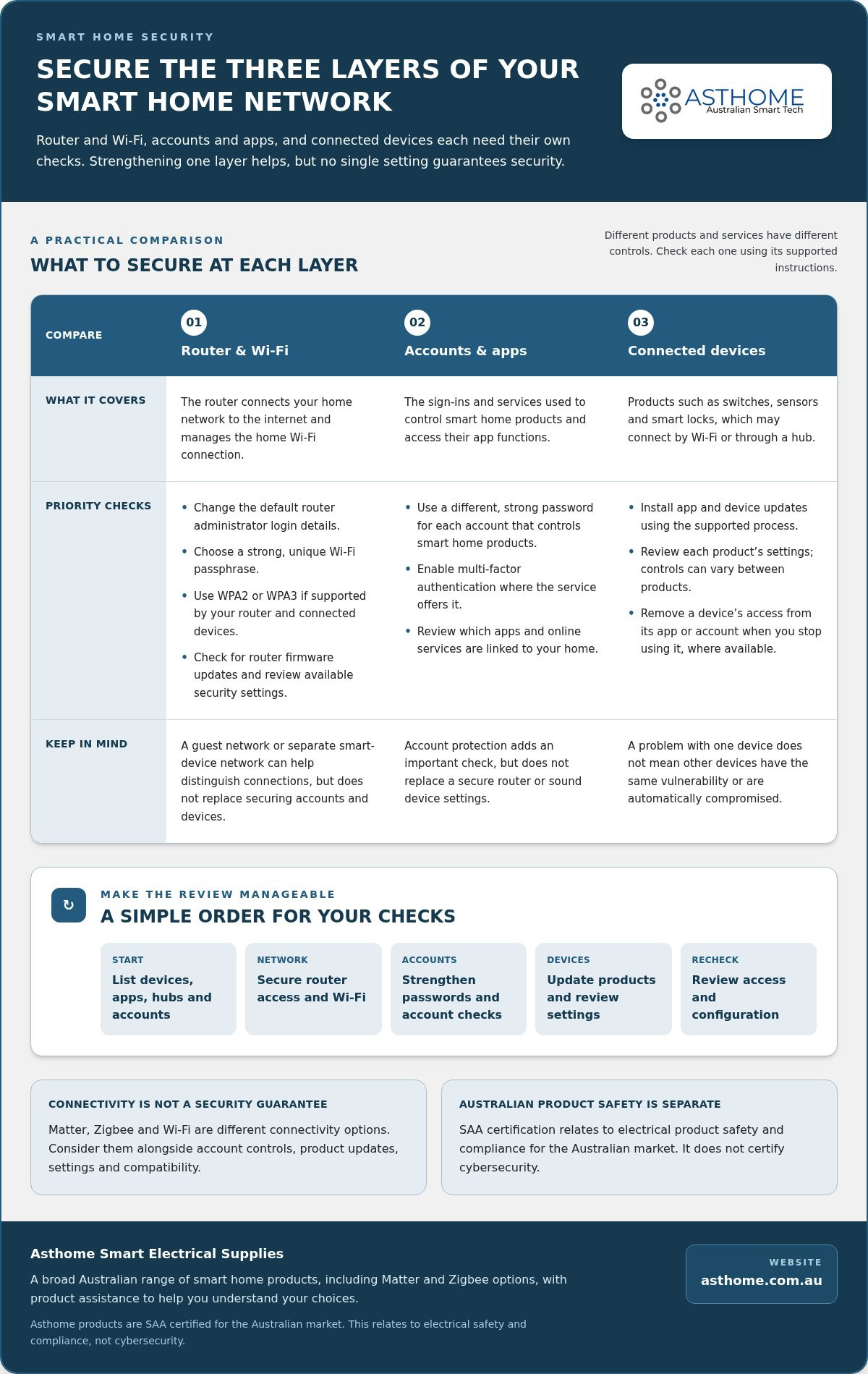
A practical approach to securing your smart home network from hackers is to think in three connected layers: the router and Wi-Fi, the accounts and apps used to control devices, and the devices themselves. Each layer has different controls. Strengthening one helps, but no single setting can guarantee a secure network.
This layered approach is useful in a home with products from different brands. A device may connect through Wi-Fi or a hub, while its app account is managed separately. For background on how connected products fit into an ecosystem, Asthome’s guide to the Matter smart switch explains one approach to device interoperability. The NIST guidelines for smart home security also discuss smart home privacy and security from the user’s perspective.
Secure the router and home Wi-Fi
Start with the router, which manages the connection between your home network and the internet. Change its default administrator login details. These are separate from the password you use to join Wi-Fi. Choose a strong, unique Wi-Fi passphrase and use WPA2 or WPA3 encryption if your router and connected devices support the relevant option. Router settings and menu names vary, so follow the device instructions rather than changing unfamiliar options at random.
Check for router firmware updates and install them through the manufacturer’s supported process. Review the available security settings and enable appropriate protections. If your router supports a guest network or a separate network for smart devices, consider using it to distinguish those devices from the network used by personal devices. This can help organise connections, but it doesn’t replace securing each account and device.
Protect smart home accounts and devices
Accounts are another layer to secure. Use a different, strong password for each account that controls smart home products. That way, a password reused elsewhere won’t also unlock a device app. Enable multi-factor authentication where the service offers it. This adds another account check, but it doesn’t replace a secure router or sound device settings.
Next, review the products themselves. Install app and device updates using the supported process, then look through each product’s settings to understand how it’s configured. A smart switch, sensor and lock may have different controls, so don’t assume that settings in one app apply to every product. If you stop using a device, remove its access from the relevant app or account where that option is available.
Keep the layers working together. A well-protected Wi-Fi connection won’t secure an account with a reused password, and a strong account password won’t update an out-of-date device. Asthome’s Australian smart home range includes Matter and Zigbee modules, switches, sensors and smart locks, with product assistance to help you understand the products in your setup.
Matter, Zigbee and Wi-Fi: what connectivity choices mean for security
Matter, Zigbee and Wi-Fi describe different ways smart home products communicate. None guarantees that a device is secure, and choosing one protocol doesn’t remove the need to consider setup, software updates, account access and network configuration. A well-managed setup depends on the whole chain, from the device to the app or hub used to control it.
When securing your smart home network from hackers, consider how each product connects and what supports that connection. Wi-Fi devices communicate over your home wireless network. Zigbee products use a separate wireless protocol and commonly connect through a compatible hub. Matter is an interoperability standard that helps compatible smart home products work across ecosystems, using supported network technologies such as Wi-Fi or Thread.
| Approach | Network relationship | Setup considerations | Security caveat |
|---|---|---|---|
| Wi-Fi | Connects to the home wireless network | Check the router’s supported security options and the device’s setup requirements | Network encryption doesn’t replace secure accounts, updates or device settings |
| Zigbee | Uses a wireless protocol, often with a compatible hub | Check hub compatibility, device pairing and how the system is managed | Using Zigbee doesn’t by itself establish how securely a product is implemented or maintained |
| Matter | Supports interoperability across compatible smart home ecosystems, using supported network technologies | Check ecosystem compatibility and the setup process for the device and controller | Interoperability isn’t a promise that every product or account is configured securely |
How Matter and Zigbee fit into a smart home
Matter is designed to help compatible devices from different manufacturers work together. It doesn’t replace the network connection, device software or account controls. Zigbee is a connectivity protocol used by smart home products, including products that communicate through a hub. Asthome’s Zigbee 3.0 switch module guide provides more protocol context. With either setup, security depends on the product’s implementation and how it’s maintained.
Questions to consider when adding a connected device
Before adding a product, read its setup and support information. Find out how updates are delivered for the device and its app, and whether setup requires an account, hub or access to your Wi-Fi network. Review privacy, user-access and remote-control settings too. These details help you understand what the product needs to operate and which controls you can manage.
Protocol choice is one part of product selection, not a shortcut around everyday security habits. Compare the connection requirements with your existing equipment, and consider whether the product and app fit the way you manage your home. Asthome’s Australian range includes Matter and Zigbee-compatible smart home products, with product assistance to help you understand the options.
A practical routine for securing your smart home network
A set order makes security tasks easier to manage. Work through the setup steps for your home, then repeat a short review regularly and whenever you add a device or change an account. Keep a simple inventory of device names, the app or account used to manage each one, and any connected hub. Store it somewhere private, but don’t put passwords in an unprotected note or device list.
The Australian Cyber Security Centre’s cyber security guidance supports a practical routine built around account protection, software updates and secure device settings.
First-time setup: work through the essentials
- Secure router access. Change the router’s default administrator credentials using its setup instructions. Keep the administrator login distinct from your Wi-Fi passphrase.
- Strengthen Wi-Fi. Set a strong, unique passphrase and select WPA2 or WPA3 if your router and devices support it. Check the router for available firmware updates and security settings.
- Protect accounts. Give each smart home account a unique password. Turn on multi-factor authentication where the service offers it, and review who can access shared household accounts.
- Update devices. Check for available device and app updates, then install them using the supported process. If a product has a default password or login, change it during setup.
- Review settings. Check permissions, remote access and other features. Disable options you don’t need while keeping functions required for normal operation.
Take it one step at a time. If you’re unsure what a setting does, refer to the router or device instructions before changing it. The aim is to understand how each product is configured, not to switch off features blindly.
New device setup and regular checks
For every new device, install available updates, use a unique account password and review permissions before relying on its connected functions. Add its name and associated account to your inventory, but leave out login details. Use a reputable password manager or another secure method to store credentials separately.
During a regular check, work through your inventory. Look for available updates, review account access and sessions, and check that router and device settings still suit your household. Remove access for devices or users you no longer recognise or need, using the controls provided by the relevant service.
How to respond to suspicious activity
If an account behaves unexpectedly, use a trusted device to change its password and enable multi-factor authentication if available. Review active sessions and revoke access through the service’s controls where possible. If a device itself seems concerning, disconnect it from the network if you can do so safely and practically, then follow the manufacturer’s support guidance. Avoid resetting equipment until you understand the steps, as a reset may remove useful settings or information.
A steady routine is more useful than trying to change everything at once. Asthome’s Australian smart home range includes connected switches, sensors and smart locks, with product assistance to help you understand your options. Explore Asthome smart home products as you plan your setup.
Choose smart home products with security and Australian suitability in mind
Product selection is one part of a well-managed smart home. Look for clear information about how a device connects, which accounts or hubs it needs, and how you’ll manage it after setup. Match those requirements to your household’s existing equipment and routines. A product that fits your setup is easier to configure and keep track of.
What product information helps you make an informed choice
Before choosing a device, review its setup instructions, update information and support documentation. Check which app, hub or network connection it requires, and whether it works with the ecosystem you already use. A device that depends on a hub, for example, may involve a different setup process from one that connects directly to your home network.
Think about the intended use as well as compatibility. Choose features that suit the job, and understand what access or remote-control settings are available. Keep the product documentation with your device inventory so you can refer to it during setup or future reviews.
- Update information: Understand how the device and its supporting app are maintained.
- Account controls: Review how users gain access and which settings you can manage.
- Documentation: Keep setup instructions and support details easy to find.
- Compatibility: Check that the product’s connection requirements fit your existing ecosystem.
Where electrical certification fits into smart home security
Electrical product suitability and cybersecurity are separate considerations. For Australian homes, choose products intended for the Australian market, then assess their update information, account controls and setup requirements separately. Electrical certification alone doesn’t tell you how a product’s software, accounts or connected services are protected.
Asthome’s range includes Matter and Zigbee-compatible modules, switches, sensors and smart locks for Australian customers. All Asthome products are SAA certified for the Australian market. Treat product selection as one part of your security routine: understand how a device connects, record it in your inventory and review its settings after setup. Explore Asthome’s smart home products to find options for your connected home.
Make your next smart home change a secure one
Security is an ongoing household habit, not a one-off setup task. As your devices and routines change, make each new connection a prompt to review what access it needs and how you’ll manage it. This makes securing your smart home network from hackers part of everyday device care, rather than a major project you keep putting off.
Choose one useful next step today: note a device or account you haven’t reviewed recently, check its settings, then add a reminder to revisit it. When considering another connected product, look for an option that suits your setup and gives you the information you need to manage it. Asthome offers a broad range of smart home brands and components, with competitive pricing and prompt customer assistance with products.
Explore connected options for your home with Asthome’s Australian smart home products. Choose products that suit your setup, and keep building good security habits as your home evolves.
Frequently Asked Questions
Is a smart home network safe from hackers?
No internet-connected setup can be considered completely risk-free. The practical goal of securing your smart home network from hackers is to reduce avoidable exposure, not promise that compromise can never happen. Use distinct passwords for device accounts, enable multi-factor authentication where available, keep software updated and protect router access. Risk varies between products and services, so review the controls each one provides and maintain your security routine.
Can hackers access smart home devices through Wi-Fi?
Yes, a poorly secured Wi-Fi network may increase opportunities for unauthorised access, but Wi-Fi alone doesn’t explain every security incident. A device could, for example, be affected by a weakness in its app account or software even when your wireless passphrase is strong. Protect router administration, use a robust Wi-Fi passphrase and check which devices are connected. Treat these as useful safeguards, not a guarantee against every attack.
How do I secure my smart home router?
Start by changing the router’s default administrator login, setting a strong Wi-Fi passphrase and installing available firmware updates. Choose the strongest suitable Wi-Fi security option supported by both the router and the devices that need to connect. Review remote administration and any guest or IoT network options. Router menus vary by model, so follow the instructions for your equipment rather than relying on generic steps that may not match its settings.
Should I put smart home devices on a separate Wi-Fi network?
A separate guest or IoT network can help distinguish smart devices from personal devices if your router supports it. It doesn’t replace secure accounts, strong passwords or updates. Before moving devices, consider what needs to communicate. A controller on one network may not be able to reach a device on another, depending on the router and product configuration. Follow the instructions for both, then test the functions you rely on after making a change.
Are Matter or Zigbee devices more secure than Wi-Fi devices?
There’s no simple secure-versus-insecure ranking. Matter, Zigbee and Wi-Fi are different connectivity approaches, not guarantees of protection. A product’s implementation, configuration, updates and linked account practices all matter. Before choosing a device, check its setup and support information, including the app or hub it requires. Then secure the router and accounts involved. Don’t assume that using a particular protocol makes a product immune to hacking or automatically safer in every home.
What should I do if I think a smart home device has been hacked?
If you suspect a device is compromised, disconnect it from the network if you can do so safely and practically. From a trusted device, change the password for the account that controls it, review active sessions and revoke access where those controls are available. Install updates and follow the manufacturer’s support instructions. If unusual activity continues or you can’t safely investigate, seek appropriate technical help rather than assuming a reset will resolve the issue.