

Different wireless standards don’t have to mean disconnected devices. A smart gateway connects devices that use protocols such as Wi-Fi, Bluetooth, Zigbee and Z-Wave, translating between their communication standards so they can work together and connect to smart platforms. That’s what a smart gateway is used for: bridging devices, networks and control systems.
A gateway is more than another box on the network. Its practical role is to help compatible devices communicate, whether they’re home sensors and switches or connected equipment in a commercial or industrial setting. Compatibility depends on the protocols supported by both the gateway and the devices, so a gateway won’t automatically connect every product from every brand.
This guide explains how gateways work, where they’re used across homes, industry and commerce, and how standards such as Zigbee 3.0 can support communication between devices from different manufacturers. You’ll also see where gateways fit into a smart home setup, and what to consider when matching a gateway to the devices and systems you want to connect.
Key Takeaways
- A smart gateway acts as a bridge between compatible devices and networks, translating communication protocols so connected systems can work together.
- Gateway compatibility depends on the standards supported by both the gateway and the devices, so matching protocols matters when combining products across brands.
- Gateways can support connected applications in homes, industry and commerce, from smart controls to sensor-based systems.
- Wi-Fi, Zigbee and Z-Wave serve different roles in connected setups; understanding their differences helps you choose the right way to link devices.
- Explore Asthome Smart Electrical Supplies’ Matter and Zigbee switch modules, dimmer modules and Wi-Fi light switches when matching smart controls to your setup.
What is a smart gateway?
A smart gateway links compatible devices that use different communication protocols, then connects them to a smart platform or external network. Its job is to bridge communications, not to make every device compatible automatically.
Connecting Devices Across Protocols
A smart gateway translates or relays messages between devices using standards such as Zigbee, Bluetooth and Wi-Fi. This matters when a sensor and controller use different protocols: they can exchange information through a compatible gateway rather than communicating directly.
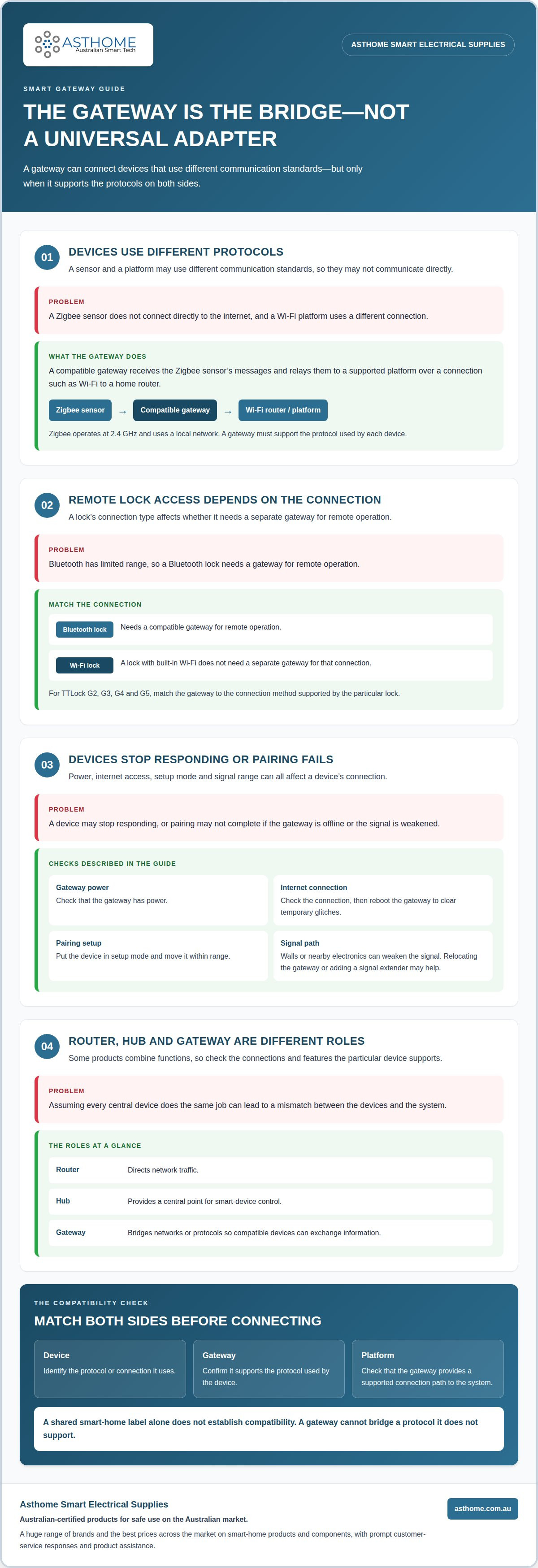
Zigbee devices use a local network and don’t connect directly to the internet; a gateway can bridge that network to a smart platform. Zigbee operates at 2.4 GHz, while Wi-Fi 802.11 can link a Zigbee gateway to a home router. The gateway must support the protocol used by each device.
For example, a Zigbee sensor and a Wi-Fi-connected platform can exchange information through a compatible gateway. Keeping low-bandwidth devices off Wi-Fi may also help reduce network congestion as more smart devices are added.
Connecting Homes to External Networks
A home gateway connects local devices to a router and, through it, to external networks and online smart platforms. This connection can enable app control away from home. Communication between devices on the local network is a separate part of the setup.
Smart locks show why the connection type matters. A Bluetooth lock needs a gateway for remote operation because Bluetooth has limited range, while a lock with built-in Wi-Fi doesn’t need a separate gateway for that connection. For TTLock G2, G3, G4 and G5, match the gateway to the connection method supported by the particular lock.
If devices stop responding, check that the gateway has power and an internet connection, then reboot it to clear temporary glitches. If pairing fails, put the device in setup mode and move it within range. Walls or nearby electronics can weaken the signal, so relocating the gateway or adding a signal extender may help.
Gateway Roles, Setup and Security
A router directs network traffic, a hub provides a central point for smart-device control, and a gateway bridges networks or protocols. Some products combine these functions, so check which connections and features the particular device supports.
A gateway can link compatible switches, sensors, locks and other smart devices. In a smart home, it helps them communicate through shared systems and, where supported, enables app control. Internet access is needed for functions that rely on an online platform, but local device communication is separate.
Set up a gateway by connecting it to home Wi-Fi, then pairing devices through the relevant mobile app. Security features may include data encryption, user-access management and traffic filtering between devices and the cloud. These controls can help manage risk, but a gateway cannot bridge a protocol it doesn’t support.
Smart gateway definition and role
A smart gateway is an intermediate device that helps connected equipment exchange information with a network or platform. In an Internet of Things (IoT) system, it sits between the sensing layer and the network layer. For example, a temperature sensor measures room conditions, while the gateway helps route its readings to a system that can display or use them.
A Zigbee gateway provides this connection for devices that communicate using Zigbee. Zigbee operates on IEEE 802.15.4. The gateway receives messages from compatible devices, then passes them to a supported platform through another connection, such as Wi-Fi to a home router. That route can let a sensor’s reading appear in a smart home interface.
So, what is a smart gateway used for in practice? It helps devices communicate with systems that use a different, supported protocol or connection. For example, a Zigbee sensor can send information through a gateway to a platform that also manages compatible switches. The gateway carries messages; the platform applies the rules that determine what happens next.
This distinction clarifies the gateway’s role. A sensor measures a condition, such as movement or temperature. A switch controls a connected function. A router directs network traffic. A gateway links compatible communication paths. Some devices combine functions, but the key question remains: what is a smart gateway used for in your setup? The answer depends on the protocols and systems it supports.
A Zigbee gateway can keep low-bandwidth device traffic on its local network instead of connecting every sensor directly to Wi-Fi. For example, a compatible temperature sensor can send readings through the Zigbee gateway, which then relays them to a platform over Wi-Fi. This can reduce the number of smart devices communicating directly with the router.
Some gateways process information locally, reducing reliance on external servers and potentially limiting privacy risks. Security features may include data encryption, user-access management and traffic filtering between connected devices and cloud services. These controls help manage communication, but the gateway is only one part of system security.
For a useful setup, match the gateway to the devices and platform you intend to connect. Confirm that each uses a supported protocol and that the gateway provides a connection path between them. If one device uses Zigbee and another uses a different standard, the gateway must support both sides. A shared smart-home label alone doesn’t establish compatibility.
By handling low-bandwidth devices over protocols such as Zigbee, a smart gateway can help reduce Wi-Fi congestion. Devices can communicate over a protocol suited to their traffic, leaving Wi-Fi available for other network activity. The gateway helps manage this traffic without requiring those devices to connect directly over Wi-Fi.
Smart home, industrial and commercial applications
Smart gateways support connected systems in homes, offices, farms and industrial sites. Their function depends on the devices, protocols and platform involved.
Gateway Applications Across Settings
Across different settings, gateways carry data between field devices and platforms used to monitor or control them. At home, a motion sensor can trigger a compatible lighting automation. In agriculture, a gateway can collect readings over a long-range LoRaWAN network to help inform farming decisions.
Industrial systems can use gateways to relay device communications, including 2.4 G communication described for industrial IoT. For fleet tracking, a gateway can collect GPS location alongside readings such as temperature or door status. These examples show why the gateway’s role matters: it connects operational data with the system people use to act on it.
Smart Home Gateway Types and Protocols
A smart home gateway may bridge local protocols such as Zigbee with a home network and connected platform. Zigbee uses IEEE 802.15.4, while Wi-Fi can provide a link from a gateway to a router. The correct type depends on the protocols used by the devices and the platform that needs their data.
Some setups use a dedicated Zigbee gateway; others connect a compatible coordinator or gateway to a platform such as Home Assistant. Either way, the Zigbee devices and platform need a supported connection path. When planning a system with mixed devices, check the gateway’s protocol support rather than relying on its general “smart” label.
Smart Home and Office Uses
At home, a gateway can bring compatible sensors, switches and locks into a central control system. A mobile app may then provide remote control of connected devices. Some gateways also support parental controls that limit children’s access to inappropriate online content, depending on their features.
In an office, connected sensors can report conditions such as temperature, while access devices can send status information to a central platform. A Home Assistant setup may combine compatible devices in one interface, with a Zigbee gateway providing the connection for Zigbee sensors. This coordinated view lets staff monitor connected equipment through platform controls instead of treating each device as a separate system.
Consider security alongside function. A gateway can help manage connected-device traffic, but its usefulness still depends on the protocols and services it supports. A LoRaWAN gateway serving agricultural sensors, for example, has a different role from a Zigbee gateway linking smart-home devices. Match the gateway to the data source, network and platform.
Cross-brand device compatibility
Cross-brand compatibility means devices from different manufacturers can communicate through shared protocols and a compatible gateway. Zigbee 3.0 is identified as a standard that supports communication between devices from different manufacturers. That can make it easier to combine, for example, a sensor from one brand with a switch from another in one connected setup.
A shared protocol is a starting point, not a guarantee that every feature will work together. Check that the gateway, device and control platform support the same protocol and relevant device functions. Two Zigbee products may connect to the same gateway, for example, but the platform must still recognise their functions for them to work in an automation.
A gateway provides a communication path between wireless devices and the system controlling them. A Zigbee device can send data to a compatible gateway, which then relays it through the home network and router. This differs from connecting each device directly to Wi-Fi. The right arrangement depends on the devices’ protocols and the gateway’s capabilities.
Mobile control adds another layer. A compatible app can let you operate connected devices remotely through an online platform, but the device, gateway and app must work together. Remote control depends on that connection path being available. If a sensor connects locally but the gateway loses internet access, local communication may continue while app access from elsewhere is interrupted.
For a mixed-brand setup, map the connections before pairing devices. Note each product’s protocol, the gateway’s supported protocols and the control platform. Then pair one device and test its core function, such as whether a sensor reading appears or a switch responds. This helps pinpoint whether an issue lies with the device, gateway or platform.
Consider the intended use as well as the connection. A temperature sensor and a lighting switch may both join a smart-home system, but they perform different functions and need suitable controls. A gateway that supports their protocols can bridge communication; it cannot make unsupported products compatible or add features they weren’t designed to provide. Match each device to the right system before building broader automations.
Cross-brand setups can reduce reliance on one manufacturer’s range, while requiring careful protocol matching. Zigbee 3.0 offers a shared basis for compatible devices, but the gateway and platform still determine which products connect and what you can control. That distinction helps you plan a flexible system without assuming that a shared wireless label means every device works together.
Bridging Wi-Fi, Zigbee and Z-Wave
Integration across Wi-Fi, Zigbee and Z-Wave requires a gateway that supports the protocols used by the devices. It can bridge those devices to a shared platform, but it doesn’t make every wireless product interchangeable. A Wi-Fi switch, Zigbee sensor and Z-Wave controller need a supported connection path into the same system before their functions can be coordinated.
Wi-Fi can connect a gateway with a home router and internet service. Zigbee devices communicate through their own local network, using IEEE 802.15.4 at 2.4 GHz. A compatible gateway can relay Zigbee messages through Wi-Fi to a platform. So, what is a smart gateway used for in this mixed setup? It lets a platform use a sensor reading in an automation involving another compatible device.
Z-Wave is another smart-device protocol, but not every gateway supports it. Compare the gateway’s supported protocols with those of the devices you plan to connect. A gateway that bridges Zigbee and Wi-Fi, for instance, may not connect a Z-Wave sensor. Shared control requires a supported connection, not just a “smart” label.
Keeping low-bandwidth sensor traffic separate from Wi-Fi can help reduce congestion on a busy home network. A Zigbee motion sensor can communicate locally through its gateway, which then links the information to a router. The sensor and router don’t need to use the same protocol, but the gateway must support both sides of the connection.
The connection method can affect reliability. For critical systems, Ethernet can provide a more stable gateway connection than Wi-Fi. Walls or nearby electronics can weaken wireless signals, so relocating the gateway may improve the connection to devices. The result depends on gateway placement, device protocols and the available network connection.
Plan the integration by listing each device, its protocol and the platform you want to use. Identify a gateway that supports those protocols and connects to the required network. Pair devices one at a time and test their main functions, such as whether a Zigbee sensor reading appears in the platform. This helps isolate whether a connection issue comes from the device, gateway or platform.
What is a smart gateway used for when a setup includes devices from different brands? It bridges supported communication paths, but doesn’t replace a router or add unsupported functions. For a Zigbee setup, explore Zigbee smart home components to find compatible devices for your system. Match the gateway and devices carefully, especially when combining Wi-Fi, Zigbee and Z-Wave.
Asthome Smart Electrical Supplies: Matter Smart Switch Module
Asthome Smart Electrical Supplies offers the Matter Smart Switch Module, alongside smart home products and components from a wide range of brands. Its range includes the Zigbee 3.0 Smart Switch Module, Smart Zigbee Dimmer Module and Smart Wi-Fi Light Switch (1/2/3/4 Gang). Asthome aims to offer some of the best prices across the market, while focusing on products certified for safe use in Australia.
If you’re comparing options for your setup, Asthome’s customer service team provides prompt responses and product assistance. Visit asthome.com.au or contact Asthome Smart Electrical Supplies to explore the range.
Plan your next smart home upgrade
Understanding what a smart gateway is used for gives you a clear starting point. Next, map your setup: list the devices you want to connect, their protocols and your preferred control platform. Then identify the functions you need, such as switching or dimming lights, and whether you’re building around Matter or Zigbee. This narrows the options before you add more devices.
For smart switching, Asthome Smart Electrical Supplies offers a Matter Smart Switch Module, Zigbee 3.0 Smart Switch Module and Smart Zigbee Dimmer Module. Asthome focuses on supplying Australian-certified products intended for safe use on the Australian market. Product assistance can help you compare options against your setup and planned functions.
Ready to explore smart switching components for your system? Contact Asthome Smart Electrical Supplies to discuss your product needs. Take the next step with a setup that suits the way you want to use your connected home.
Frequently Asked Questions
How do gateways work?
A gateway receives messages from connected devices and passes them to the network or platform that needs them. It can also carry compatible commands back to devices. For example, a door sensor can report that it’s open, and a connected controller can use that event to trigger an action. Whether messages can be understood and routed correctly depends on the gateway’s protocol support and device configuration.
What is a smart gateway and how does it work?
A smart gateway is a network device that manages communication between connected equipment and other systems. It can translate between supported protocols, process some information locally and relay other data to a platform. Unlike a sensor, which collects information, or a switch, which controls a circuit, its role is to connect systems. Its exact capabilities depend on its supported connections and built-in functions.
Which wireless protocols do smart gateways support, such as Zigbee, Z-Wave, Wi-Fi and Matter?
Protocol support varies by gateway model, so there is no universal list. Zigbee, Z-Wave and Wi-Fi are different communication technologies; Matter is an interoperability standard that can operate over supported network technologies. Before choosing a gateway, compare its stated support with the devices you plan to use. A shared Matter or Zigbee label alone doesn’t guarantee that every device feature will work together.