

What if a building’s smart-home system could coordinate more than lights and switches? A smart home for multi-dwelling units connects apartment devices with shared building functions, such as access control, resident communications and energy monitoring. The system works best when these elements are planned to work together.
Smart technology can simplify daily building operations, but the details matter. Residents need practical ways to manage entry and receive updates, while property teams need a clear view of how connected devices work across private apartments and shared spaces.
This guide explains how these systems operate in Australian multi-dwelling buildings, from access credentials and resident apps to energy monitoring and connectivity. It also covers planning considerations, including product suitability and the importance of products approved for sale and use in Australia.
Key Takeaways
- Match access methods and permissions to the needs of residents, building staff and visitors.
- Plan how connected devices will communicate across apartments and shared spaces, whether the building is new or existing.
- Use resident apps to bring building notices, visitor access and everyday requests into one communication channel.
- Understand what energy monitoring can show, and how smart meters record and share electricity-use information in Australia.
- Consider connectivity, device compatibility and Australian-certified products when planning a building’s smart-home setup.
Access control using key fobs, mobile credentials or biometrics
Responsibility generally follows ownership and building arrangements. The owners corporation manages shared access infrastructure, while the lot owner or tenant manages devices inside an apartment as agreed. Developers may install systems during construction, but building management and residents need clear ongoing responsibilities.
In a smart home for multi-dwelling units, access control links apartment entry with shared doors and everyday automation. A building can assign separate permissions to residents, staff and service providers.
Keyless Entry Methods
Keyless entry replaces or supplements a physical key with a fob, mobile phone or biometric identifier. Each option offers a different balance of convenience, administration and access management.
A resident might use a fob at the foyer and a mobile credential at their apartment door. Biometric access identifies a person through a recognised physical trait. Building systems can assign permissions to staff and vendors, then keep logs of entry activity.
Smart Locks and Building Access
Smart locks control apartment doors, while intercoms connect visitors with residents or building staff. Integrating these functions with existing building access systems can coordinate access to shared entrances and private doors.
For example, a visitor can use the building intercom to contact a resident, who may then grant entry using the system’s available controls. The process depends on existing access arrangements and device compatibility. Coordinated permissions help ensure that a foyer credential does not automatically provide access to every apartment.
For an upgrade, map each access point first: the street entrance, foyer, lift, shared facilities and apartment doors. Identify which existing system controls each point. This helps building managers distinguish common infrastructure from devices serving one lot and clarify who issues or removes credentials.
Mobile credentials can simplify access management when a resident changes phones or a service provider needs temporary permission. Set distinct access levels for residents, building staff and vendors. Event logs can help managers review entry activity, and two-factor authentication adds a verification step where the system supports it.
Access control can also trigger lighting automation. For instance, unlocking a smart lock could activate a configured lighting scene inside an apartment. Smart lighting controls remain separate from building entry permissions, so access to the foyer does not itself authorise control of a resident’s lights.
Heating and thermostat controls may also be part of a connected apartment setup. A resident could adjust heating after arriving home, while building-wide systems remain under separate management. Keep permissions clear: an apartment lock manages entry, while a thermostat manages indoor comfort.
For Australian buildings, plan integration around the existing access system, the boundary between common and private property, and the credentials each user needs. A smart door lock can manage apartment entry, while an intercom supports visitor communication. Together, they can improve convenience without merging every building function into one access level.
How Do Smart Homes Operate?
Connected devices use sensors, controllers and network connections to automate selected apartment or building functions. In multi-dwelling buildings, the system needs to work across private lots and shared infrastructure.
Automation Across Building Types
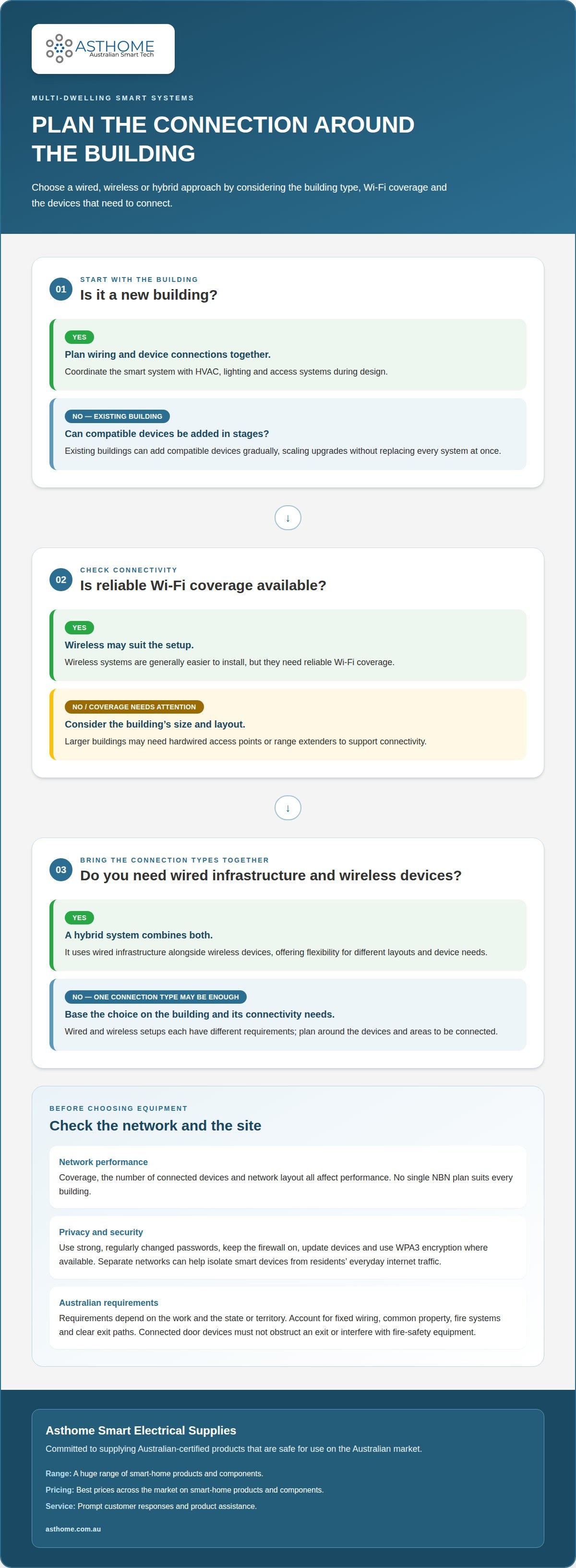
Building automation links devices so a trigger produces a defined action, such as a motion sensor switching on hallway lighting. In a new building, designers can plan wiring and device connections alongside HVAC, lighting and access systems. Existing buildings can add compatible devices in stages, allowing owners to scale upgrades without replacing every system at once.
Leak sensors can be placed under sinks, near appliances or in a mechanical room. If a major leak is detected, an automatic shutoff valve can stop the water supply. This connects detection to a practical response instead of relying only on an alert reaching a resident or manager.
Smart System Types and Requirements
Smart home systems can use wired or wireless connections, and the suitable setup depends on the building and its connectivity needs. Wireless setups are generally easier to install but need reliable Wi-Fi coverage. Larger buildings may need hardwired access points or range extenders. A hybrid system combines wired infrastructure with wireless devices, making it a flexible option for different layouts and device needs.
Internet access and a building’s local network work together to connect compatible devices. No single NBN plan suits every building: coverage, the number of connected devices and network layout all affect performance. Separate networks can help isolate smart devices from residents’ everyday internet traffic.
Australian electrical, building and fire-safety requirements depend on the work and the state or territory. A system must account for fixed wiring, common property, fire systems and clear exit paths. For example, a connected door device must not obstruct an exit or interfere with building fire-safety equipment.
There’s no single installation cost for an Australian apartment or strata building. The scope depends on the number of devices, wired infrastructure, network changes, integration with existing systems and whether the project covers one apartment or shared areas. These factors shape the equipment and work involved.
Smart systems can expose privacy and cybersecurity risks if accounts, networks or devices are poorly managed. Use strong, regularly changed passwords, keep the firewall on, update devices and use WPA3 encryption where available. A separate network for smart devices can also limit their connection to personal devices and information.
Before approving smart locks, cameras or other devices, strata committees should consider whether they affect common property, shared networks, privacy or fire-safety arrangements. A camera facing a shared corridor, for example, raises different considerations from a sensor inside one apartment. The approval process should also clarify who manages access and device settings.
Smart thermostats and motion sensors can automate comfort and lighting, while leak detection can help limit water damage. Connected functions may stop during a power outage unless the system has suitable backup, such as a battery-operated keypad for access. Planning for these dependencies helps owners understand what remains usable if power or network connectivity fails.
Resident apps and building communications
A resident app can bring building updates and selected services into one mobile interface. Residents may receive announcements, book shared amenities, message management, report maintenance issues and track package notifications. The benefit is easier access to these tasks, rather than having them spread across separate communication channels.
Resident demand for smart amenities depends on whether they improve daily building life. A booking feature can help organise shared rooms, while maintenance requests give residents a direct way to report issues. Safety notifications can deliver urgent information, such as a building access disruption, alongside routine updates about planned maintenance.
Smartphone-based entry connects an app with compatible door hardware and an access system. Using a smartphone or tablet, a resident can see and speak to a visitor remotely, then open the building door through the system. This can help when the resident is away from the entrance, but app permissions determine which doors they can control.
Parcel handling is another practical example. A resident may grant a courier access to a designated parcel area without granting access to private apartments or other shared spaces. Clear permission boundaries matter: access to a delivery area should not automatically provide entry to every part of the building.
Building communication works best when each message has a clear purpose and destination. Management can use announcements for building-wide notices, direct messaging for individual issues and maintenance requests for faults requiring follow-up. A lift outage notice should reach affected residents, while a report about a leaking tap needs to reach the team handling repairs.
An app can also connect residents with selected apartment functions, depending on device compatibility and permissions. A resident might use a phone to adjust heating through a connected thermostat, while building management sends separate messages about shared facilities. Keeping apartment controls distinct from building communications helps residents understand each function.
App access depends on more than the screen residents use. The building needs compatible hardware, a working network connection and a process for managing user access when residents move in or leave. Removing a former resident’s account, for instance, helps prevent continued access to building features after their tenancy ends.
Before introducing an app, define which tasks it supports and who manages each channel. A noticeboard may suit general updates, while urgent safety messages need a clear communication route. Organising bookings, parcel notifications and maintenance requests in one place helps residents manage common tasks without confusing them with access permissions or heating controls.
Energy-use monitoring and efficiency
Energy monitoring shows how electricity is used across an apartment or shared building spaces. In Australia, a smart meter records electricity use every 30 minutes and typically sends that information to retailers once or twice a day. This provides usage data, but not necessarily a live view for residents or building managers.
For a central view, building managers can monitor shared loads separately from apartment use. Common-area lighting, lifts and ventilation serve different purposes from a resident’s appliances, so separating these loads makes the data easier to interpret. For example, a rise in overnight common-area use may prompt a review of lighting schedules or equipment operation.
Inside an apartment, connected monitoring can help residents see how appliances contribute to consumption. A kettle or heater draws power at particular times, while a camera or network device may add to the background load. Comparing usage before and after switching off an idle device gives residents a practical way to assess its effect.
Smart meters and home energy platforms serve different roles. A meter measures electricity use and shares readings with the retailer; a compatible platform can combine available energy data with controls for lighting, heating and other devices. For Australian apartments, compare platforms by the data they display, the devices they support and whether monitoring and automation work together.
Energy controls can respond to everyday routines. A resident could use a smart switch to turn off selected lighting when leaving home, or adjust heating through a compatible thermostat. These controls may reduce avoidable use, but connected devices also add standby demand. Compare the energy saved with the energy those devices consume.
Real-time energy monitoring can reduce residential energy consumption by 5-15%. The value is in seeing when usage changes, then linking that change to an action. If a resident notices higher evening use, they can review appliances operating at that time and adjust settings or routines. Monitoring supports decisions; it does not itself switch off equipment.
In a multi-dwelling building, agree who can see each data set before connecting apartment and common-property systems. Residents may need access to their own usage information, while building managers need data relevant to shared equipment. Separating these views keeps monitoring useful and avoids treating private apartment consumption as a measure of building-wide operations.
A smart meter also doesn’t automatically change how an Australian customer is charged for electricity. Monitoring can still help residents understand consumption patterns and building teams assess shared loads. For a clear comparison, review meter readings, platform data and device controls together, then identify which changes address the largest or most persistent usage patterns.
Smart home technology in multi-dwelling units
Smart-home planning in an apartment building must account for private lots and shared infrastructure. Design around building boundaries, network coverage and residents’ needs, rather than treating every device as an isolated upgrade.
Start with a building map marking apartment doors, common entrances, plant rooms and shared amenities. This helps distinguish devices controlled by individual residents from equipment serving the whole building. A sensor inside one apartment, for example, has a different role from a device monitoring a shared mechanical room.
In a new development, plan the internet connection, network layout and device locations before finishing walls and ceilings. This lets the design team position access points where residents and building equipment need coverage. If the system includes sensors in separate areas, consider their locations and communication paths early.
Existing buildings need a staged approach. First identify the systems already in place, then choose a limited area for an initial upgrade, such as common-area lighting or one apartment. A staged installation lets owners assess how devices work with the building’s network and existing equipment before extending the setup.
Wireless devices can reduce the need for new cabling, but still depend on reliable network coverage. Concrete walls, floor layouts and distance from an access point can affect connectivity. Larger buildings may need additional access points or range extenders to connect devices across apartments and shared spaces.
Scalability also depends on keeping system roles clear. A building network can support common-property functions, while residents use separate devices inside their apartments. A building manager may oversee shared-area equipment, for example, while a resident controls a sensor or switch at home. Clear separation supports permissions, maintenance and future changes.
Plan for residents to move and devices to be replaced. Building management needs a practical way to remove access when a resident moves out while retaining control of shared infrastructure. A consistent record of installed devices, their locations and network connections can simplify later maintenance.
For Australian projects, select products intended and certified for safe use on the Australian market. Compatibility matters too: a device must suit the network, connected hardware and intended location. Asthome’s range includes smart-home components for different setups. Explore smart-home components when planning compatible devices for an apartment or shared building.
Asthome Smart Electrical Supplies: NDIS SDA Compliant Smart Home Kit
Asthome Smart Electrical Supplies offers the NDIS SDA Compliant Smart Home Kit for readers considering smart-home products in an SDA setting. Its range also includes the Zigbee 3.0 Smart Switch Module, Smart Zigbee Dimmer Module and Smart Wi-Fi Light Switch (1/2/3/4 Gang).
Asthome focuses on supplying products approved for sale and use in Australia with SAA approval and RCM marking. Explore a broad range of brands, with the best prices across the market on smart-home products and components.
For prompt, helpful product assistance, contact Asthome Smart Electrical Supplies.
Make the next decision a practical one
Before choosing devices, decide what the next stage of your project needs to achieve. A smart home for multi-dwelling units can begin with a focused product selection and expand as building requirements become clearer. Matching each component to its intended use keeps planning practical.
Asthome Smart Electrical Supplies offers a Universal Smart Switch Module, Zigbee 3.0 Smart Switch Module and Smart Zigbee Dimmer Module. Asthome focuses on supplying Australian-certified products intended to be safe for use on the Australian market, alongside a broad range of smart-home brands and components. Product assistance can help make the options easier to navigate.
Whether you’re planning an apartment upgrade or considering components for a wider project, take the next step with a clear idea of the functions you need. Discuss your smart-home requirements with Asthome Smart Electrical Supplies and move your plans forward with confidence.
Frequently Asked Questions
What smart home features are most useful in Australian apartments and multi-dwelling buildings?
Useful features address everyday access, comfort, safety and electricity use. A smart door lock can manage apartment entry, while a motion sensor can trigger lighting in a chosen area. Temperature and humidity sensors can help residents understand indoor conditions, and smart switches can control lights. Choose features to suit the building: residents may prioritise apartment controls, while a strata committee may focus on shared facilities and building-wide communications.
How can residents retrofit smart home devices without damaging wiring or common property?
Start with devices that do not require changes to fixed wiring or shared building surfaces, such as suitable wireless sensors. Keep equipment inside the apartment and avoid drilling into common walls or modifying shared systems without following the building’s approval process. A resident could place a sensor on a freestanding shelf rather than fix it to a shared corridor wall. A licensed electrician should handle electrical work.
How do smart home platforms compare for energy monitoring, climate control and automation in Australian apartments?
Smart-home systems can monitor energy use and automate climate controls such as thermostats, but the material gives no comparison between platforms. In Australia, smart meters record electricity use every 30 minutes and typically send information to retailers once or twice a day.
What Australian electrical, building and fire safety rules apply to smart home installations in multi-dwelling units?
Requirements depend on the work and the state or territory. Installations need to account for fixed wiring, common property, fire systems and clear exit paths. Connected devices must not obstruct exits or interfere with fire-safety equipment.