

A flat smart lock battery usually disables the keypad, touchscreen and app unlocking, but the lock won’t open on its own. If you’re wondering what happens if a smart lock battery dies, access depends on the model’s backup options, such as a physical key or emergency power connection. Some emergency USB-C connections provide enough power for a single entry.
It’s understandable to worry about being locked out, especially if you rely on keyless entry every day. Low-battery alerts and backup access methods can give you time to act. This guide explains what a dead battery means, how to respond at the door, what alerts and physical keys can do, and how to replace batteries safely using your lock’s instructions.
Key Takeaways
- Recognise the signs of a low battery, including alerts from the lock itself or its connected app.
- Know which backup access methods your lock supports and keep the relevant key or power option accessible.
- Use the battery type and replacement procedure specified for your lock, rather than guessing.
- A flat battery can stop digital unlocking, but the lock won’t suddenly open on its own.
- If batteries run down faster than expected, door alignment and how often the lock is used may be worth examining.
Don’t Panic: What Happens if Your Smart Lock Battery Dies?
A flat battery can stop a lock responding to digital controls, but it won’t open on its own. What to do next depends on the lock’s backup options, such as a physical key or external power connection.
Emergency Power Through USB-C
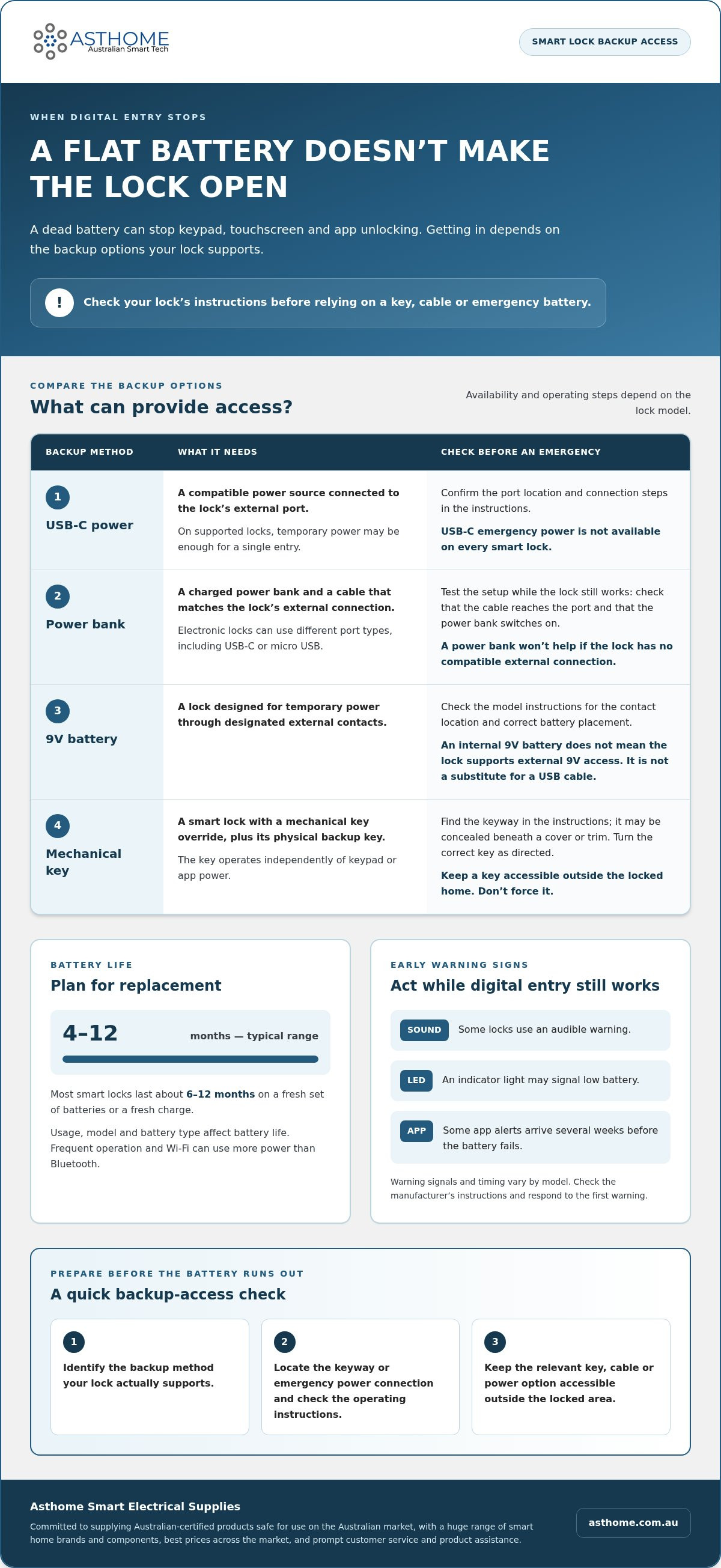
USB-C emergency power uses a power source connected to the lock’s external port to provide temporary power. On locks with this feature, it may provide enough power for one entry, allowing you to operate the lock without opening its battery compartment.
Check your lock’s instructions for the port location and connection method before using it. USB-C isn’t an emergency-power feature on every smart lock, so don’t assume a similar-looking port will work. If your model supports it, keep the correct cable accessible and follow the operating steps.
Power Banks and Emergency Access
A power bank can provide temporary emergency power when a compatible lock’s batteries are flat. Keep a charged power bank with both USB-C and micro USB cables, as electronic locks can use different port types.
Identify your lock’s emergency connection and test the setup while the lock still works. For example, check that the cable reaches the port and that you can switch on the power bank. A power bank won’t help if the lock has no compatible external connection.
Nine-Volt Battery Access
Some smart locks support temporary power from a 9V battery through external contacts. This method matters if your lock has the designated contacts and its instructions describe 9V emergency access.
Don’t assume every lock with a 9V battery inside supports this method externally. Check the lock model’s instructions for the contact location and correct battery placement. Locks designed for USB power use a different connection, so a 9V battery isn’t a substitute for a USB cable.
Emergency Keys and External Connections
Some smart locks provide a mechanical key override, while others offer an external battery connection, such as USB-C or designated 9V contacts. The available backup depends on the lock model, so locate its keyway or power connection before an emergency.
Keep the emergency key accessible outside the locked area, not inside the home behind the locked door. Use a cable or battery for emergency power only if your model supports that option. This preparation gives you a practical alternative when keypad or app access stops working.
Smart lock batteries typically last between 4 and 12 months, depending on usage, model and battery type. Most smart locks last about 6 to 12 months on a fresh set of batteries or a fresh charge. Frequent operation and a Wi-Fi connection can use more power than Bluetooth, so usage and connection type can affect battery life. Follow the lock’s low-battery alerts, and replace its batteries before they reach critical levels.
Low-battery alerts
Smart locks may warn you with sounds, an LED indicator or mobile app notifications. Learn what your lock’s alerts mean so you can respond before its battery runs out.
Low-Battery Warning Signals
A low-battery warning is a sound, light or app message that signals the lock needs attention. It gives you a chance to arrange a battery change while you can still access the lock.
Some smart locks with app alerts notify users several weeks before the battery fails. Other models use a sound or LED indicator. The timing and signal vary, so check the manufacturer’s instructions to identify the warning for your model.
Notice what happens when you enter a fingerprint or use the keypad. If the lock also displays an indicator or sends an app notification, arrange replacement batteries. Don’t dismiss a warning just because the lock still works.
- Read the alert message in the app, if your lock has one.
- Check the manufacturer’s guide for the meaning of sounds or LED signals.
- Record when the warning appears, so you can track battery life.
Alerts for Preventing Lockouts
Battery alerts can help prevent lockouts by giving you time to replace batteries before the lock stops responding. Acting on the first warning is more useful than waiting for the keypad, fingerprint reader or app to fail.
Use the alert as a prompt: identify the correct battery type, get replacements ready and follow the lock’s instructions. If an app notification arrives while you’re away, plan to change the batteries when you return rather than assuming the warning can wait indefinitely.
In a shared home, make sure everyone who relies on the lock knows what the warning looks or sounds like. A simple household routine can prevent someone dismissing an alert that another person needs to act on. Keep the manufacturer’s instructions accessible so you can check the signal.
- Respond to a low-battery alert promptly.
- Make sure household members recognise the lock’s warning signals.
- Use the model’s instructions to confirm the alert and battery-change process.
An alert is a prompt to act, not a substitute for a backup entry plan. If the lock gives no warning, or you’re unsure what an indicator means, consult its instructions and note the signal for next time. Recording alerts alongside battery changes can help you recognise changes in battery life without relying on memory.
Physical backup keys
Some smart locks have a mechanical key override, allowing you to unlock the door from outside when the battery is flat. This works only if the lock has the feature and you have its physical key.
Unlocking with a Mechanical Key
A mechanical override is a key-operated backup that works independently of keypad or app power. It lets you use the keyway when digital unlocking is unavailable.
Find the keyway in the lock’s instructions before you need it. Some models conceal it beneath a cover or trim, so learn how to open that part. Insert the correct backup key and turn it as directed. Forcing the key can damage the mechanism.
Most smart locks include two physical backup keys in the box. Keep one somewhere accessible outside the locked home, and store the second separately as a spare. A key left inside the house won’t help if you’re standing outside with a flat lock.
Backup Entry from Outside
You can unlock a smart lock from outside with a physical key if the model has a mechanical override. Without that feature, outside access depends on another supported method, such as an external emergency power connection.
Before relying on a backup key, practise locating the keyway and using the key while the lock still works. Test backup-unlocking methods every couple of months. This helps you spot a misplaced key or an unfamiliar cover before an actual lockout.
Keep backup entry methods separate from the lock itself. For example, carry a key securely or leave a spare with someone you trust. Don’t rely on app notifications to open a lock without power: notifications can warn you, but they aren’t a physical override.
A dual-battery system is different from a mechanical key. It uses a battery arrangement designed by the lock’s manufacturer, rather than a keyway that works independently of electronic power. Check the model instructions to understand whether its second battery set is a reserve and how the lock behaves when the primary set runs flat.
Don’t assume a dual-battery design provides the same access as a physical key. Identify the exact backup arrangement and test the method described for your lock. Keep a spare key accessible even if your model has two battery sets, and note where the exterior keyway is.
Replacing smart lock batteries
In Australia, replacing batteries yourself means buying the correct type. A paid service may also include labour and call-out charges. The total depends on the lock, its battery arrangement and whether you replace the batteries yourself or arrange a service.
Smart lock batteries commonly last between 4 and 12 months, depending on usage, model and battery type. High-traffic doors may need fresh batteries after 3 to 6 months. Treat these as planning guides, not fixed schedules for every electronic lock.
Check the manufacturer’s instructions before opening the battery compartment. Smart locks may use AA or AAA batteries, while other models use lithium-ion, 9V or C batteries. Match the specified type and follow the polarity markings. Don’t assume rechargeable batteries are suitable unless the lock’s instructions allow them.
- Keep the door open while you replace and test the batteries.
- Open the compartment as directed in the model instructions.
- Remove the old batteries and check for corrosion or moisture.
- Fit the specified batteries in the marked orientation.
- Close the compartment, then test the keypad, fingerprint reader or other normal entry method.
Replace batteries as a complete set when the instructions call for it. Mixing old and new batteries, or using different types together, can affect operation. Choose alkaline or lithium batteries only if the lock supports them, and keep the compartment clean and free from dust or moisture.
Battery alerts are useful prompts, but don’t wait for a critical warning before arranging replacements. Replace smart lock batteries before they reach critical levels. A recurring calendar reminder can help: record the replacement date and note when the next low-battery alert appears. If the interval changes, review usage, battery type and the manufacturer’s guidance.
Plan a replacement routine around the door’s use. For a high-traffic entrance, check the lock’s alert history and replacement date more often than you would for a rarely used door. Follow the model’s guidance on timing, rather than treating 12 months as a universal interval. Rechargeable batteries also need to match the lock’s stated requirements.
After changing batteries, check that the electronic lock responds correctly before closing the door. Test the keypad or fingerprint method and make sure the battery cover is seated properly. If the lock still signals low power, check the battery orientation and type against the instructions. Corrosion or visible moisture in the compartment also needs attention, as either can affect the lock.
What happens when a smart lock battery dies
A dead battery stops a lock responding to digital controls, including a keypad, touchscreen or connected app. The bolt doesn’t retract by itself, so outside access depends on the model’s backup method.
Loss of Powered Lock Functions
When the power runs out completely, the smart lock’s electronic unlocking functions stop responding. Entering a code, presenting a fingerprint or using an app won’t operate a lock with no power.
The physical bolt stays in its current position rather than opening by itself. If it’s locked, the door stays locked until you use a working backup method or restore power. If it’s already unlocked, battery failure won’t automatically move the bolt into the locked position.
Smart locks differ in their backup arrangements. A mechanical key override works independently of keypad power, while an external connection may provide temporary emergency power. A power bank helps only if the lock has a compatible port and you have the correct cable.
Risk of Being Locked In or Out
A flat battery can leave you locked out if you’re outside and the lock has no usable backup method. It doesn’t automatically lock you inside: the effect on internal operation depends on the lock’s design and how its bolt works.
Before relying on a lock, find out how it opens from both sides. Check whether the inside handle or thumbturn works mechanically, and learn how to use the exterior key or emergency power method. The distinction matters: an app and keypad need power, while a mechanical method may not.
If you discover the battery is flat at the door, don’t keep entering codes or tapping the keypad. Those actions can’t restore power. Instead, use the backup method specified for your model, such as its physical key or compatible external power connection.
Keep an emergency key accessible outside the home. If your lock uses external power, keep the correct cable with a charged power bank. Testing your backup method regularly can reveal a misplaced key or unsuitable cable before you need it.
A reliable plan matches your actual lock, not general assumptions about smart locks. Check the model instructions for its power connection, keyway and inside operation. If none of the listed methods works, don’t force the handle or key, as this can damage the lock further. When physical backup keys are completely unavailable, regaining access may require a locksmith or specialised tools from lockpickpros.com.
Asthome Smart Electrical Supplies: Matter Smart Switch Module
Asthome Smart Electrical Supplies supplies the universal Smart Switch Module and other products for smart-home projects beyond door access. Its range includes smart-home products and electrical components, with products SAA approved for the Australian market.
Alongside the universal Smart Switch Module, the range includes Zigbee 3.0 Smart Switch Modules and Smart Zigbee Dimmer Modules. Asthome aims to offer competitive prices across the market, helping you compare options for your setup without expecting a switch module to provide backup power for a smart lock.
For help choosing a suitable product, contact Asthome Smart Electrical Supplies. The team provides prompt responses and product assistance.
Make your next smart-home decision with confidence
Knowing what happens if a smart lock battery dies can help you plan access, and it also highlights a wider point: each smart-home device has a specific role. A lighting module won’t restore a lock’s power, so choose products for the job you need them to do.
For other home automation projects, Asthome Smart Electrical Supplies offers the Matter Smart Switch Module, Zigbee 3.0 Smart Switch Module and Smart Zigbee Dimmer Module. Asthome focuses on supplying Australian-certified products for the Australian market, with customer assistance to help you with product choices.
If you’re planning a smart-home upgrade or need help choosing a suitable module, contact Asthome Smart Electrical Supplies. Take the next step with a clear idea of what you want to control, and choose equipment that suits that setup.
Frequently Asked Questions
How do I handle a dead electronic lock?
Use the backup method designed for your lock, then restore power before relying on the usual electronic controls. At the door, find the model’s mechanical keyway or emergency power connection and follow the instructions. Once inside, replace the batteries with the specified type. Test the keypad or other entry method with the door open so you can confirm it works before closing the door.
How to change battery on door lock?
Open the battery compartment according to the lock’s instructions, then fit batteries of the specified type and orientation. Keep the door open during the change. Check for corrosion or moisture before fitting fresh batteries, and don’t mix old and new cells. Close the compartment securely, then test the lock from both sides while the door remains open. This can reveal an installation issue before normal use.
What happens to a smart lock when its batteries run flat?
If you’re wondering what happens if your smart lock battery dies, its powered entry controls stop responding. A code, fingerprint or connected app can’t operate the lock, but the bolt doesn’t automatically retract or move to the opposite position. If the door is locked when power fails, it stays locked until you use a supported backup method. The lock’s behaviour from inside depends on its mechanical design.
How do you unlock a smart lock with a dead battery?
Use the backup method provided for your lock, such as its mechanical key or external emergency power connection. Check the model instructions for the keyway location, compatible cable and connection procedure. A power bank won’t help unless the lock has a matching external port. If you’re carrying a key, make sure it belongs to that lock and isn’t stored inside the home.
How do smart locks warn you when batteries are running low?
Smart locks may use a beep, LED indicator or mobile app notification to signal low battery. Some locks with app alerts notify users several weeks before battery failure. Check the instructions to identify your model’s signal, then act on the first warning rather than waiting for the controls to stop responding. If several people use the door, tell them what the alert looks or sounds like.
How do you replace batteries in popular smart lock models?
Follow the instructions for your exact model, because battery type and compartment access vary between locks. For example, one model may use AA batteries while another specifies AAA or a different type. Note the model name before starting, keep the door open, and match the new batteries to the polarity markings. After replacement, test the lock’s usual entry method before closing the door.
Which smart locks use a 9V battery or USB power for emergency access?
Only models with designated external 9V contacts support a 9V battery, while USB-C emergency power works only on compatible locks with that connection. Check your lock’s instructions to identify its supported method.