

The smartest kitchen power point isn’t necessarily the one with the most features. Choosing a smart USB charging socket for kitchen use starts with a practical question: what do you need to charge, and should the socket connect to your smart-home system? USB-C, USB-A or a combination can suit different household devices, while smart connectivity brings a separate set of choices.
It’s easy to focus on the charging ports and overlook the connection requirements. Asthome’s Zigbee Double GPO Powerpoint with USB-C 20W combines a double GPO with USB-C charging. As a Zigbee product, it requires a Tuya Zigbee Gateway to function correctly. Asthome’s Wi-Fi smart socket uses Wi-Fi and doesn’t require a gateway, so consider your existing setup when comparing products.
This guide will help you weigh USB-A and USB-C needs against smart-connectivity preferences, understand the Zigbee and Wi-Fi gateway difference, and identify an Australian-approved kitchen GPO for your setup. Asthome supplies SAA-approved switches and sockets for sale and use in Australia, alongside a broad range of smart-home products and components. Licensed electrical professionals can also access trade account pricing. Asthome’s approach is simple: From Electricians, for Electricians.
Key Takeaways
- Match a smart USB charging socket for kitchen use to the devices you charge and the cables you already have.
- Separate USB charging from smart connectivity: a USB port doesn’t determine how the GPO connects to your smart-home system.
- Factor gateway requirements into your choice: Asthome Zigbee devices need a Tuya Zigbee Gateway, while the Wi-Fi smart socket doesn’t need a gateway.
- Map where devices are used and charged around the kitchen before comparing socket options and access.
- Compare Asthome’s Zigbee Double GPO Powerpoint with USB-C 20W with your setup, and consider its SAA approval for sale and use in Australia.
Choosing a smart USB power point for the kitchen
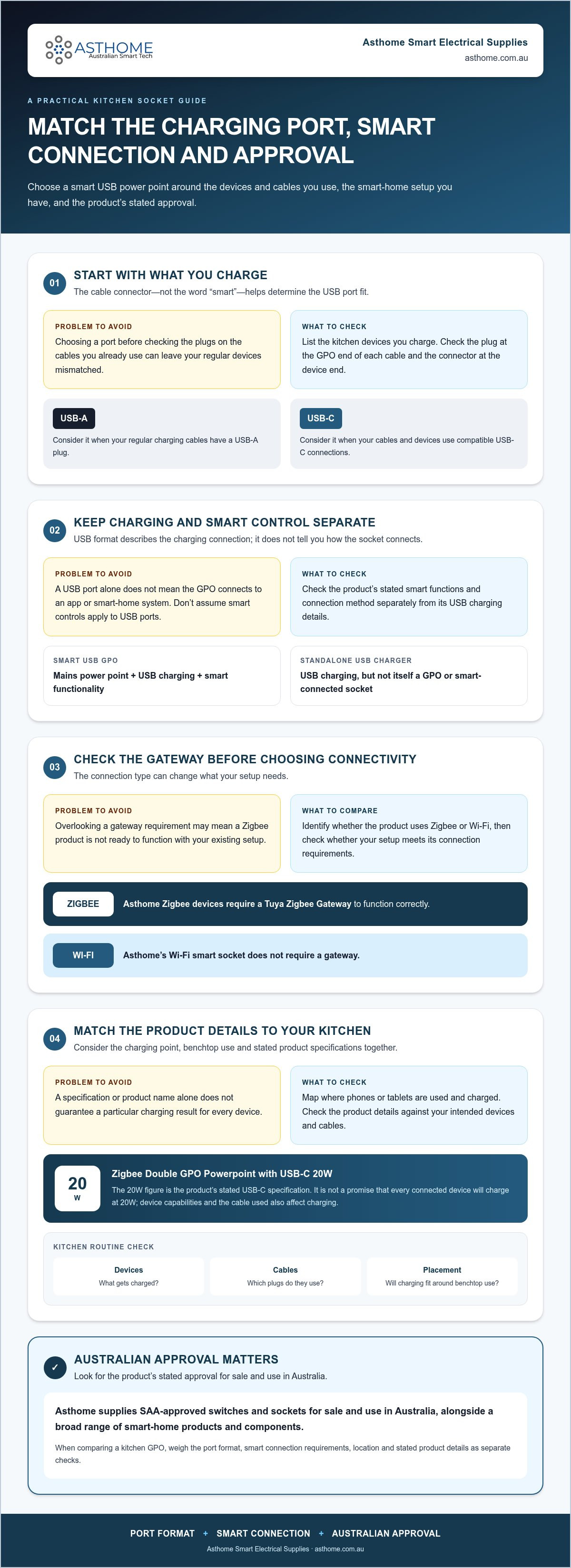
Choose a kitchen socket by looking at the devices you charge, your household’s charging habits and the smart-home setup you want. A smart USB charging socket for kitchen use combines a GPO with USB charging, but USB ports and smart connectivity are separate features. Don’t assume that a socket with USB ports can connect to an app or smart-home system. Check the product’s stated capabilities.
Plan around how you use the kitchen. Think about where phones or tablets are set down, whether charging happens during meal preparation or overnight, and how easy it is to reach the outlet without disrupting benchtop use. A suitable choice should fit your routine, not just look convenient on a product page.
Quick definition
A smart USB GPO combines a mains power point, USB charging and smart functionality in one unit. A standalone USB charger provides USB charging but isn’t itself a GPO or a smart-connected socket.
Which kitchen devices will you charge?
Start with a short list of devices that regularly end up in the kitchen, such as phones, tablets and wireless earbuds. Note which charging port each device uses and which cables you already reach for. A USB-A socket suits a cable with a USB-A plug; a USB-C socket suits one with a USB-C plug. Check the connector at the device end of each cable too. If you need compatible cables or everyday charging accessories, Australian stores such as Useful Bit stock a range of tech and home essentials.
USB-C is a newer connector format, but the best fit depends on your devices and cables, not the name alone. For background on the connector, see USB-C technology. Check the exact product’s stated charging details before deciding what it can charge or how it will perform. The connector type alone doesn’t guarantee a particular charging speed.
What makes a kitchen socket smart?
USB charging and smart connectivity are distinct functions. The controls available depend on the product. If a product specifies app control or scheduling, those features may suit a routine such as managing a connected appliance at set times. Don’t assume smart controls apply to the USB ports unless the product information says so.
Decide what you want the smart feature to do before choosing a socket. If you mainly need convenient charging, prioritise the port format your devices and cables use. If you want smart connectivity, compare the product’s stated functions and connection method. This keeps the decision focused on features that meet an actual household need.
- List devices: Note what you charge and the ports on your cables.
- Map the routine: Consider where charging happens and how the outlet fits around benchtop use and nearby appliances.
- Separate the functions: Compare USB charging needs independently from smart connectivity.
USB-C, USB-A, or both: compare kitchen charging options
Choose a port format by checking the connectors on the cables you use, rather than assuming one option suits every device. For a smart USB charging socket for kitchen use, keep two decisions separate: which USB connection fits your charging routine, and whether you need smart connectivity. USB-A or USB-C describes the charging connection; it doesn’t tell you how the socket connects to a smart-home system.
| Option | What to consider | May suit |
|---|---|---|
| USB-A | Check whether your existing charging cables have a USB-A plug. | Households whose regular devices and cables use USB-A. |
| USB-C | Check that the cable plug fits the USB-C port and the other end fits your device. | Households already using USB-C cables and compatible devices. |
| GPO with USB-C | Combines a standard GPO with USB-C charging in one socket. | Setups where USB-C charging and access to a GPO are both useful. |
When does USB-C suit a kitchen setup?
USB-C may suit your kitchen if the devices you regularly bring into the space use USB-C cables. Check both ends of each cable: the plug that connects to the GPO and the connector that fits the device. For a general overview, the USB-C reference explains the connector’s design and role among USB connectors.
Asthome’s Zigbee Double GPO Powerpoint with USB-C 20W has a stated USB-C specification of 20W. That specification is product-specific, not a promise that every connected device will charge at 20W. A device’s own capabilities and the cable used affect charging. Compare the stated specification with your intended devices rather than assuming it suits every phone, tablet or other device in the household.
When might USB-A or a separate charger suit better?
USB-A is worth considering if your household already uses USB-A cables for regular charging. If your devices use a mix of cable types, list them before choosing a socket format. A separate charger may suit a household that prefers its existing charging equipment; an integrated USB point may suit one that wants USB charging built into the GPO. The better fit depends on your devices and routine, not a general claim about performance.
Smart connectivity is a separate decision from USB format. The Connectivity Standards Alliance (CSA) develops smart-home standards including Zigbee and Matter, while USB-C and USB-A refer to charging connectors. Keeping the terms distinct helps you compare charging fit and smart connectivity without conflating the two.
To compare the USB-C option with Asthome’s wider smart power point range, start with the cables your household actually uses, then weigh GPO and smart-connectivity requirements separately.
Zigbee or Wi-Fi: understand the smart socket connection
USB charging and smart connectivity meet different needs. Once you’ve chosen a charging format, check how the socket communicates with your smart-home setup. For an Asthome smart USB charging socket for kitchen use, check whether the specific product uses Zigbee or Wi-Fi and whether it needs a gateway to function correctly.
| Zigbee | Wi-Fi |
|---|---|
| Asthome Zigbee devices require a Tuya Zigbee Gateway to function correctly. | Asthome’s Wi-Fi socket uses Wi-Fi and doesn’t require a gateway. |
| Include the required gateway in your setup. | No Zigbee gateway is needed for the Wi-Fi socket. |
What does a Zigbee gateway mean for your kitchen?
A gateway is required for Asthome Zigbee devices to function correctly. Asthome specifies a Tuya Zigbee Gateway, so include it in your setup rather than treating it as optional. If you’re considering the Zigbee Double GPO Powerpoint with USB-C 20W, remember that it’s a Zigbee product. Its USB-C charging specification doesn’t change the gateway requirement.
Consider the whole setup, not just the kitchen socket. If you already use Zigbee devices, include the required gateway in your plans. If you’re choosing a single smart socket, compare the gateway requirement with the Wi-Fi option before deciding.
How should you think about app and ecosystem compatibility?
Compatibility depends on the specific device and its stated protocol. Don’t assume a Zigbee product also supports Wi-Fi or Matter, or that a Wi-Fi device works with every smart-home app. Check the product information for the connection method and supported app options. Tuya App and Smart Life are relevant where they’re listed for the particular product.
Keep ecosystem claims just as precise. Don’t assume Apple HomeKit compatibility for every smart socket. Apply it only where the specific device is identified as a Matter device and the compatibility is stated. A protocol name alone doesn’t mean a product works across every platform or app.
Use this quick check before comparing models:
- Identify the protocol: Is the socket Zigbee or Wi-Fi?
- Plan the connection: Include a Tuya Zigbee Gateway for Asthome Zigbee devices. The Asthome Wi-Fi socket doesn’t need a gateway.
- Match the app: Use only app options stated for the specific product.
The distinction is straightforward: Zigbee devices need a gateway, while Asthome’s Wi-Fi socket connects through Wi-Fi without one. Keep the protocol, gateway and app details tied to the exact product you’re considering.
Plan a smart USB charging socket around your kitchen
A little planning helps you choose a smart USB charging socket for kitchen use that fits your household. Identify the devices, map charging routines, check the smart protocol, then compare products. This keeps charging convenience, smart connectivity and kitchen layout in view before you settle on a GPO.
Map charging routines and socket use
Start with the devices that regularly need charging and when they’re typically used. A phone might be plugged in while someone prepares breakfast, while a tablet is used later for recipes. Note the connectors and cables involved, then consider whether USB charging built into the GPO suits those routines or a separate charger is more practical.
Next, look at where charging happens. Consider benchtop use, nearby appliances and whether the proposed socket location would be convenient to access during the day. Think about how cords and devices fit into your normal kitchen routine; one location won’t suit every home. Charging convenience is one decision, smart connectivity is another. If you want the socket to fit into a smart-home setup, include that requirement in your product comparison.
Check the product and installation context
Before comparing options, match the product’s stated USB format and smart protocol to your devices and setup. For Zigbee products, include the required Tuya Zigbee Gateway in your plan. A Wi-Fi socket has a different connection requirement. Rely on the product’s documented features instead of assuming USB charging, app control or automation works the same way across all models.
For general power-point context, refer to an Australian GPO standards guide alongside the product information. Asthome’s listed switches and sockets are SAA-approved for sale and use in Australia. That gives you a clear compliance point to consider when comparing products for an Australian kitchen.
Installation is a separate, important consideration. Never attempt electrical installation while power is applied. Installation decisions and electrical work should be handled by an appropriately licensed electrical professional. Plan the GPO around your household’s needs, and leave installation matters to a qualified professional.
Use this checklist to keep the decision in order:
- Identify devices: List what needs charging, the USB format and the cables those devices use.
- Map routines: Note when and where charging takes place, including benchtop use and nearby appliances.
- Check protocol: Confirm whether the product uses Zigbee or Wi-Fi and account for any gateway requirement.
- Compare products: Match the stated features and Australian approval to your kitchen setup.
Asthome’s range includes smart power points for Australian-market use. Explore Asthome smart power points to compare options with your charging routine and smart-home setup.
Choose an Asthome smart USB socket with confidence
Make your choice by matching the USB format to your devices and cables, selecting the smart protocol that suits your setup, allowing for any gateway requirement and considering Australian approval. Asthome’s listed switches and sockets are SAA-approved for sale and use in Australia, a useful product detail to include when comparing options.
- USB format: Match the ports and cables your household uses.
- Smart protocol: Choose the connection that fits your setup.
- Gateway: Factor the required gateway into your product selection.
- Australian approval: Consider the socket series’ stated SAA approval.
Who is the Zigbee USB-C product suited to?
The Zigbee Double GPO Powerpoint with USB-C 20W may suit buyers looking for a double GPO with USB-C charging in the kitchen. Its stated USB-C specification is 20W. As a Zigbee product, it requires a Tuya Zigbee Gateway to function correctly. Consider it if the USB-C format and gateway requirement suit your intended setup.
Compare the product’s details with your needs. Asthome offers a broad range of smart-home products and electrical components from different brands, with competitive pricing across its range. Its customer service team provides product assistance and prompt responses to help you narrow down your selection.
What should licensed electricians and homeowners do next?
Homeowners can compare product details with their household’s charging needs and planned setup. Licensed electricians can explore Asthome’s trade account option for discounted pricing. Asthome’s customer service team can assist with product questions as you choose a product for Australian-market use.
Browse Asthome smart power points to compare product options for your setup.
From Electricians, for Electricians: Assuring quality for your installations.
Turn your shortlist into a practical next step
Before choosing a smart USB charging socket for kitchen use, turn your preferred setup into a clear brief. Note what you want the socket to do in your daily routine and what role, if any, smart connectivity should play. A concise plan makes it easier to compare options without getting sidetracked by features that don’t match your needs.
For a new or changed GPO, keep product selection distinct from installation planning. Share the intended setup with an appropriately licensed electrical professional so installation decisions can be considered in context. A considered choice can help your kitchen’s charging point fit naturally into the way you use the space.
Ready to compare products? Browse Asthome smart power points and choose an option to suit your setup.
Frequently Asked Questions
Does the Zigbee Double GPO Powerpoint with USB-C 20W need a gateway?
Yes. It requires a Tuya Zigbee Gateway to function correctly. Include the gateway in your setup rather than treating the GPO as a standalone Wi-Fi device. This is especially useful to account for when planning Zigbee devices across several rooms.
Does a Wi-Fi smart socket need a Zigbee gateway?
No. Asthome’s Wi-Fi smart socket uses Wi-Fi and doesn’t require a gateway. Its connection requirements differ from those of the Zigbee option. If you’re choosing a socket and don’t want to add a Zigbee gateway, compare the Wi-Fi model. Check the individual product’s stated protocol when comparing models.
Will every phone charge at 20W from a USB-C socket?
No. The Zigbee Double GPO Powerpoint with USB-C 20W has a stated USB-C specification of 20W, but that doesn’t mean every phone will charge at that level. The phone’s charging capability and the cable used affect the result. Check your device information and cable connections to see whether the product’s stated specification suits your household’s phones.
Is a smart USB charging socket the same as a smart plug?
No. A smart USB charging socket is a fixed GPO that combines USB charging with socket functionality. A smart plug is a separate device that plugs into an existing outlet. Consider whether you need a built-in power point or a plug-in option. For a kitchen renovation or GPO replacement, that distinction helps define what you’re comparing.
Can I install a smart USB charging socket while the power is on?
No. Never attempt to install a socket while power is applied. A GPO is fixed electrical equipment, so installation decisions and electrical work should be handled by an appropriately licensed electrical professional. Decide which product you want for your kitchen project, and leave installation to a qualified professional.
Are Asthome smart sockets approved for use in Australia?
Yes. Asthome’s listed switches and sockets are SAA-approved for sale and use in Australia. The socket series registration number is SAA-220058-EA. Keep the exact product and its approval information together when reviewing options for an Australian installation. This is a product-specific detail for homeowners and licensed electrical professionals to consider.
How do I choose between a smart USB GPO and a standard USB power point?
Choose a smart USB GPO if you have a specific need for smart connectivity; choose a standard USB power point if built-in USB charging is your main requirement. If you only want a convenient place to charge a device, smart features may not be necessary. Compare the product’s stated controls, connection protocol and USB format with your intended use.