

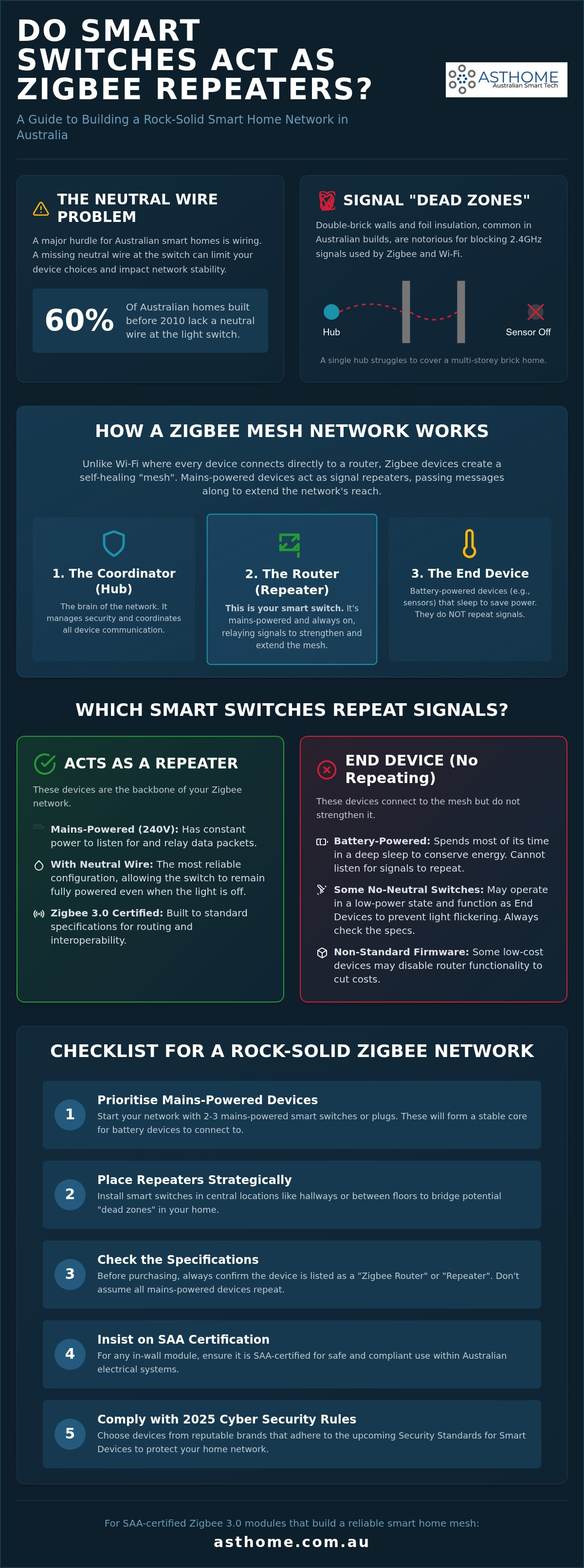
Around 60% of Australian homes built before 2010 lack a neutral wire at the light switch, a technical hurdle that does more than just complicate your installation. If you're tired of sensors dropping offline in a double-storey brick home, you've likely asked: do smart switches act as zigbee repeaters to bridge those dead zones? It's a common point of confusion for homeowners and trade professionals alike who want a network that actually stays connected.
We know how frustrating it is to spend money on hardware that fails to reach the gateway. This guide will help you discover exactly which smart switches strengthen your Zigbee mesh and how to choose the right modules for a rock-solid Australian smart home. We'll clarify the technical requirements for signal repeating, explain the impact of the Cyber Security (Security Standards for Smart Devices) Rules 2025, and show you which SAA-certified Asthome modules will turn your existing wiring into a reliable, self-healing network.
Key Takeaways
- Understand how Zigbee 3.0 creates a self-healing mesh where mains-powered devices act as routers to bridge coverage gaps.
- Get a definitive answer to the question: do smart switches act as zigbee repeaters based on their power source and wiring configuration.
- Identify the critical differences between neutral and no-neutral modules and how they impact your network's overall stability.
- Discover how to visualise your network using trade-standard tools to identify weak links and orphaned devices in your mesh.
- Ensure your smart home remains compliant with Australian SAA standards and the latest 2025 cyber security regulations.
Understanding the Zigbee Mesh: Why Your Smart Switch Matters
Most homeowners start their smart journey with Wi-Fi devices, only to find their network crawling once they add more than a dozen units. Zigbee offers a more professional alternative by creating a collaborative web of devices. This leads many to ask: do smart switches act as zigbee repeaters? In most cases, the answer is a definitive yes. Unlike Wi-Fi, where every device competes for a direct connection to the router, Zigbee devices work together to pass data along.
This protocol relies on the Zigbee mesh network standard, which organises hardware into three specific roles. First, the Coordinator (your Zigbee Gateway Hub) manages the security and traffic. Second, Routers act as repeaters, staying awake to relay signals from other devices. Third, End Devices, like battery-powered motion sensors, stay in a low-power sleep state and cannot repeat signals. Because a smart switch is typically wired into your home's power, it often takes on that vital Router role.
The Anatomy of a Zigbee Mesh Network
In a mesh setup, signals "hop" from one device to another to reach the hub. If you have a smart switch in the kitchen and another in the hallway, a signal from a distant bedroom sensor can bounce through both to reach the gateway. This creates a self-healing network. If one switch is turned off at the wall or fails, the mesh automatically reroutes the data through the next available path. When you consider how to set up your home, remember that the density of your repeaters is often more important than the raw distance between a device and the hub. This is why understanding if and how do smart switches act as zigbee repeaters is the first step to a stable installation.
Why Range Matters in Australian Brick Homes
Australian building standards often clash with smart home technology. Solid internal brick walls and foil-backed insulation are excellent for climate control, but they are notorious for killing 2.4GHz signals. In sprawling double-storey builds or Point Cook townhouses, "dead zones" are a common frustration. A single hub in the living room rarely reaches the upstairs bedrooms through layers of timber and brick. By strategically installing mains-powered smart switches, you turn your home's electrical grid into a signal-boosting network. This eliminates the need for multiple hubs and ensures that your sensors stay online, regardless of how many walls are in the way.
Routers vs. End Devices: Which Smart Switches Repeat Signals?
Distinguishing between a Router and an End Device is the most critical step in building a reliable mesh. Generally, the industry follows the Mains-Powered Rule. If a device is wired directly into your home's 240V circuit, it has the constant energy required to listen for and re-transmit data packets. This is the primary reason why many ask, do smart switches act as zigbee repeaters; they are usually always awake. Conversely, battery-powered hardware like motion or temperature sensors are End Devices. They spend most of their time in a deep sleep to preserve battery life, only waking up to report a change in state. They cannot pass on messages from other devices because they aren't listening when they sleep.
The Role of Mains Power in Signal Repeating
A device needs a constant power supply to function as a network node. According to the official Zigbee standard, a mesh network thrives on these router nodes to ensure data reaches the coordinator. While a smart plug is an obvious repeater, a smart switch module hidden behind your wall plate does the same job. It remains powered even when the lights are off, provided it has a neutral wire connection. This allows it to act as a permanent relay point for your entire home. If you rely solely on battery devices, your mesh will be fragile. Adding just two or three mains-powered switches can transform a patchy network into a rock-solid system by providing multiple paths for data to travel.
Identifying Router-Capable Hardware
Not every mains-powered device is guaranteed to repeat signals. Some manufacturers disable the router function in their firmware to reduce costs or simplify the hardware. For instance, certain low-power smart bulbs are notorious for being End Devices only. To ensure your network stays strong, always check the manufacturer specifications for Zigbee Router or Repeater status. This is why Zigbee 3.0 smart switch modules are the gold standard for mesh stability. They are designed to meet strict interoperability rules, ensuring they play nicely with other brands. Most professional-grade hubs can manage up to 128 devices, but this capacity relies on having enough routers to share the load. If you find your sensors are frequently dropping off, it is likely time to add a dedicated repeater. You might consider upgrading to a high-quality Zigbee Gateway Hub to better coordinate these router nodes and improve overall system response times.
The Neutral Wire Dilemma: Does Your Aussie Switch Support Repeating?
In the Australian market, the presence of a neutral wire at the switch plate is the single biggest factor in network performance. While modern builds often include a neutral, approximately 60% of Australian homes constructed before 2010 do not. This creates a technical fork in the road for homeowners asking: do smart switches act as zigbee repeaters? The answer depends entirely on how the device draws its power. A "With-Neutral" switch has a complete circuit, allowing it to stay fully powered and active as a router. A "No-Neutral" switch must rely on parasitic power, which significantly limits its capabilities.
If you are planning a renovation in Point Cook or a multi-storey build, the best advice is to have your licensed electrician pull a neutral wire to every switch box. This small step creates a permanent backbone for your smart home. Without it, you are essentially installing a collection of isolated control points rather than a collaborative mesh. Relying on no-neutral setups might solve the immediate wiring problem, but it won't help your sensors reach a distant hub.
How No-Neutral Switches Function
No-neutral switches stay alive by drawing a tiny amount of current through the light fitting itself. This "parasitic" draw is so small that it doesn't illuminate the bulb, though it often requires a bypass capacitor at the light to prevent LED flickering. Because the power available is so limited, these switches are almost always configured as End Devices. They simply don't have the energy budget to keep a high-power Zigbee radio constantly listening for and re-transmitting data from other devices. Adding ten no-neutral switches to your home will provide smart control, but it won't extend your Zigbee range by a single metre.
The "With-Neutral" Advantage for Mesh Stability
A switch with a neutral wire connection is a different beast entirely. It has access to a full 240V supply, allowing the Zigbee radio to operate at its maximum transmit power without restriction. These modules function as reliable routers, strengthening the mesh every time you add one to a room. This is particularly relevant as Matter smart switches begin to enter the market, offering even greater interoperability. Licensed electricians generally prefer neutral-based modules because they eliminate the flickering issues associated with no-neutral setups and provide a much more stable communication path. For a rock-solid smart home, the neutral wire is the true hero of the Zigbee mesh.
Troubleshooting and Strengthening Your Point Cook Zigbee Network
Setting up your modules is only half the battle. To truly master your smart home, you need to see how your devices communicate. We've established that the answer to do smart switches act as zigbee repeaters is usually yes, but only if they are positioned to bridge the right gaps. If your network feels sluggish, don't rely on the "Zigbee Heal" myth. While older protocols required manual healing, modern Zigbee 3.0 networks self-optimise over time. Simply leaving the network alone for 24 hours often allows the mesh to find the most efficient paths itself without any manual intervention.
Strategic placement is vital. You should aim to place a repeater-capable switch roughly every 10 metres, or in every room that contains battery-powered sensors. This ensures that no end device has to work too hard to find a parent router. If you have a double-storey home, place a smart switch near the top and bottom of the stairs. This creates a vertical "bridge" for the signal to travel between floors, bypassing the heavy timber or concrete flooring that often blocks 2.4GHz transmissions.
Visualising Your Mesh with Home Assistant
Advanced users should leverage the ZHA visualisation map or Zigbee2MQTT to identify weak links in the chain. These tools show you exactly which devices are acting as routers and which are struggling as orphans. Pay close attention to the Link Quality Indicator (LQI) values. An LQI above 200 represents a rock-solid connection, whereas anything below 50 suggests a device is on the edge of the mesh. You might also spot "chokepoints" where too many sensors are trying to talk through a single smart switch. In this scenario, adding another repeater-capable module nearby will balance the load and significantly reduce command latency.
Physical Factors Affecting Signal Propagation
Interference is the silent killer of Zigbee stability. Since Zigbee operates on the 2.4GHz band, it often clashes with Wi-Fi channels. To avoid this, ensure your Zigbee 3.0 Gateway Hub is placed at least two metres away from your Wi-Fi router. We also frequently encounter the "Kitchen Shield" effect in modern Point Cook builds. Large stainless steel appliances like fridges and ovens act as literal signal blocks between the lounge and the laundry. If your sensors are dropping off, a smart switch installed in the hallway can bounce the signal around these metal obstacles. To ensure your mesh has the best possible start, we recommend using a professional-grade Zigbee Gateway Hub to act as your network's central coordinator.
Choosing Reliable Zigbee 3.0 Modules for Your Next Project
Buying hardware from overseas marketplaces might seem like a bargain, but it's a massive risk for Australian homeowners. For a smart switch to be legal and insurance-compliant in this country, it must carry the Regulatory Compliance Mark (RCM) and meet SAA standards. Installing uncertified gear doesn't just void your product warranty; it can void your home insurance in the event of an electrical fire. When you ask do smart switches act as zigbee repeaters, you should also be asking if they are engineered for the local 240V grid. Trade-quality hardware ensures that your repeating nodes don't just extend the signal but do so with the thermal management required for our climate.
Building a cost-effective mesh doesn't mean you need a router at every single light point. A smart strategy involves mixing and matching. Use high-quality router modules in central locations and transition to more affordable end-devices in smaller rooms where range isn't an issue. This balanced approach creates a stable backbone without overspending on hardware that the mesh doesn't actually need to function at peak performance.
Asthome’s Trade-Quality Zigbee Solutions
The Zigbee 3.0 Smart Switch Module is our flagship solution for creating a robust mesh. Unlike generic modules that may only function as end-devices, this unit is a verified router. It is purpose-built to relay signals from your sensors back to the gateway. It fits comfortably behind standard Australian wall plates, making it a favourite for retrofits in older homes. For more specialised needs, our NDIS SDA kits utilise these same robust mesh principles. In high-stakes accessibility environments, signal drops are a safety issue. We rely on these mains-powered repeaters to ensure every voice or button command is executed instantly.
Future-Proofing with Matter and Zigbee
You might wonder if Zigbee is still relevant now that Matter 1.5 is the standard for many new builds in Victoria. In 2026, Zigbee remains the most mature and reliable choice for retrofitting existing Australian homes. While Matter-over-Thread is gaining ground, your Zigbee repeaters aren't going anywhere. A well-designed Zigbee mesh is local, fast, and doesn't rely on your internet connection to function. When planning your next smart lighting purchase, remember this final checklist:
- Check for a neutral wire to ensure the switch can technically act as a router.
- Verify SAA certification for legal and safe installation.
- Ensure the module uses Zigbee 3.0 for the best possible interoperability.
- Map your mesh after installation to confirm do smart switches act as zigbee repeaters in the specific locations you have chosen.
By following these steps, you'll move beyond a collection of gadgets and create a professional, trade-standard smart home that stands the test of time.
Build a Rock-Solid Zigbee Mesh Today
Establishing a stable smart home in Australia requires more than just buying the latest gadgets. It demands an understanding of how your electrical wiring dictates your network's strength. We've answered the core question: do smart switches act as zigbee repeaters? The key lies in the neutral wire. By prioritising with-neutral modules, you turn every light switch into a powerful routing node that bridges dead zones and supports your battery-powered sensors.
Safety and compliance are just as critical as connectivity. Stick to hardware that carries the RCM and SAA certification to protect your home and ensure your insurance remains valid. Whether you're an electrician looking for trade reliability or a homeowner in Point Cook seeking local expertise, choosing the right hardware is the first step toward a self-healing mesh that actually works. Don't settle for patchy Wi-Fi signals when a professional Zigbee setup is within reach.
Ready to eliminate those frustrating drop-offs? Upgrade your mesh with SAA-certified Zigbee 3.0 Modules from Asthome. Our team provides local support and trade discounts for licensed professionals, helping you build a smarter, safer home with confidence.
Frequently Asked Questions
Do all hardwired Zigbee devices act as repeaters?
Not necessarily, though most mains-powered devices do. While constant power is a prerequisite for repeating, the device must also have "Router" firmware enabled by the manufacturer. Some budget smart bulbs or specific low-power modules are intentionally limited to "End Device" status to save on manufacturing costs. Always check the technical specifications for "Zigbee Router" capability before purchase to ensure your hardware contributes to the mesh.
Do Zigbee smart switches work without a neutral wire?
Yes, no-neutral models are available for the approximately 60% of Australian homes built before 2010 that lack a neutral wire at the switch. However, these models rarely function as routers. Because they draw a tiny amount of parasitic power, they lack the energy budget to stay awake for signal relaying. If you're asking do smart switches act as zigbee repeaters in a no-neutral setup, the answer is generally no; they remain as end devices.
How many Zigbee repeaters do I need for a standard four-bedroom house?
For a typical four-bedroom Australian home, we recommend installing three to five mains-powered repeaters. This density ensures that battery-operated sensors in any room are never more than one "hop" away from a router. In double-storey builds, placing one repeater near the staircase and another in a central upstairs hallway is vital to overcome the signal dampening caused by floor joists and insulation.
Can I use different brands of Zigbee repeaters in the same mesh?
Yes, interoperability is a core feature of the Zigbee 3.0 standard. You can mix Asthome modules with other certified Zigbee 3.0 hardware without issues. The mesh is designed to be brand-agnostic, meaning a switch from one manufacturer can relay signals for a sensor from another. This flexibility allows you to choose the best hardware for specific rooms while maintaining a unified, self-healing network across the entire property.
Does a Zigbee smart bulb act as a repeater if the wall switch is off?
No, once power is cut at the wall switch, the smart bulb loses all functionality, including its ability to repeat signals. This often causes "orphaned" devices where sensors that were routing through that bulb suddenly drop offline. For a reliable mesh, it's better to use smart switch modules that stay powered 24/7, ensuring the repeater nodes remain active even when the lights are physically turned off.
What is the maximum range of a Zigbee repeater in an Australian home?
Indoors, you can expect a reliable range of 10 to 15 metres between repeaters. While the open-air range is much higher, Australian construction materials like internal brick walls and foil-backed insulation significantly reduce signal propagation. To maintain a high Link Quality Indicator (LQI) score above 200, try to keep your router nodes within 10 metres of each other, especially when navigating around large metal appliances.
How do I know if my smart switch is an "End Device" or a "Router"?
You can verify a device's role by checking the manufacturer's spec sheet for "Router" status or by using visualisation tools like Zigbee2MQTT. In these maps, routers are typically colour-coded differently from end devices. If the switch requires a neutral wire, it is almost certainly a router. If it is a no-neutral model, it is likely an end device that won't contribute to your network's range.
Will adding more Zigbee repeaters slow down my network?
No, adding more repeaters actually improves network performance and stability. Unlike Wi-Fi, where more devices can cause congestion, a Zigbee mesh becomes more resilient as you add more router nodes. Each repeater provides an alternative path for data, allowing the network to "self-heal" if one device goes offline. A standard gateway can manage up to 128 devices, provided you have a healthy ratio of routers to end devices.