

Did you know that smart home technology can reduce your household energy bills by up to 40%? Most Australians are tired of battling bathroom condensation and the skyrocketing costs of running an air conditioner through a humid summer. It is frustrating when one room feels like a sauna while the other is freezing, but you don't have to settle for inefficient climate control.
By integrating a smart temperature and humidity sensor into your home ecosystem, you can automate your environment to stop mould before it starts and slash your power usage. This article provides a technical roadmap to mastering setup and automation using Zigbee 3.0 and Matter 1.4 protocols. We'll cover everything from NDIS SDA accessibility requirements to ensuring your devices meet the mandatory Cyber Security Rules 2025 and carry the RCM for Australian safety.
What You Will Learn:
- How to monitor Relative Humidity (RH) to proactively prevent mould growth in damp Australian environments.
- The technical differences between Zigbee 3.0 and Matter protocols for reliable, low-latency sensor connectivity.
- Optimal placement strategies for your smart temperature and humidity sensor to ensure accurate data collection without interference.
- How to configure IFTTT logic to automate bathroom exhaust fans and smart GPOs for better energy efficiency.
- The importance of choosing SAA-certified hardware that complies with the RCM and the Cyber Security Rules 2025.
Understanding the Role of Smart Sensors in the Australian Climate
A smart temperature and humidity sensor is far more than a digital thermometer. It acts as a 24/7 environmental sentry, capturing precise data points and transmitting them to your smartphone or automation hub. While a traditional instrument that measures humidity requires you to be physically present to read a screen, a smart sensor logs historical trends. This allows you to identify exactly when and where your home's thermal envelope is failing. It's a professional grade tool for practitioners who value data over guesswork.
In states like Victoria, where external temperatures swing wildly, indoor humidity spikes are common. High Relative Humidity (RH) creates the perfect breeding ground for black mould, particularly in poorly ventilated 'micro-climates'. You might find these pockets in a laundry after a heavy drying cycle, a basement wine cellar, or a baby's nursery. Without data logging, these spikes often go unnoticed until you see physical spores or smell dampness. These sensors provide the visibility needed to manage these hidden risks effectively.
Why Humidity Monitoring Matters in Australia
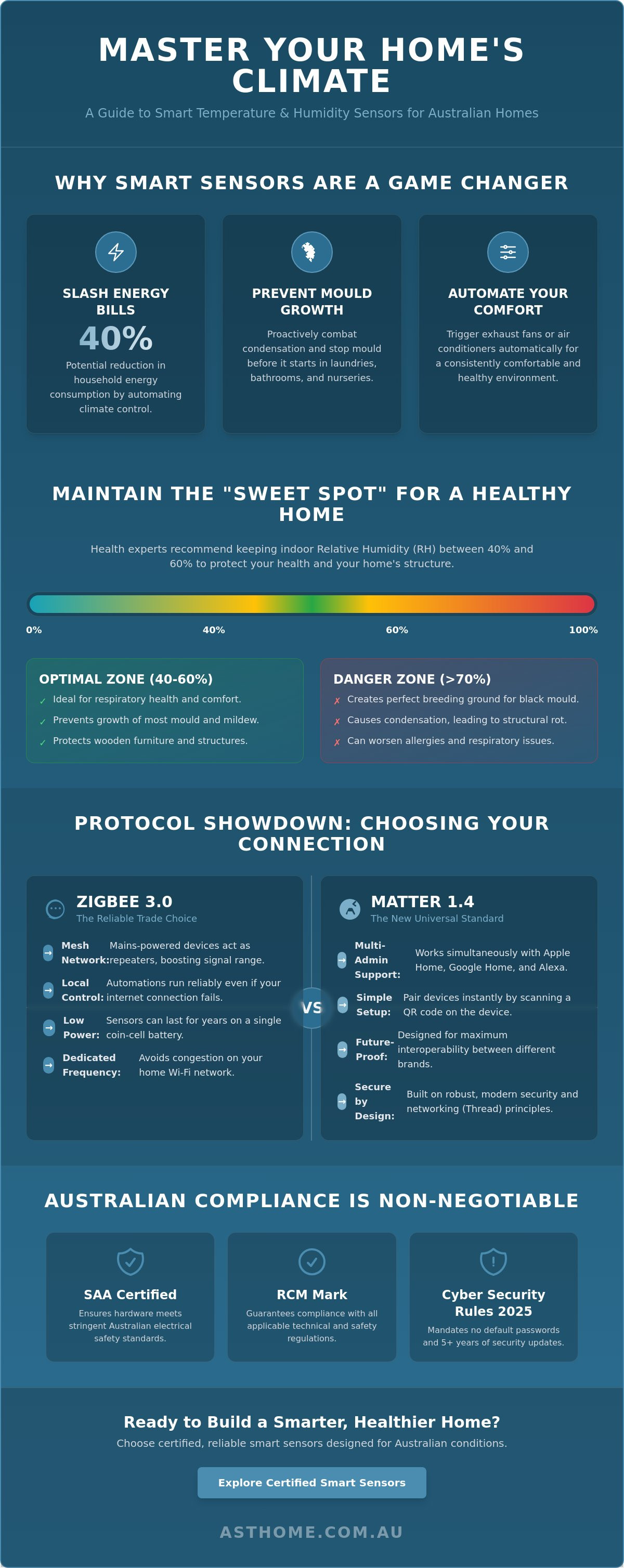
Health experts generally recommend keeping indoor humidity between 40% and 60%. This range is the 'sweet spot' for respiratory health and general comfort. When RH exceeds 70% for extended periods, condensation forms on window tracks and behind furniture. In an Australian winter, this moisture leads to structural rot and expensive repairs. Using a smart temperature and humidity sensor allows you to spot these trends before the damage becomes permanent. It's about proactive maintenance rather than reactive cleaning.
Real-time Alerts vs. Manual Checks
Manual checks are unreliable because environmental conditions change fast. A smart sensor sends an immediate notification to your phone if a room hits a dangerous threshold. This gives you the chance to open a window or trigger an exhaust fan immediately. By reviewing historical data, you can also see how your home performs during different seasons. This insight is essential when working through a smart home hardware checklist australia to ensure every room is optimised for efficiency and safety. You get the peace of mind that comes from a system that never stops monitoring.
Selecting the Right Protocol: Zigbee 3.0 vs. Matter Sensors
Connectivity is the backbone of any reliable smart home. When you install a smart temperature and humidity sensor, you must decide which protocol will carry your data. While Wi-Fi is common, it is notoriously power-hungry. A Wi-Fi sensor often drains its batteries in a few months because it maintains a constant, heavy link to your router. Zigbee 3.0 and Matter, specifically running on Thread, are the professional standards for low-power devices. They allow sensors to remain operational for years on a single coin-cell battery.
Selecting the right protocol also impacts your home's security. Since March 4, 2026, the Cyber Security Rules 2025 have mandated that all consumer IoT devices sold in Australia meet strict safety standards. This includes a ban on universal default passwords and a requirement for at least five years of security updates. Choosing compliant hardware ensures your network remains secure while you manage the health effects of mould and condensation.
Zigbee 3.0: The Reliable Trade Choice
Zigbee 3.0 is a mature, robust protocol favoured by trade professionals. It uses a mesh network where every mains-powered device, like a smart power point, acts as a signal repeater. This significantly improves range in larger Australian homes where a single Wi-Fi router might struggle to reach back bedrooms or laundries. Because Zigbee operates on a separate frequency from your standard Wi-Fi, your sensors won't cause network congestion. You will need a Zigbee Gateway Hub to coordinate these devices, which provides the benefit of local control. This means your automations keep running even if your NBN connection drops out.
Matter: The New Universal Standard
Matter 1.4 is the latest evolution in smart home interoperability. Its primary advantage is "multi-admin" support, allowing your sensors to communicate with Apple Home, Google Home, and Alexa at the same time. Setup is straightforward; you simply scan a QR code on the device. Pairing a sensor with a matter smart switch australia creates a seamless, future-proof ecosystem. It's an excellent choice for users who want to mix and match different brands without worrying about compatibility. To get started with a reliable mesh network, consider an SAA-certified Zigbee Gateway Hub to anchor your environmental sensors.
How to Install and Calibrate Your Smart Humidity Sensor
Precision is the difference between a high-performing automation and a frustrating technical failure. Simply sticking a smart temperature and humidity sensor to a wall isn't enough; you need to consider the physics of your home. To capture an accurate ambient reading, install the device approximately 1.5 metres above the floor. This height avoids the cooler air pockets near the floor and the heat that pools near the ceiling. Data integrity is everything. Avoid placing sensors near drafty windows, air conditioning vents, or direct sunlight, as these environmental factors produce "false readings" that trigger your automations at the wrong times.
Onboarding your device depends on the protocol you selected earlier. For Matter 1.4 devices, the process involves a quick QR code scan within your preferred smart home app. Zigbee 3.0 sensors require you to put your Zigbee Gateway Hub into pairing mode first. Once the hub finds the sensor, the connection is local and secure. Effective monitoring is a critical step in managing the health risks of mould, especially in older Australian homes with poor sub-floor ventilation. If you suspect a sensor is drifting, compare its live data against a secondary reference for 24 hours to verify accuracy.
Optimal Placement for Accuracy
External walls are often poor choices for sensor placement. Because of thermal bridging, these walls are frequently colder than the actual room temperature, which can skew your data. In bathrooms, the goal is to detect steam plumes before they settle. Place the sensor away from the splash zone but close enough to the shower to trigger an exhaust fan automation quickly. You can use adhesive mounts for a clean look or keep the sensor free-standing on a shelf for better flexibility during the initial testing phase. Accuracy drives comfort.
Configuring Your Smart Hub
Once paired, you must configure the polling interval. This setting determines how often the smart temperature and humidity sensor reports back to the hub. A shorter interval provides real-time accuracy but drains the battery faster. For most Australian homes, a report every five minutes or whenever a 0.5-degree change occurs is the ideal balance. Organise your sensors by room and use logical naming conventions. Names like "Master Ensuite Humidity" or "Nursery Temp" make voice assistant queries intuitive. You won't have to guess which device is reporting an alert when your phone pings at 2:00 AM.
Creating Smart Automations to Manage Comfort and Mould
Automation turns a passive smart temperature and humidity sensor into an active climate manager. The logic follows a simple 'If This, Then That' (IFTTT) structure. If the sensor detects a specific threshold, it triggers a response from another device. For example, if the bathroom humidity exceeds 70%, your hub can immediately activate a Zigbee 3.0 Smart Switch Module connected to the exhaust fan. This ensures moisture is removed before it settles on surfaces. The benefit of using a switch module is that it hides behind your existing wall plate, keeping your home's aesthetic intact while adding professional-grade control.
In NDIS Specialist Disability Accommodation (SDA) applications, these automations are essential. Participants with thermoregulation issues can't always manually adjust settings or detect subtle environmental changes. A sensor-driven system maintains a safe, comfortable environment automatically. It's a critical component of an NDIS SDA Compliant Smart Home Kit. You can also manage summer heat by setting a rule: if the temperature hits 26°C, the smart curtain motor closes to block direct sunlight. This reduces the load on your air conditioner and keeps the home cool without manual intervention.
The Bathroom Mould-Prevention Routine
Mould prevention requires more than just turning a fan on; it requires leaving it on until the air is dry. You can link your humidity sensor to a Zigbee 3.0 Smart Switch Module or a Smart Power Point (GPO) for the fan. Set a 'clearance' timer in your app. The fan should run until the humidity drops below 50%. This methodical approach ensures you aren't just moving steam around but actually drying the room. For appliances like portable dehumidifiers, a Smart Power Point (GPO) is the ideal choice. You can plug the unit directly into the GPO and set a rule to trigger power only when the sensor identifies a spike. This is an efficient way to protect your property while reducing energy waste from fans or units left running for hours.
Energy-Saving HVAC Automations
Heating and cooling account for a massive chunk of Australian energy bills. You can slash these costs by creating zone-based heating. Use your sensors to trigger smart AC controllers only when a room is in use. By pairing the temperature data with a motion sensor, you ensure the system doesn't cool an empty room. During peak Victorian heatwaves, these automations keep your home comfortable while protecting your hip pocket. Ready to upgrade your home's intelligence? Browse our range of SAA-certified Smart Temperature and Humidity Sensors to start building your automation rules today.
Why SAA Certification and Local Support Matter for Sensors
Buying a smart temperature and humidity sensor from an overseas marketplace is a gamble that rarely pays off. These devices often skip the rigorous testing required for the Australian market. Since March 4, 2026, the Cyber Security Rules 2025 have mandated that all consumer IoT devices must have a 24/7 vulnerability reporting channel and a five-year security update period. Cheap imports often lack this support, leaving your home network vulnerable to hacks. By choosing local, you get hardware that is built for our regulations and supported by experts who understand the Victorian climate.
Asthome is a business run by practitioners for practitioners. We don't just shift boxes; we use these tools in the field. This peer-to-peer reliability means you get technical advice rooted in real-world experience. If your Zigbee mesh is dropping out or your Matter hub won't pair, you can talk to someone who knows the technical protocols inside out. We bridge the gap between high-tech innovation and traditional trade reliability, ensuring your smart home remains a functional asset rather than a technical burden.
Safety and Compliance in Australia
In Australia, safety isn't optional. Every mains-powered device we sell carries the Regulatory Compliance Mark (RCM) and has passed SAA safety testing. This verifies that the hardware complies with AS/NZS 3000 (Wiring Rules) and the latest safety standards. It's a critical detail for your home insurance. If a non-certified device causes an electrical fault, many insurers will reject your claim outright. This risk applies to your entire ecosystem, including your smart temperature and humidity sensor and your smart door lock. Sticking to SAA-certified gear gives you the peace of mind that your home is both smart and safe.
Trade Accounts and Professional Support
We are proud to support the local trade industry. Asthome offers dedicated trade accounts for licensed electricians in Point Cook and across Australia. This provides access to trade-only pricing and the technical specifications required for professional installations. We understand the licensing requirements and the pressure of delivering a reliable system to your clients. Our team is here to help you select the right components for any project, from a single room to a full NDIS SDA build. It's the supportive, community-minded approach that distinguishes us from international retailers. Ready to start your next project? Browse our full range of SAA-certified Smart Temperature and Humidity Sensors and secure the hardware you need for a professional result.
Take Control of Your Home Environment
Optimising your living space requires more than just reactive adjustments. By deploying a smart temperature and humidity sensor, you gain the technical visibility needed to prevent mould, protect your property, and slash energy bills. Whether you choose the maturity of Zigbee 3.0 or the interoperability of Matter 1.4, the key is professional-grade hardware that meets Australian safety standards. Proper placement and logical automation rules are what turn a simple gadget into a powerful climate management tool.
Don't settle for uncertified imports that put your insurance and security at risk. At Asthome, we provide Victorian-based support and fast shipping for all our RCM-compliant hardware. We also offer dedicated trade accounts for licensed professionals who need reliable gear for their clients. It's time to build a smarter, safer, and more efficient home for your family.
Secure your home with SAA-certified Smart Sensors from Asthome
Frequently Asked Questions
Where is the best place to put a smart temperature and humidity sensor?
The optimal position for a smart temperature and humidity sensor is roughly 1.5 metres above the floor on an internal wall. This height ensures you are measuring the ambient air temperature rather than the heat pooling at the ceiling or the cold air near the floor. Avoid placing devices in direct sunlight, near air conditioning vents, or behind curtains. These spots create micro-climates that produce false readings and trigger your automations at the wrong times.
Do I need a hub for a Zigbee temperature and humidity sensor?
Yes, you need a Zigbee Gateway Hub to connect Zigbee-based sensors to your network. Unlike Wi-Fi devices that talk directly to your router, Zigbee sensors communicate with the hub to save power and improve network stability. This hub acts as the brain of your system. It allows your sensors to trigger other devices, like a smart switch module, even if your internet connection goes down.
Can a smart sensor help prevent mould in my bathroom?
A smart sensor is a critical tool for mould prevention when linked to an automated exhaust fan. By setting a rule where the fan activates when humidity exceeds 70%, you remove moisture before it settles on surfaces. It's much more effective than a manual switch because the system keeps the fan running until the air is dry. This methodical approach stops the damp conditions that allow black mould to thrive.
How long do the batteries last in a smart humidity sensor?
Batteries in a Zigbee-based smart temperature and humidity sensor typically last between one and two years. These devices use low-energy protocols and only "wake up" to report data when a significant change occurs. The exact lifespan depends on your polling interval settings. If you set the sensor to report every tiny change, the battery will drain faster. Most users find a balance that provides accurate data with minimal maintenance.
Are smart sensors compatible with Home Assistant and Apple HomeKit?
Most Zigbee 3.0 and Matter-certified sensors are fully compatible with Home Assistant and Apple HomeKit. Matter 1.4 sensors are particularly versatile; they allow for "multi-admin" control across different platforms simultaneously. If you use Home Assistant, you can integrate Zigbee sensors via a compatible dongle or hub. This flexibility ensures your environmental data is accessible through your preferred dashboard or voice assistant without being locked into a single brand.
What is the difference between a Wi-Fi and a Zigbee smart sensor?
The main difference lies in power consumption and network reliability. Wi-Fi sensors connect directly to your router but drain batteries quickly, often requiring a recharge every few months. Zigbee sensors are much more efficient and can run for years on a single coin cell. Additionally, Zigbee creates a mesh network that doesn't clog up your home Wi-Fi bandwidth. This makes it the preferred choice for professionals and serious hobbyists.
Can I use these sensors for NDIS SDA compliant homes?
Yes, these sensors are a core component of an NDIS SDA Compliant Smart Home Kit. They provide automated climate control for participants who may have difficulty detecting or managing temperature changes manually. By automating blinds, fans, and heaters based on real-time data, you create a safer and more accessible living environment. This technology helps meet the high physical support and robustness requirements specified in the SDA Design Standard.
Do smart sensors require a subscription fee for data logging?
Most professional-grade smart sensors do not require a subscription fee for basic data logging and automation. The data is typically stored locally on your hub or processed through a free app provided by the manufacturer. You can view historical trends and set up complex IFTTT rules without any ongoing costs. This makes them a cost-effective long-term solution for monitoring your home's thermal performance and preventing structural damage from humidity.