

Your smart home shouldn't feel like a part-time job. You've invested in the latest gear, but if your lights "fall off" the network or lag when you walk into a room, you're likely losing a battle against Australian building materials. Mastering troubleshooting zigbee network issues australia is essential when dealing with double-brick walls and interference from high-powered NBN routers. We understand the frustration of an automation failing at night just because a signal couldn't penetrate a masonry wall or got crowded out by a 2.4GHz Wi-Fi signal.
We'll show you how to fix dropouts, eliminate lag, and ensure your devices stay connected through 2026 and beyond. This guide covers everything from selecting Zigbee 3.0 channels that avoid Wi-Fi overlap to using SAA-certified modules as strategic repeaters to strengthen your mesh. You'll learn how to build a stable, lag-free smart home that remains reliable and compliant with the latest Australian security standards. By the end of this guide, you'll have the technical knowledge to ensure your home automation never leaves you in the dark again.
Key Takeaways
- Learn how to turn every mains-powered switch into a signal repeater to eliminate dead zones and strengthen your network mesh.
- Master the "frequency fight" by aligning your Wi-Fi and Zigbee channels, a critical step for troubleshooting zigbee network issues australia.
- Identify how double-brick walls and foil-backed sarking create signal-killing barriers and discover the hardware workarounds to bypass them.
- Follow our systematic 5-step methodology to isolate "zombie" devices and restore your automation without needing a full network reset.
- Understand why SAA-certified Zigbee 3.0 hardware is the non-negotiable standard for Australian insurance compliance and long-term reliability.
Understanding Zigbee Mesh Stability in Australian Homes
Zigbee isn't just a wireless signal; it's a conversation between every device in your house. Unlike Wi-Fi, where every gadget fights for the router's attention, Zigbee creates a mesh network. In this setup, every mains-powered device acts as a repeater, passing messages along to the next node. This is why troubleshooting zigbee network issues australia often involves looking at your home's layout rather than just your internet speed. If your devices are "gossiping" too much through too many hops, you'll experience lag. The Zigbee Gateway Hub serves as the brain of the operation, managing these conversations and ensuring commands reach their destination without getting lost in the digital noise.
Routers vs. End Devices: The Backbone of Your Mesh
To build a reliable network, you must understand the hierarchy of your hardware. Devices are categorised as either "Routers" or "End Devices." A Zigbee 3.0 Smart Switch Module Australia is a classic example of a router. Because it has a constant 240V power supply, it stays awake to repeat signals for other devices. This is particularly useful in older Australian homes where neutral wires might be scarce; choosing the right module can turn a dead zone into a connectivity hub. For a technical breakdown of how these roles are assigned, this Zigbee protocol overview explains the underlying architecture.
Conversely, battery-powered kit like motion sensors or temperature gauges are "End Devices." These are "sleepy" components that wake up only to send data before going back into power-save mode. They don't extend your range. If your mesh relies too heavily on sensors without enough hardwired routers to support them, the network will collapse. One dodgy, non-compliant device can act as a "weakest link," causing the entire mesh to crash by dropping packets or refusing to route traffic correctly. Always ensure your routers are SAA-certified to maintain both network integrity and home insurance compliance.
The Self-Healing Myth: When Manual Intervention is Needed
You might have heard that Zigbee is "self-healing," but this isn't a magic fix for poor planning. Mesh healing is the process where nodes find new parent routes when a previous path becomes unavailable. If you unplug a smart plug, the surrounding devices should eventually find a new way back to the hub. However, healing doesn't always solve problems caused by physical interference or distance. If a module is buried behind thick double-brick or shielded by foil-backed insulation, no amount of "healing" will find a path through a wall it can't penetrate. When troubleshooting zigbee network issues australia, you often need to manually intervene by adding a dedicated repeater or repositioning your gateway to give the mesh a fighting chance.
Solving the 2.4GHz Traffic Jam: Wi-Fi vs. Zigbee Channels
Most Australian homes rely on high-powered NBN routers that blast Wi-Fi signals across the 2.4GHz spectrum. Unfortunately, this is exactly where your Zigbee network operates. Think of it like a quiet conversation in a crowded pub; if the Wi-Fi is "shouting," your smart home commands won't be heard. This spectral overlap is a foundational hurdle when troubleshooting zigbee network issues australia. When your router and your smart devices fight for the same airwaves, the result is lag, unresponsive switches, and sensors that "fall off" the network without warning.
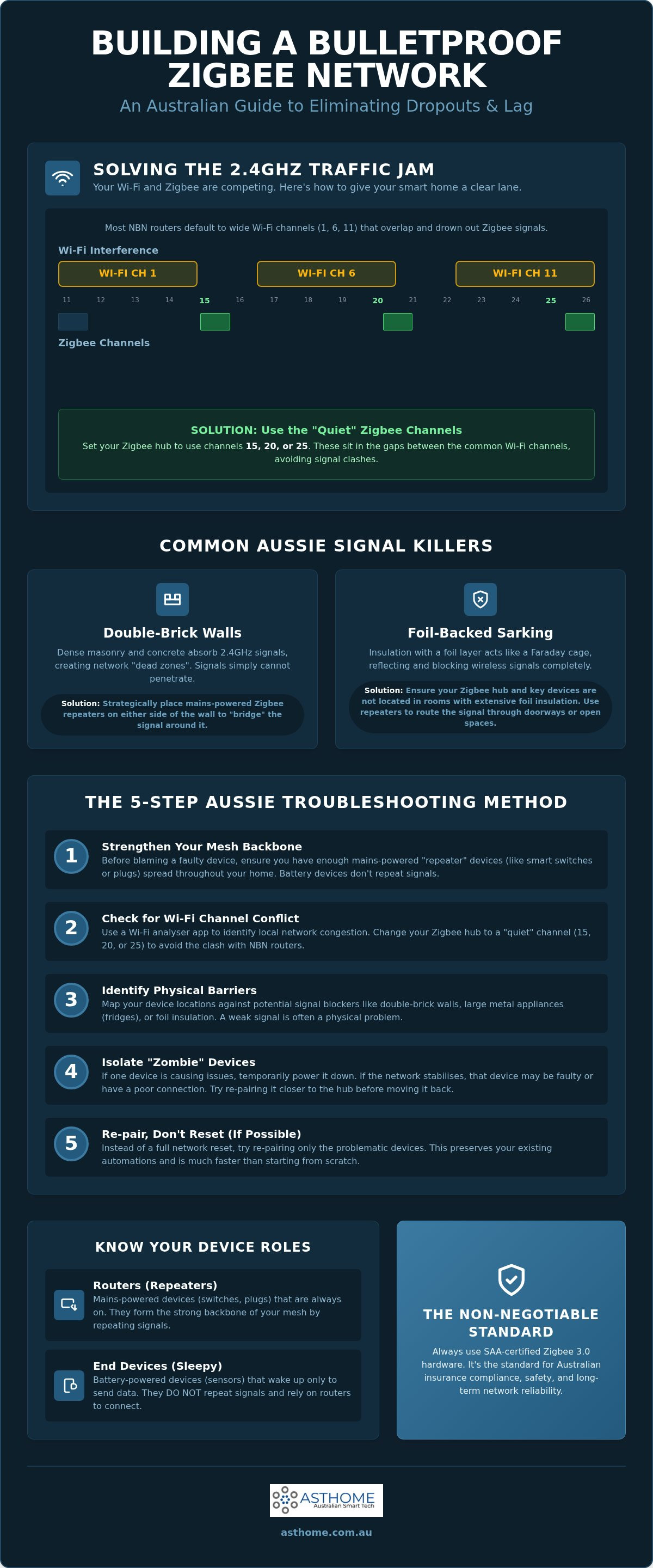
Visualising the overlap is the first step to a fix. Wi-Fi channels are significantly wider than Zigbee channels. In Australia, most routers default to Wi-Fi channels 1, 6, or 11. These wide bands can easily swallow several Zigbee channels at once. To find clear air, you need to target the "Quiet" Zigbee channels: 15, 20, or 25. These specific frequencies sit in the spectral dips between common Wi-Fi peaks, providing a much-needed buffer for your automation commands to travel through without being drowned out by Netflix streams or video calls.
Coexistence Strategies for High-Density Suburbs
If you're living in a high-density development, such as the townhouse precincts in Point Cook, the problem isn't just your own router; it's your neighbour's too. You might have your network perfectly configured, but a neighbouring router on a high-gain setting can still bleed into your space. Use a Wi-Fi analyser app to scan the local environment and see which channels are most congested. By adopting a "side-channel" approach and shifting your Zigbee mesh to the very edge of the spectrum, such as channel 25, you can often bypass the worst of the suburban traffic jam.
Hardware Placement to Minimise Spectral Noise
Spectral noise is the primary cause of intermittent dropouts. Many homeowners make the mistake of placing their Zigbee Gateway Hub directly on top of their Wi-Fi router to keep the cabling tidy. This is a recipe for interference. Follow the "Two-Metre Rule" and ensure there is physical distance between these two hubs. This separation drastically improves the signal-to-noise ratio, allowing the hub to hear faint signals from distant sensors. While the Zigbee 3.0 standard introduced better interference mitigation, physical separation remains the most effective low-tech fix for a flaky mesh.
Aussie Housing Obstacles: Brick, Foil, and Signal Death
Australian construction is notoriously tough on radio frequencies. While mesh networking is designed to be resilient, the physical environment of a local home can create a literal "Faraday Cage" effect. If you live in a double-brick house, your Zigbee signals are fighting against dense masonry that absorbs 2.4GHz waves. This physical barrier is a frequent culprit when troubleshooting zigbee network issues australia. Commands that work perfectly in an open-plan living room often fail to reach a bedroom or study tucked behind a structural brick wall.
Modern building standards introduce another invisible enemy: foil-backed insulation, commonly known as sarking. This reflective material is excellent for thermal efficiency but acts as a mirror for smart home signals. If your hub is located in a central hallway and you're trying to reach a device near an external wall or in the roof cavity, the foil can bounce the signal away entirely. This leads to devices "dropping off" the mesh even if they are physically close to the gateway. You need to plan your network to "hop" around these obstacles rather than trying to blast through them.
Overcoming Internal Brick Walls and Steel Frames
Older Melbourne homes and many contemporary builds feature thick internal masonry or heavy-gauge steel framing. These materials don't just weaken signals; they can kill them. To fix this, stop relying on the gateway to do all the heavy lifting. Use mains-powered modules, such as a smart GPO (Power Point), as strategic mid-point repeaters in long hallways. By placing a repeater every five to seven metres, you ensure the signal has a clear path around corners. In RF terms, "Line of Sight" is always superior to "Penetration." If a signal can see the next node through a doorway, your reliability will skyrocket.
Outdoor Range and Weatherproof Challenges
Automating your garden lighting or driveway gates presents a unique set of challenges. An outdoor motion sensor often has to communicate through brick veneer and a metal garage door, which is a recipe for lag. Metal is a total signal blocker. If your sensor is struggling, place a Zigbee 3.0 module on the inside of the wall closest to the sensor to act as a dedicated bridge. Always ensure your outdoor hardware is SAA-certified to handle Australian temperature extremes. Non-compliant gear often drifts in frequency when the mercury hits 40 degrees, causing the mesh to desync and fail right when you need your security lighting most.
The 5-Step Aussie Troubleshooting Methodology
When your automation fails, don't start pulling switches out of the wall. You need a systematic approach. Troubleshooting zigbee network issues australia requires a methodical process to isolate the fault without nuking your entire setup. Following a logical sequence saves time and prevents you from creating new problems while trying to fix old ones.
Step 1 involves identifying the "Zombie" device. Is it just one switch acting up, or has the whole floor gone dark? If it's a localised failure, the issue is likely that specific node. Step 2 is the "Power Cycle" dance. Switch off the circuit at the board or the GPO for at least 10 seconds. This allows the internal capacitors to drain completely, forcing a fresh boot. Step 3 moves to your controller, whether you use Home Assistant, Hubitat, or a dedicated gateway. Look for "Ghost" nodes. These are entries for devices that no longer exist but still haunt your routing table, causing digital traffic jams.
Step 4 is the choice between re-pairing or re-meshing. Sometimes, deleting a device and re-adding it is the only way to force it to pick a better parent route. Finally, Step 5 is the safety and compliance check. Verify SAA compliance. A cheap, uncertified import might be "shouting" garbage data across the mesh, which causes lag for every other device. Non-compliant hardware often lacks the sophisticated radio filtering found in certified gear, making it a primary suspect for network instability.
Identifying the Root Cause: Hardware vs. Software
Distinguishing between a hardware fault and a signal issue is vital for a quick fix. If your smart light switch is physically clicking but not showing up in your app, it's likely a mesh issue rather than a dead component. Check your "LQI" (Link Quality Indicator) scores in your hub's interface. A score below 50 suggests a signal struggle, while a score of 0 usually means the device is completely out of range. Don't forget the basics; low battery levels in sensors are the number one hidden cause of Zigbee failure in Australian homes.
The "Last Resort" Reset
If all else fails, perform a factory reset on your Zigbee 3.0 Smart Switch Module Australia. Most modules reset by holding the pairing button or toggling the physical switch in a specific pattern. When re-adding devices, try to keep the same entity names in your software. This prevents your existing automations from breaking. Once your mesh is stable, document the layout. Knowing which switch acts as a repeater for which sensor makes future maintenance a breeze. Upgrade to reliable, certified hardware by browsing our SAA-certified Zigbee range today.
Future-Proofing with SAA-Certified Zigbee 3.0 Hardware
Building a stable smart home isn't just about software settings; it's about the physical integrity of your components. Troubleshooting zigbee network issues australia often reveals that the root cause is poor quality, uncertified hardware that can't handle local electrical standards. SAA certification isn't a suggestion; it's a legal requirement for any device connected to your home's 240V mains. Using non-compliant gear puts your property at risk and will likely void your home insurance if an electrical fault occurs. Professional-grade Zigbee 3.0 modules provide the reliable, low-latency mesh needed for high-stakes environments, ensuring your automations fire every single time.
Zigbee 3.0 offers significant advantages over older, proprietary protocols by unifying the standard for better interoperability. As we move through 2026, Matter smart switches are becoming the new benchmark for connectivity, working alongside your existing Zigbee mesh. Choosing hardware that supports these emerging standards ensures your home remains functional as technology evolves. By starting with a solid foundation of SAA-certified Zigbee 3.0 devices, you create a mesh that is both secure and ready for the next generation of smart home integration.
Why Trade-Grade Hardware Matters for Stability
The difference between "cheap" consumer gadgets and trade-grade hardware lies in the radio sensitivity. High-quality Zigbee radios can "hear" faint signals through the double-brick walls and foil insulation we covered earlier. Licensed electricians prefer Asthome’s SAA-certified modules because they meet rigorous Australian safety standards and offer predictable performance. This reliability is especially critical for NDIS SDA compliant homes, where smart technology isn't just a luxury but a vital tool for independence. In these settings, a mesh failure isn't just an annoyance; it's a breakdown in accessibility that requires a robust, compliant backbone to prevent.
Moving Toward Matter and Thread Coexistence
The smart home landscape is shifting toward a multi-protocol future. You don't need to rip out your existing Zigbee mesh to enjoy the benefits of newer standards. A multi-protocol gateway acts as a bridge, allowing your Zigbee 3.0 devices to talk to the latest Matter-enabled gear. This coexistence allows you to expand your network using the best tool for each specific job. Whether you are automating a simple light or a complex SDA kit, the final recommendation remains the same. Start with a solid Zigbee 3.0 foundation using compliant hardware. This approach minimises the need for troubleshooting zigbee network issues australia and ensures your smart home remains a reliable asset for years to come.
Build a Mesh That Doesn't Fail
Stabilising your smart home isn't about luck; it's about engineering. You've now got the tools to handle the "frequency fight" by selecting quiet channels and the strategy to navigate the signal-killing double-brick walls common in our local builds. By following our 5-step methodology, you can move from reactive troubleshooting zigbee network issues australia to a proactive, reliable setup that stays connected through the night. It's time to stop worrying about devices falling off the mesh and start enjoying the convenience you've built.
The foundation of any lag-free home is hardware that meets our local regulations. Using SAA-certified Zigbee 3.0 modules ensures your network is safe, insurance-compliant, and powerful enough to act as a backbone for NDIS SDA solutions. As Victoria-based trade experts, we've seen how the right gear transforms a frustrating setup into a seamless experience. Don't settle for grey-market imports that can't handle Australian conditions or spectral noise.
Upgrade your mesh with SAA-certified Zigbee 3.0 Modules from Asthome and take the guesswork out of your automation. Your smart home should work for you, not the other way around. Get your mesh sorted today and enjoy a truly responsive, future-proof home.
Frequently Asked Questions
Why do my Zigbee devices keep dropping off the network in Australia?
Interference from high-powered 2.4GHz Wi-Fi routers and physical barriers like double-brick walls are the primary causes. In suburban Australia, high-density housing means your neighbours' NBN routers might be drowning out your smart home commands. You can solve this by shifting to a quiet Zigbee channel and adding more mains-powered routers to strengthen the mesh. Troubleshooting zigbee network issues australia often starts with identifying these external signal "shouters."
Can I use Zigbee and Wi-Fi 6 on the same 2.4GHz frequency?
Yes, but they will compete for bandwidth unless you manage your channel selection carefully. Wi-Fi 6 still utilises the 2.4GHz band for range, which overlaps with the Zigbee protocol. To ensure stability, set your Wi-Fi to a fixed channel like 1 or 6 and move your Zigbee network to channel 25. This creates a spectral buffer that prevents your high-speed internet traffic from crashing your smart lighting commands.
How many Zigbee devices can one gateway hub handle before it lags?
Most modern Zigbee 3.0 gateways can handle between 50 and 128 devices, provided you have enough routers in the mesh. If you only have battery-powered sensors, the hub will struggle once you hit its direct-connection limit, which is often as low as 15 to 20 devices. Adding smart switches or GPOs expands this capacity by offloading the routing work from the central hub to the rest of the network.
Does double-brick housing really block Zigbee smart switches?
Double-brick walls significantly attenuate Zigbee signals by absorbing the 2.4GHz radio waves. While the signal isn't completely blocked, it is often weakened enough to cause intermittent dropouts or high latency. Placing a mains-powered module on both sides of a structural wall is a proven strategy for troubleshooting zigbee network issues australia in older masonry homes. This allows the signal to "hop" through the doorway instead of trying to penetrate the brick.
Is it better to use a Zigbee repeater or just more smart switches?
It is generally better to use smart switches because they provide functional value while acting as high-quality repeaters. Every SAA-certified mains-powered switch you install naturally extends the mesh network. Dedicated repeaters are useful for empty spaces like long hallways or lofts, but integrated modules are more efficient for building a dense, reliable smart home backbone without adding extra clutter to your power points.
How do I change the Zigbee channel on my hub to avoid interference?
You can usually change the channel through your hub's advanced settings or via a coordinator interface like Zigbee2MQTT. Note that changing the channel often requires you to re-pair some of your "sleepy" battery-powered devices so they can find the new frequency. Aim for channels 15, 20, or 25 to find the clearest air away from common Australian Wi-Fi traffic peaks on channels 1, 6, and 11.
What is the maximum range of a Zigbee 3.0 module in an Aussie home?
In a typical Australian home, a Zigbee 3.0 module has a reliable range of 10 to 20 metres through one or two internal walls. While the theoretical open-air range is much higher, the presence of steel frames and foil insulation reduces this significantly. Maintaining a distance of 5 to 7 metres between nodes is the best practice for ensuring a lag-free mesh that can route around obstacles.
Are all Zigbee switches sold in Australia SAA certified?
No, many "grey-market" switches sold on international marketplaces lack SAA certification. In Australia, any 240V device must carry the RCM mark, which incorporates SAA safety approval. Using uncertified hardware is a major risk that can lead to network instability and the potential voiding of your home insurance policy. Always check for the RCM logo on the back of your smart switches and modules before installation.