

The most expensive mistake in home automation isn't picking the wrong hub; it's treating 240-volt Australian mains wiring like a casual weekend project. Setting up automated lighting and custom routines should make your home effortless to run, yet unstable Wi-Fi dropouts, uncertified overseas imports, and frustrated family members flicking off wall switches quickly turn high-tech plans into daily headaches. Knowing the essential DIY smart home installation mistakes to avoid ensures your setup is responsive, reliable, and safe from day one.
You don't need an electrical licence to design a brilliant system, but you do need to know where DIY network architecture ends and licensed trade work begins under Australian law. In this guide, you will discover how to sidestep hazardous electrical missteps, protocol bottlenecks, and insurance-voiding compliance traps. Here is your practical roadmap to building a seamless smart home the whole family actually enjoys, powered by certified hardware built to handle local conditions.
Key Takeaways
- Understand Australian electrical safety laws to recognise the DIY smart home installation mistakes to avoid, leaving 240V mains wiring to licensed electricians while you manage the ecosystem design.
- Protect your home and insurance policies by sourcing SAA-certified hardware engineered for local voltage, steering clear of hazardous overseas grey imports.
- Eliminate Wi-Fi dropouts and lag by shifting high-density smart switches and sensors onto robust Zigbee 3.0 or Matter mesh networks.
- Keep physical wall switches intuitive for the entire household by installing in-wall smart modules rather than relying solely on app-controlled smart bulbs.
- Check switch cavity depths and neutral wire availability before purchasing hardware, staging your setup room by room with prompt technical guidance.
1. The Critical Australian Mistake: DIY Mains Wiring and Non-Compliant Hardware
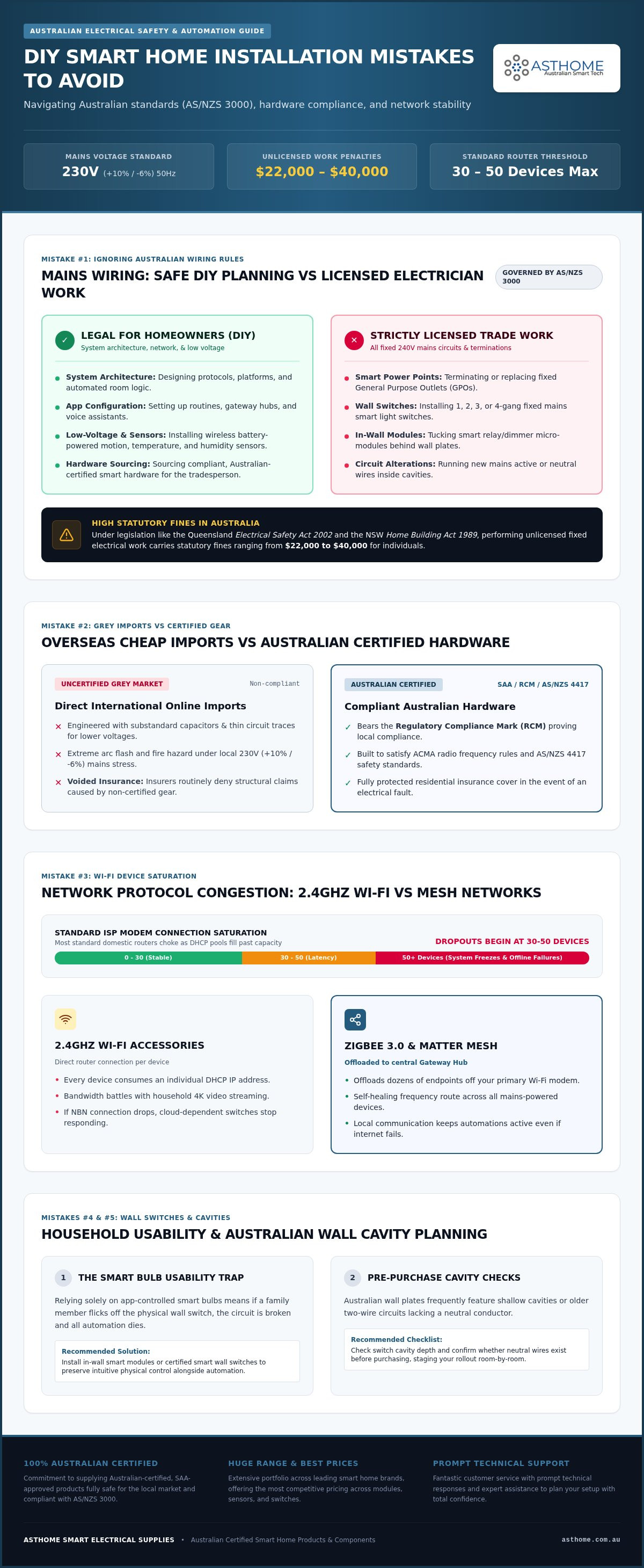
International video tutorials often make hardwiring smart switches look like a quick weekend project. In Australia, following that advice is both dangerous and illegal. Chief among the DIY smart home installation mistakes to avoid is treating fixed 240V mains wiring as amateur work. Australian homes run on a nominal 230V supply (+10%/-6%) at 50 Hz, delivering substantial energy that creates extreme arc flash and fire hazards if handled incorrectly.
Understanding Australian Electrical Regulations and AS/NZS 3000
Domestic electrical installations across every state and territory are governed by AS/NZS 3000, known as the Wiring Rules. Under state legislation like Queensland's Electrical Safety Act 2002 or the NSW Home Building Act 1989, only a licensed electrician can legally install or alter fixed mains electrical circuits. This legal mandate covers hardwiring a Smart Power Point (GPO), fitting a Smart Wi-Fi Light Switch (1/2/3/4 Gang), or tucking micro-modules behind wall plates. Unlicensed work risks severe penalties, with state fines reaching up to $22,000 to $40,000 for individuals.
You can still take full ownership of your system design without touching active copper. As a homeowner, you can legally and safely manage:
- Designing your overall home automation protocols and architecture.
- Setting up apps, mobile platforms, and smart routines.
- Mounting low-voltage and battery-powered hardware, such as a Smart Motion Sensor or Smart Temperature and Humidity Sensor.
- Supplying certified hardware for your licensed electrician to terminate.
The Perils of Uncertified Overseas Smart Switches
Ordering cheap hardware directly from overseas marketplaces introduces significant safety risks into your walls. Grey-market products often feature substandard capacitors and thin circuit traces engineered for lower voltages, causing them to degrade rapidly under Australian conditions. Worse yet, they rarely carry valid local testing approvals.
Mains gear sold in Australia must carry the Regulatory Compliance Mark (RCM), proving it meets electrical safety standards (such as AS/NZS 4417) and ACMA radio frequency rules. If uncertified equipment causes an electrical fault or fire, residential insurers routinely deny coverage, leaving you liable for structural damages. Sidestepping these DIY smart home installation mistakes to avoid starts with sourcing hardware built specifically for local standards. Asthome addresses this risk directly by supplying only fully SAA-certified smart components across leading brands at competitive market prices, backed by prompt technical support. For a comprehensive breakdown of wall-plate configurations, explore The 2026 Guide to Smart Light Switches for Australian Homes.
2. Protocol Congestion: Overloading Wi-Fi Instead of Building a Mesh Network
Plugging dozens of standalone smart accessories straight into your home Wi-Fi network feels convenient at first. It is also one of the classic DIY smart home installation mistakes to avoid. While consumer routers handle laptops and phones effortlessly, adding thirty or forty Wi-Fi bulbs and switches quickly saturates the 2.4GHz band, leading to dropped commands, high latency, and frozen devices.
The Downfalls of 2.4GHz Wi-Fi Smart Device Saturation
Most standard ISP-supplied modems struggle when pushed past 30 to 50 simultaneous client connections. Every Wi-Fi gadget demands an IP address from your router's DHCP pool. As that table fills up, smart devices randomly drop offline or take several seconds to execute basic switching commands. Bandwidth battles between family members streaming high-definition video and cloud-reliant smart gadgets make matters worse. If your NBN connection drops out, cloud-based Wi-Fi switches frequently stop responding altogether, locking you out of your own lighting automations.
Why Zigbee 3.0 and Matter Form Superior Smart Ecosystems
Building a robust smart home requires moving automation traffic off your primary Wi-Fi network and onto dedicated low-power mesh architectures. Installing a central Zigbee Gateway Hub offloads dozens of endpoints from your domestic router onto an independent, self-healing frequency. In a mesh network, every mains-powered component, like a Smart Zigbee Dimmer Module or in-wall relay, acts as a repeater node that strengthens coverage across your property.
For modular retrofits, deploying a certified Zigbee 3.0 Smart Switch Module Australia: The 2026 Retrofit Guide solution keeps communication fast and entirely local. For modern multi-platform setups, adopting a Matter Smart Switch Australia: The 2026 Guide to Future-Proofing Your Home approach links Apple Home, Google Home, and Home Assistant together seamlessly using local IP transport.
While configuring wireless protocols is completely within the realm of DIY design, remember that hardwiring in-wall receivers to fixed power must comply with Australian regulations prohibiting DIY electrical work. Sourcing the right radio protocols and SAA-certified hardware is easy when you have access to prompt technical advice. You can explore a wide variety of market-leading mesh gear at competitive prices directly through asthome.com.au to plan your backbone without crowding your router.
3. The Usability Trap: Breaking Physical Wall Switches and Daily Habits
A smart home should make daily routines simpler, not harder. One of the most frustrating DIY smart home installation mistakes to avoid is stripping away tactile controls in favour of mobile apps. If someone has to unlock a phone, launch an app, or shout at a voice assistant just to turn on the bathroom light, the automation has failed. When technology disrupts natural habits, household members and visiting guests quickly grow irritated.
The Smart Bulb Dilemma: Why In-Wall Modules Win
Filling every light fitting with smart bulbs is a common starter move, but it creates a classic operational flaw. The second someone flips the mechanical wall switch down out of reflex, mains power cuts out completely. The bulb goes dark and drops offline immediately. Automations stop triggering, schedules fail, and remote commands return errors.
Placing plastic switch guards or sticky tape over standard wall plates is a clumsy fix that ruins the look of your interior. A far better strategy is mounting smart switch modules behind your existing wall plates. By pairing in-wall relays with your existing switches, the physical toggle acts as an input trigger rather than a crude power cut. The circuit stays energized around the clock, allowing automations, apps, and manual rocker switches to operate in total harmony.
Maintaining Family-Friendly Physical Controls and Smart Dimmers
Keeping wall switches intuitive guarantees high household adoption. Anyone entering a room can flick a switch naturally, while your background routines handle the rest. According to the Australian Government smart homes guide, reliable home automation hinges on balancing connected systems with practical, everyday household habits.
You can upgrade your lighting circuits while keeping conventional faceplates by using well-matched components:
- Tuck a Smart Zigbee Dimmer Module behind your wall plate to gain smooth wireless dimming without losing physical push-button control.
- Pair your dimming circuits with a compatible Dimmable LED Driver to eliminate buzzing, light flickering, and low-end dropouts across domestic downlights.
- Automate task lighting with sensors, consulting The 2026 Guide to Motion Sensors for Australian Smart Homes to illuminate hallways and pantries hands-free.
Avoiding these usability-focused DIY smart home installation mistakes to avoid keeps your automation effortless for everyone under your roof. Remember that your electrician will need to carry out the physical installation of any in-wall relays behind the switch plate.
4. Overlooking Neutral Wires, Box Depth, and Australian Wall Cavities
Ordering smart switching hardware without checking what sits behind your plasterboard is among the most disruptive DIY smart home installation mistakes to avoid. American tutorials often claim that neutral conductors are simple white wires waiting inside deep, plastic enclosures. In Australia, building traditions and historical wiring topologies tell a very different story.
Navigating Neutral vs No-Neutral Australian Lighting Circuits
Millions of established Australian homes use a "loop-at-the-light" wiring design. In this setup, active power runs directly to the ceiling fixture, with only active feed and switched active lines dropping down to the wall switch. If you purchase a smart relay that requires a dedicated neutral connection, the unit cannot operate unless new conductors are drawn through your finished walls. Sourcing dedicated no-neutral smart modules bypasses this labour entirely, pairing with small bypass capacitors across the light load to stop low-draw LEDs from flickering or glowing when powered off.
Confirming your switch cavity layout before purchasing hardware saves time and avoids delays. Have your licensed electrician inspect a switch plate during your initial consultation to identify whether neutrals are present.
Managing Cavity Space Behind GPOs and Light Switch Gangs
Available wall depth dictates what hardware will fit safely without crushing insulated cables. Standard Australian timber-stud framing with 10 mm or 13 mm plasterboard provides a roomy 70 mm to 90 mm void, comfortably accepting standard C-clip wall brackets and behind-switch modules. Double-brick and cavity-brick builds, however, present a major obstacle. These walls frequently rely on shallow metal wall boxes cut directly into masonry, leaving depths of just 25 mm to 35 mm.
For tight enclosures, selecting compact hardware is mandatory. You can avoid wall-fit failures by checking your clearances against The 2026 Reference Guide to Power Point (GPO) Standards in Australia before you finalise orders. Fitting a slim Matter Smart Switch Module or Zigbee 3.0 Smart Switch Module leaves adequate breathing space behind standard plates. Where multi-gang lighting groups crowd a single cavity, replacing the entire faceplate with a unified Smart Wi-Fi Light Switch (1/2/3/4 Gang) reduces in-wall wire clutter significantly.
Don't let unexpected cavity measurements stall your trade schedule. For pre-purchase technical sizing and SAA-certified hardware across the market's leading brands, shop certified Australian smart gear at asthome.com.au and verify your module dimensions with our support team today.
5. How to Plan and Execute a Seamless Australian Smart Home with Asthome
Automating an entire property overnight often leads to misconfigured routines and overwhelmed networks. A phased rollout delivers vastly better results. Tackling your home room by room allows you to test automations thoroughly, confirm signal coverage, and verify that the ecosystem feels intuitive for the entire household. Taking this measured approach helps sidestep the DIY smart home installation mistakes to avoid, transforming high-tech design into reliable, everyday comfort.
Designing a Scalable, Unified Smart Ecosystem
Start by selecting a central platform to anchor your routines, whether you prefer Apple Home, Google Home, or Home Assistant. Standardise your communication backbone around Zigbee 3.0 or Matter to keep device chatter off your domestic Wi-Fi band. Once your hub is active, layer in practical automation hardware step by step:
- Place a Smart Motion Sensor in transient zones like pantries and hallways to trigger pathway illumination automatically.
- Monitor indoor climates using a battery-operated Smart Temperature and Humidity Sensor to coordinate heating, cooling, or exhaust fans.
- Upgrade living room shading with a smooth Smart Curtain Motor and Track, shielding interiors from harsh afternoon heat on automated schedules.
- Secure perimeter doors by installing a durable, SAA-certified Smart Door Lock for keyless entry and access tracking.
This tiered strategy creates a cohesive system where every new device reinforces your mesh network instead of competing for bandwidth.
Sourcing SAA Certified Hardware with Expert Local Support
A dependable smart build requires hardware you can trust behind your walls. Asthome bridges the gap between trade-grade reliability and DIY design. Rather than navigating risky grey-market marketplaces, you can access an extensive multi-brand catalogue featuring the best market prices on fully approved Australian gear.
Every in-wall module, switch, and power outlet supplied by Asthome is fully SAA certified, ensuring full compliance with Australian safety benchmarks when handed over to your electrician for installation. You don't have to guess your way through protocol pairing, neutral wire workarounds, or cavity sizing either. Our Australian support team delivers prompt responses and technical guidance to help you plan your layout accurately before ordering. Browse the full range of certified modules, sensors, and controllers at Asthome Smart Electrical Supplies to build a smarter, safer home from the ground up.
Build a Smarter, Safer Home with Confidence
Automating your home should bring convenience and comfort, not technical headaches or safety hazards. Sidestepping the major DIY smart home installation mistakes to avoid comes down to two golden rules: design your logic around responsive local mesh protocols like Zigbee or Matter, and always leave 240-volt fixed wiring to a licensed professional. When you preserve intuitive wall controls and verify your wall cavity depths in advance, your automation works reliably for everyone under your roof.
You don't need to tackle system design alone. Asthome gives you access to a vast multi-brand catalogue packed with the best prices on the market, backed by prompt customer support for your technical layout enquiries. Every switch, relay, and outlet carries full SAA certification, giving you complete peace of mind that your home meets stringent Australian electrical standards. Ready to start your retrofit? Explore SAA-certified smart switches and modules at Asthome and build a responsive, future-proof setup today.
Frequently Asked Questions
Can I legally install a smart light switch myself in Australia?
No, you cannot legally wire a 240V smart switch yourself. In Australia, fixed mains electrical work falls strictly under AS/NZS 3000 and state electrical safety legislation. Trying to wire switches without a licence is one of the most critical DIY smart home installation mistakes to avoid. While you can configure apps, mount battery sensors, and design system logic, a licensed electrician must carry out the physical installation.
What is the danger of buying cheap smart switches from overseas websites?
Cheap overseas smart switches rarely undergo independent testing for Australian conditions. Many are built with low-grade components rated only for 110V or poor heat tolerances, making them prone to capacitor burnout, short circuits, and electrical fires on 230V circuits. They also lack mandatory RCM and SAA approval markings. Sourcing uncertified grey imports exposes your household to severe shock risks and leaves you legally responsible for any damage.
Do all smart home switches require a neutral wire in Australian homes?
No, not all smart switches need a neutral conductor. While many older Australian homes rely on active-only loop wiring at the switch, dedicated no-neutral smart modules operate using minimal trickle current. When paired with a small bypass capacitor at the light fitting, these units prevent LED flickering without running fresh cabling. Checking your switch plate cavity with an electrician before purchasing ensures you select the correct module type for your home.
Why do my smart lights turn off when someone uses the wall switch?
Standard smart bulbs require continuous electrical current to remain responsive. When someone flips a conventional wall switch, it cuts 240V mains power to the fitting entirely, dropping the bulb offline and breaking your automations. You can fix this issue permanently by installing smart switch modules behind your existing wall plates. This keeps the light circuit continuously powered while allowing the mechanical rocker to function as an automation toggle.
Is Zigbee or Wi-Fi better for a smart home setup in Australia?
Zigbee is generally superior for high-density setups because it creates a dedicated, self-healing mesh network. Offloading your lighting and sensors onto a Zigbee Gateway Hub prevents standard ISP routers from freezing under heavy 2.4GHz Wi-Fi traffic. While Wi-Fi works well for isolated devices, relying on it across an entire property is among the common DIY smart home installation mistakes to avoid if you want instant, locally processed response times.
What does SAA certification mean for smart electrical hardware?
SAA certification is an independent Australian safety compliance mark showing an electrical product meets rigorous AS/NZS standards. For smart hardware, it verifies that internal components can safely handle Australian mains voltage, thermal stress, and power fluctuations. Buying certified equipment from reputable suppliers like Asthome guarantees that your in-wall modules and switches are fully compliant with local electrical laws and safe for licensed trades to install.
Will installing uncertified smart home devices void my Australian home insurance?
Yes, it very likely will. Most Australian residential insurance policies contain explicit exclusion clauses regarding non-compliant electrical gear or unlicensed mains electrical work. If an uncertified smart switch causes an electrical fire or property damage, forensic investigators will inspect the installation. If the hardware lacks valid Australian certification markings like the RCM, insurers have full legal grounds to reject your claim completely, leaving you with massive out-of-pocket costs.