

Why would you rip out your premium switch plates when the most reliable smart home tech is designed to be completely invisible? Most Aussie homeowners want the convenience of automation but dread the thought of bulky Wi-Fi gear that drops out or, worse, non-compliant zigbee smart modules that could void their insurance. You've likely found that Australian wall boxes are notoriously tight on space, especially in older homes where a neutral wire is nowhere to be seen. It's a genuine concern for anyone who values safety as much as they value a smart, connected lifestyle.
This guide shows you how to select SAA-certified hardware that fits perfectly into your existing setup, ensuring your retrofit is legal, stable, and high-performing. We'll help you navigate the 2026 standards, including the mandatory Cyber Security Rules that came into effect this March. You'll learn how to choose between neutral and no-neutral hardware to build a rock-solid mesh network that provides better range than Wi-Fi ever could, keeping your home legal and your connectivity seamless.
Key Takeaways
- Understand why retrofitting behind your existing wall plates is the superior way to maintain your home's aesthetic while gaining full automation.
- Learn the 'sparkie's test' to identify if your specific wall boxes require neutral or no-neutral zigbee smart modules.
- Discover how to pair hardware like the Smart Zigbee Dimmer Module and Curtain Motor to create tailored comfort in every room.
- Master the 'Router vs. End Device' rule to ensure your mesh signal penetrates tough Aussie building materials like brick veneer.
- Verify the essential RCM markings and SAA certifications needed to keep your smart home retrofit legal and fully insured.
Why Zigbee Smart Modules are the 'Hidden Heroes' of Australian Retrofits
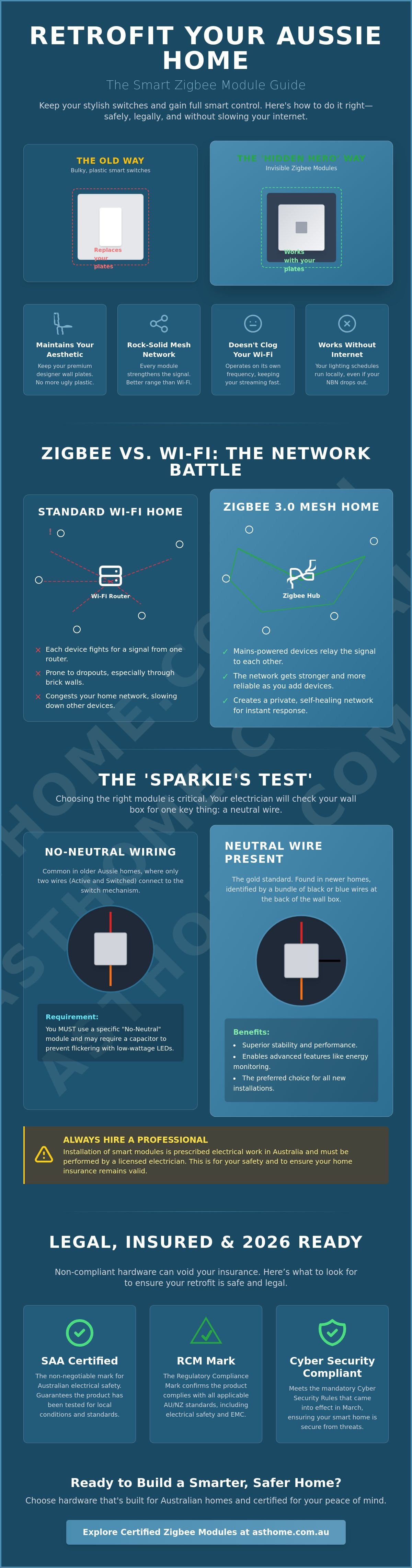
Imagine a smart home where you don't have to explain to guests how to turn on the lights. zigbee smart modules are the technical backbone of this experience. These are compact, SAA-certified controllers that sit directly behind your existing wall switches, tucked neatly inside the wall box. Unlike smart bulbs, which require the physical switch to stay 'on' at all times, a module allows your standard plates to function exactly as they always have. You get the benefits of automation without losing the tactile feel of a real switch. It's a professional solution that respects the original design of your home.
Smart bulbs often lead to colour inconsistency across a room if you can't find matching temperatures for every fixture. Modules solve this by controlling the circuit itself. This means every downlight or pendant stays perfectly synced regardless of the brand. In 2026, the standard is Zigbee 3.0. This protocol is designed for high-density environments. Whether you're in a busy suburb like Point Cook or a rural block, Zigbee 3.0 ensures your automations trigger instantly without interference from your neighbour's router. The reliability comes from the Zigbee protocol mesh structure. Every mains-powered module you install acts as a repeater. Instead of every device fighting for a signal from a central router, they pass messages to each other. This creates a self-healing network that gets stronger as you add more devices.
The Benefits of 'Invisible' Automation
Keeping your designer wall plates is a major win for your home's aesthetic. You've likely spent a lot of time choosing the right finish for your interior. Removing them for cheap-looking plastic smart switches is a step backwards. By using modules, you're building a permanent, hardwired ecosystem that adds genuine value to the property. It's an integrated solution, not a temporary gadget. Crucially, these devices operate on their own frequency. This avoids the congestion that happens when dozens of cheap smart plugs slow down your home internet and Netflix streaming. Your automation stays local, fast, and private.
Zigbee 3.0 vs. Matter: Which should you choose?
While Matter is the new talk of the industry, Zigbee 3.0 remains the gold standard for local, low-latency control in 2026. It doesn't rely on an internet connection to run your basic lighting schedules. For those deep in the Apple ecosystem, the Matter Smart Switch Modules provided by Asthome Smart Electrical Supplies offer a perfect bridge, allowing seamless integration with HomeKit. To manage it all, you'll need a dedicated Zigbee Gateway Hub. This acts as the brain of the operation, coordinating your sensors and switches while keeping the heavy lifting off your main router. It's a robust setup that practitioners trust for long-term stability.
Neutral vs No-Neutral: Choosing the Right Module for Your Wiring
Before you commit to a bulk order of zigbee smart modules, you need a clear picture of what's happening inside your wall boxes. Australian electrical standards have evolved over decades, and the wiring in a 1970s brick veneer home looks very different from a 2026 new build. The first step is the 'sparkie's test'. Your licensed electrician will check for a neutral wire, which is typically a bundle of black or blue wires tucked into the back of the junction box. If your switch only has two wires connected to it (the active and the switch wire), you likely have a 'no-neutral' setup.
Choosing the wrong module for your specific wiring leads to the dreaded 'ghost' flickering. This happens when low-wattage LED downlights receive a tiny amount of residual current, causing them to pulse or glow even when switched off. Ensuring your gear has the correct Australian electrical safety certification is the only way to guarantee the hardware handles these regional load requirements safely. If you're unsure which path to take, you can browse the range of certified smart modules at Asthome Smart Electrical Supplies to see the specific wiring diagrams for each model before you buy.
When to Use a Neutral Module
Neutral-required modules are the gold standard for any smart home retrofit. Because they have a dedicated return path for power, they offer superior stability and can provide real-time energy monitoring data. They're essential for high-load areas or when you want to track the power consumption of specific appliances. From a networking perspective, neutral-powered modules act as 'routers' in your mesh. They stay awake 24/7 to pass signals along, significantly strengthening your home's connectivity. These are the preferred choice for new builds or any room where a neutral wire is accessible.
Solving the 'No Neutral' Problem
Many older Australian homes lack a neutral wire at the switch, but this doesn't mean you're locked out of automation. No-neutral modules use a clever 'vampire' power draw to keep the Zigbee chip alive without a complete circuit. To prevent the flickering mentioned earlier, these modules often require a bypass capacitor installed at the light fitting. This small component absorbs the excess current, keeping your LEDs dark when they should be. For many Victorian renos, Zigbee 3.0 Smart Switch Modules are the go-to solution because they offer the most reliable performance in these restricted-wiring scenarios. They provide a high-performance smart experience without the massive expense of a full house rewire.
Top Zigbee Modules for Every Room: A 2026 Selection Guide
Selecting the right hardware depends entirely on the specific load and function of each room. While the underlying technology remains consistent, the physical application changes whether you're automating a home cinema or a high-traffic kitchen. In 2026, the latest Zigbee standard ensures that these devices remain future-proof, providing the security and interoperability required for a modern Aussie home. It's about choosing the right tool for the job to ensure long-term reliability.
- Living Room: The Smart Zigbee Dimmer Module is a non-negotiable for home cinema enthusiasts. It provides smooth, flicker-free control over your LED downlights, allowing for precise scene setting that Wi-Fi bulbs simply can't match.
- Bedrooms: Focus on comfort by pairing zigbee smart modules with a Smart Curtain Motor and track. You can automate your morning wake-up routine by slowly opening the blinds while your bedside lamps fade in.
- Kitchen & Laundry: These areas often feature high-amp appliances. Using a Smart Power Point (GPO) or high-rated modules ensures you can monitor energy usage and automate heavy loads like the dishwasher or washing machine safely.
- Outdoor & Security: Connectivity is key for perimeter safety. Integrating Motion Sensors with your external lighting modules ensures the patio lights only trigger when needed, saving power and alerting you to movement.
Standout Products from the Asthome Collection
Our 2-Gang Zigbee Switch Module is a favourite for practitioners because it allows you to control two separate light circuits from a single wall box. This is a massive space-saver in tight Australian cavities. For those requiring specialized accessibility, our NDIS SDA Compliant Smart Home Kit provides the necessary reliability for assisted living environments in Victoria. If you're working with dimmable circuits, our Zigbee Dimmer Module features trailing-edge technology, which is specifically designed to play nice with the LED drivers common in Australian homes.
Feature Comparison: What to Look For
Precision matters when you're retrofitting. Always check the physical dimensions of the module before purchasing. Most Australian wall boxes are 35mm deep; our modules are designed to sit comfortably behind the switch plate without forcing the fit. Amperage ratings are equally critical. A standard lighting module is usually rated for 10A, but if you're controlling a GPO, you must ensure the hardware is built for the higher load. Finally, verify app compatibility. Whether you use Tuya, Smart Life, or a local Home Assistant setup, our hardware is designed to integrate seamlessly into your preferred ecosystem.
Building a Bulletproof Zigbee Mesh in Your Australian Home
A smart home is only as good as its connectivity. While Wi-Fi relies on a central router, a Zigbee network operates as a web. To build a reliable system, you must understand the 'Router vs. End Device' rule. Mains-powered zigbee smart modules act as routers, meaning they actively repeat the signal to other devices. Battery-powered units, like sensors, are end devices that only talk to the nearest router. If your mesh is weak, your automations will lag. By installing modules behind your light switches, you effectively place signal repeaters in every room of the house.
Australian building materials present unique challenges for wireless signals. Brick veneer walls and foil-backed insulation (sarking) act as shields, often killing signals between rooms. In a double-storey home in Point Cook, for example, a single hub downstairs won't reach the master bedroom upstairs through a reinforced concrete slab or thick timber flooring. You need at least one mains-powered module on each floor to bridge the gap. If you encounter a 'device unreachable' error in Home Assistant, it's usually a sign that the mesh path is broken. Re-pairing the device in its final location often forces the network to find a more stable route through a nearby module.
Optimising Signal Strength
You can easily extend your network to the back shed or a detached garage by daisy-chaining modules. Every mains-powered device strengthens the web. However, you must manage the '2.4GHz Dance'. Both Wi-Fi and Zigbee share the same frequency band. To avoid interference, set your Zigbee channel to 15, 20, or 25, which typically sits in the gaps between standard Wi-Fi channels 1, 6, and 11. Our Smart Light Switches serve as the backbone of this mesh, providing a dense network of repeaters that keep your sensors online 24/7.
The Role of the Gateway Hub
The hub is the brain of your operation. In 2026, you have the choice between a dedicated Zigbee Gateway Hub or a multi-protocol Matter gateway. We recommend local control whenever possible. Local control means your automations happen instantly and continue to work even if the NBN goes down. Cloud-based systems often introduce 'popcorn effect' lighting, where bulbs turn on one by one with a noticeable delay. To organise a mesh with 50+ devices without lag, ensure your hub is centrally located and connected via Ethernet rather than Wi-Fi. This provides the most stable foundation for a high-performance smart home. Ready to upgrade your network? You can view our full range of Zigbee Gateway Hubs to find the right fit for your project.
Why SAA-Certified Zigbee Modules Matter for Australian Sparkies
The legal reality is simple: if it doesn't carry the RCM, it doesn't belong in an Australian wall box. Installing non-compliant zigbee smart modules is a massive liability for both the homeowner and the installer. Should an electrical fire occur, your home insurance provider will investigate the cause. If the hardware is a grey-market import that hasn't been tested to AS/NZS 60669.1:2020 standards, your claim can be flatly rejected. At Asthome, we're practitioners first. We understand that your reputation as a sparkie relies on the gear you install. That's why every module in our range undergoes rigorous local testing to ensure it handles Aussie conditions safely.
For those working on specialised projects, meeting NDIS compliance is critical. Our NDIS SDA Compliant Smart Home Kits are designed to provide the rock-solid uptime required for assisted living environments. Licensed professionals in Victoria can also access our Trade Accounts, which offer bulk pricing and priority technical support. It's about building a partnership where you have the backup you need for complex retrofits. We ensure that every device we sell meets the latest Cyber Security Rules 2025, which became mandatory on March 4, 2026.
Compliance and Safety Standards
The Regulatory Compliance Mark (RCM) is your primary seal of authenticity. It proves the device meets Australian safety and EMC requirements. Unlike the European 'CE' mark, which isn't legally recognised here for electrical safety, the RCM is a mandatory anchor for any hardwired smart device. Our modules also feature advanced thermal protection. This is vital for the Australian climate, where roof spaces and wall cavities can reach extreme temperatures in summer. Buying from a local Point Cook supplier ensures you're getting hardware designed for our local grid and environmental stressors, rather than generic gear meant for cooler climates.
Ready to Upgrade Your Home?
By now, you've seen why Zigbee modules are the smartest investment for a 2026 retrofit. They offer an invisible, reliable, and high-performance mesh that respects your home's original aesthetic. Before you start your project, run through this final checklist to ensure a smooth transition to a smarter home:
- Select a high-quality Zigbee Gateway Hub to act as the brain of your mesh network.
- Choose the correct neutral or no-neutral zigbee smart modules for your specific wiring setup.
- Book a licensed sparkie to perform the installation in accordance with the AS/NZS 3000:2018 wiring rules.
- Verify that all components carry the RCM to maintain your home insurance validity.
Don't settle for flakey Wi-Fi or non-compliant imports that put your property at risk. Browse our full range of SAA-Certified Zigbee Smart Modules here.
Future-Proof Your Australian Home with Confidence
Retrofitting your home for the 2026 smart standard doesn't need to be a complex ordeal. By focusing on SAA-certified hardware and understanding your specific wiring requirements, you can create an automated environment that is both invisible and incredibly reliable. The shift toward local control ensures your lighting and security work perfectly even if the NBN drops out, while a well-planned mesh network eliminates the dead zones common in brick veneer properties. It's about making your home work harder for you without changing the look you love.
Investing in high-quality zigbee smart modules is the most effective way to upgrade your existing switches without compromising on safety or aesthetics. As a practitioner-led business based in Point Cook, we provide the local support and technical expertise you need to get the job done right. Whether you are a homeowner or a licensed professional looking for trade discounts, we have the compliant hardware to suit your needs. Shop SAA-Certified Zigbee Smart Modules at Asthome and start building your bulletproof smart home today.
Frequently Asked Questions
Do I need a neutral wire for all Zigbee smart modules?
No, you don't need a neutral wire for all zigbee smart modules. We offer specific no-neutral versions designed for older Australian homes where only an active and switch wire are present at the wall box. These modules use a clever power-draw method to stay online, though you may need to install a bypass capacitor at the light fitting to prevent low-wattage LEDs from flickering when turned off.
Can I install Zigbee modules myself in Australia?
No, DIY installation of any hardwired electrical component is illegal in Australia. All smart modules must be installed by a licensed electrician to comply with the AS/NZS 3000:2018 wiring rules. Hiring a professional ensures the work is safe, legal, and covered by your home insurance policy. Your sparkie will also provide a Certificate of Electrical Safety upon completion.
Will these modules fit behind my existing HPM or Clipsal wall plates?
Yes, our modules are engineered to fit behind standard Australian wall plates, including the common Clipsal and HPM ranges. Most Aussie wall boxes provide about 35mm of depth, and our hardware is slim enough to sit comfortably behind the existing switch mechanism. This allows you to keep your home's current aesthetic while gaining full smart functionality.
How many Zigbee modules can I connect to a single gateway?
A standard Zigbee gateway hub can typically manage up to 128 devices, while high-end hubs can support over 200. Because every mains-powered module acts as a repeater, the mesh network becomes more stable as you add more devices. The zigbee smart modules pass signals to each other, allowing the network to cover large double-storey homes or reach detached garages with ease.
Do Zigbee modules work if the internet goes down?
Yes, Zigbee devices continue to operate locally even if your NBN connection fails. Unlike Wi-Fi-based gear that often requires a cloud connection to process commands, Zigbee automations happen at the hub level. Your pre-set schedules, motion-linkages, and physical wall switches will still function perfectly without an active internet connection.
What is the difference between a Zigbee module and a smart light switch?
A Zigbee module is a small device hidden inside the wall box behind your original switch, whereas a smart light switch replaces the entire physical wall plate. Modules are often the better choice for retrofits because they let you keep your preferred designer switch plates. This ensures a consistent look across your home even if you only automate a few rooms.
Are Asthome Zigbee modules compatible with Home Assistant?
Yes, our hardware is designed for broad compatibility and works seamlessly with Home Assistant. You can connect them using a universal Zigbee coordinator via ZHA or Zigbee2MQTT. This gives you total local control over your data and allows you to build complex automations that don't rely on external manufacturer servers or apps.
Why is SAA certification so important for smart home modules?
SAA certification proves that a device meets mandatory Australian safety standards and is legal for installation. Look for the Regulatory Compliance Mark (RCM) on the hardware before any work begins. Using uncertified 'grey market' imports is a major safety risk and can lead to your home insurance being voided if an electrical fault or fire occurs.