

Is that bargain-bin switch from overseas actually worth voiding your home insurance? Most Aussie homeowners are eager to automate their lighting but find themselves bogged down by the "no-neutral" dilemma and the fear of a congested network. Choosing the right smart wi-fi light switch shouldn't feel like a gamble with your electrical safety or your Wi-Fi 7 performance. You want a system that looks like a standard wall plate, works every time you ask Alexa to dim the lights, and meets the strict Australian standards your sparky expects.
We've done the hard yards to simplify your retrofit. This 2026 guide compares the top SAA-certified switches on the market, focusing on compliance with the latest Cyber Security Rules 2025 and AS/NZS 3000:2018 wiring standards. You'll learn how to identify if your home needs a neutral-required or a no-neutral module, how to maintain interoperability with Matter 1.5, and exactly what your licenced electrician needs to know for a seamless, reliable installation that provides peace of mind.
Key Takeaways
- Identify whether your home requires a neutral or "no-neutral" solution to avoid costly wiring surprises during your next electrical upgrade.
- Compare the performance of a smart wi-fi light switch against Zigbee 3.0 and Matter protocols to find the right balance between simplicity and network reliability.
- Learn how to verify SAA certification and compliance with the 2026 Cyber Security Rules to ensure your hardware is both legal and secure.
- Choose the correct gang configuration (1-4 gang) to perfectly match your existing Australian wall plates for a professional, clean finish.
- Discover how practitioner-led insights help you navigate the technical requirements that your licensed electrician needs to know before the job starts.
Understanding the Smart Wi-Fi Light Switch: The Aussie Retrofit King
A smart wi-fi light switch is more than just a fancy wall plate. It is a communication-ready device that connects directly to your home router without needing a separate gateway. This makes it the ideal choice for Australian homeowners who want to upgrade a single room or a whole floor without the complexity of a mesh network. By 2026, the technology has matured significantly. Modern units now feature Matter 1.5 compatibility, which means they play nicely with Apple Home, Google Home, and Alexa right out of the box. Because they tap into your existing Wi-Fi 7 infrastructure, you get high-speed responses and a reliable connection for every gang on the plate.
The primary appeal of these switches is their "plug-and-play" nature. Since they use your existing network, you won't have to worry about the range issues associated with older protocols in smaller homes. You gain instant access to remote control via your smartphone, allowing you to flick the porch light on from the office or set an automated schedule so you never come home to a dark house. For most Aussie retrofits, the smart wi-fi light switch provides the easiest path to automation because it uses the hardware you already own; your router.
How Wi-Fi Switches Differ from Traditional Plates
While a standard plate relies on a mechanical toggle to cut power, a smart switch uses an internal electronic relay. This difference is fundamental to how wireless switches work in a modern home. If your internet connection drops out, these switches still function as manual toggles. You won't be left in the dark just because the router is acting up. The tactile experience has also evolved. You can choose between sleek capacitive touch glass or smart mechs that fit into standard Australian wall plates to keep a traditional look.
- Internal Relays: These allow for millisecond response times and integration with motion sensors or timers.
- Tactile Options: Choose between modern tempered glass finishes or mechanical push-buttons that match your existing décor.
- Energy Monitoring: Many 2026 models include built-in power tracking so you can see exactly what your LED downlights are costing you via your app.
Why Australian Homeowners are Making the Switch
The shift away from traditional "dumb" switches is driven by security and lifestyle needs. With the cost of living rising, many Aussies use energy monitoring features to identify power-hungry circuits. Others focus on the safety benefits of "Away Mode." This feature toggles lights at random intervals while you are on holiday to make the house look occupied. It is a simple, effective way to deter intruders without the need for a full security system.
- Security: Use presence simulation to protect your property while you are away from home.
- Convenience: Group your lights to turn everything off with a single voice command from your bedside.
- Aesthetic Upgrades: Replace old, yellowing plastic plates with unified 1, 2, 3, or 4-gang smart configurations for a cleaner look.
Wi-Fi vs. Zigbee vs. Matter: Which Protocol Suits Your Home?
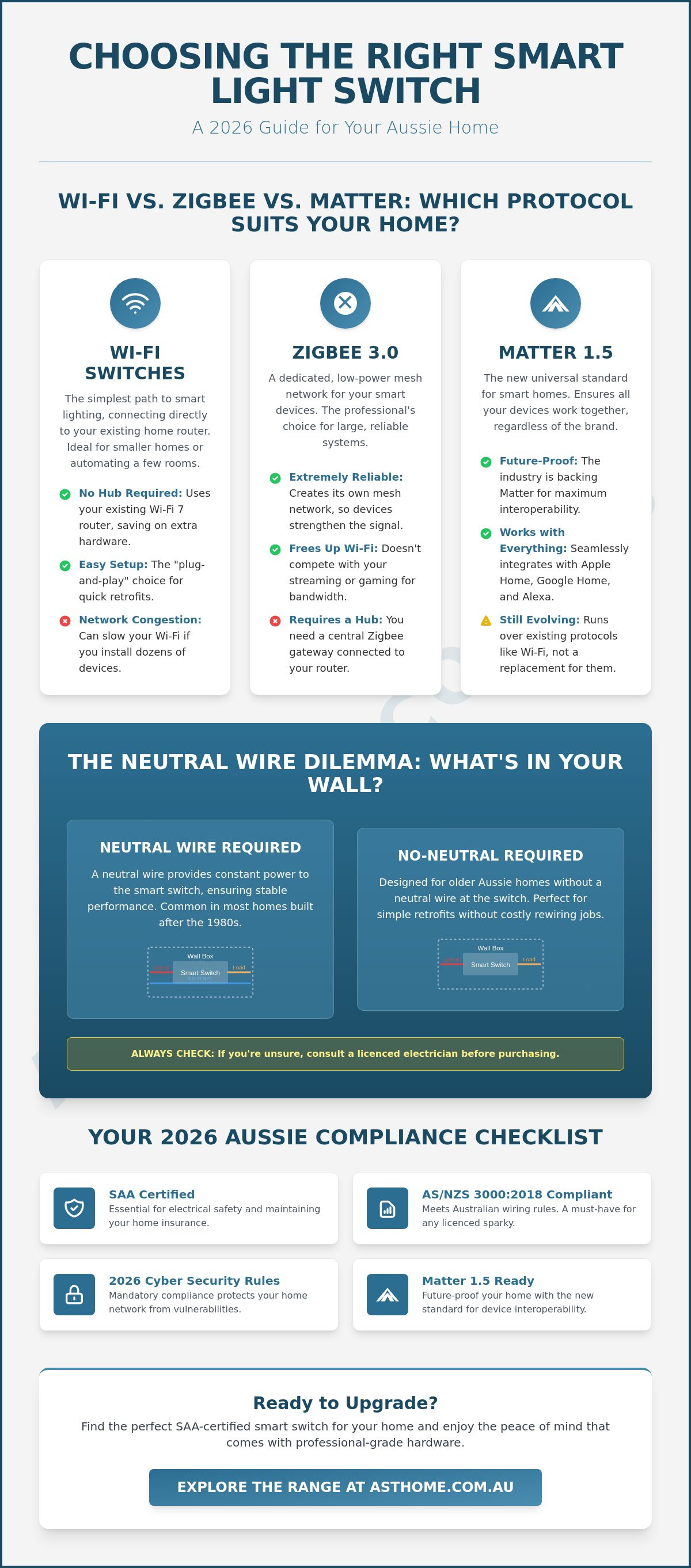
Choosing the right communication protocol is the most critical decision in your automation journey. For most Australian homes, the smart wi-fi light switch remains the benchmark for simplicity and cost-effectiveness. It connects directly to your router, bypassing the need for a gateway hub. However, as your system grows, you might consider Zigbee 3.0 or the new Matter standard. Each has distinct trade-offs regarding response time, setup complexity, and how they handle network traffic. Understanding these differences ensures your lights respond instantly every time you hit the switch or use a voice command.
The technical landscape shifted significantly on March 4, 2026. All smart devices must now comply with mandatory Australian cybersecurity rules. This legislation ensures that whether you choose Wi-Fi or Zigbee, your hardware meets minimum security standards, including the removal of universal default passwords. This provides a layer of professional-grade protection for your home network that wasn't guaranteed in years past.
The Case for Wi-Fi in 2026
In earlier years, "Wi-Fi congestion" was a genuine concern for homeowners with more than ten devices. That changed with the widespread adoption of Wi-Fi 7 mesh systems. Modern Aussie routers can now comfortably manage over 100 simultaneous connections without lag. A smart wi-fi light switch is typically the most affordable option for 1-4 gang retrofits because you don't have to buy a separate hub. If you want to ensure your system stays relevant, look for Matter smart switches. These units offer the ease of Wi-Fi setup with the universal compatibility of the Matter 1.5 protocol, allowing them to work seamlessly across different brand ecosystems.
When to Consider Zigbee Instead
Zigbee 3.0 is a professional favourite for large-scale installations. If you are planning to automate more than 20 switches, Zigbee's mesh networking becomes a major advantage. Each device acts as a repeater, strengthening the signal across the home. Many trade professionals prefer using Zigbee 3.0 smart switch modules installed behind your existing wall plates. This setup offers ultra-low latency and local control, meaning your automations will still run even if your NBN connection goes down. While it requires a Zigbee gateway hub, the reliability for complex, multi-room scenes is often worth the extra hardware.
Whether you are starting with a single room or kitting out a new build, selecting hardware that matches your existing wiring is vital. You can browse our full range of SAA-certified smart light switches and modules to find the perfect fit for your specific project requirements.
The Neutral Wire Dilemma: Choosing a Switch That Fits Your Wiring
Wiring topology is the number one reason for product returns in the Australian smart home market. Before you buy a smart wi-fi light switch, you must understand what is happening inside your wall box. A traditional light switch is a simple mechanical break in the circuit. It only needs the "Active" wire. However, a smart switch is essentially a small computer that needs to stay powered 24/7 to listen for your smartphone commands or voice triggers. To do this, it usually requires a "Neutral" wire to complete its own internal circuit.
In many older Australian homes, the electrician only ran the Active and the Switched Active to the wall plate. The Neutral wire often bypasses the switch entirely, running straight to the light fitting in the ceiling. If you try to install a standard smart switch in this environment, it simply won't turn on. You can check your wiring by safely removing your existing wall plate (with the mains power off) and looking for a bundle of blue or black wires tucked in the back. If they are there, you have a Neutral. If you only see two wires, you are in a "No-Neutral" situation.
Neutral Required Switches: The Gold Standard
If your home has a Neutral wire at the switch, you're in luck. Neutral-based switches are more stable and can handle much higher wattage loads without glitching. This setup provides a dedicated power path for the switch's Wi-Fi radio, ensuring it never drops off your network. It is also the preferred configuration when using dimmable LED drivers. Having a dedicated Neutral at the switch helps prevent the "ghosting" or flickering issues that sometimes plague smart lighting systems, especially when dimming to low levels.
No-Neutral Solutions for Older Aussie Homes
Don't panic if your 1970s brick veneer home lacks a Neutral wire. "Single Live Wire" switches are designed specifically for this scenario. These devices power themselves by "leaking" a tiny, invisible amount of current through the light globe. While ingenious, this can cause low-quality LED globes to flicker or glow faintly when they should be off. To fix this, your sparky will need to install a "Bypass" capacitor at the light fitting. This is a common requirement when retrofitting smart zigbee dimmer modules or no-neutral Wi-Fi plates. Just be aware that these switches often have a minimum load requirement, so they might not work with a single, ultra-low-wattage LED bulb.
Finding the right smart wi-fi light switch for your specific wiring layout is the difference between a seamless upgrade and a frustrating weekend. Always confirm your wiring before making a purchase to ensure the hardware matches your home's electrical reality.
Buying Guide: Key Features to Compare Before You Buy
Selecting a smart wi-fi light switch involves more than just picking a colour that matches your walls. You need to ensure the hardware is physically and legally compatible with Australian infrastructure. Many international models found on global marketplaces lack the necessary local certifications or mounting dimensions. This often leads to failed electrical inspections or, worse, voided home insurance. Understanding the technical specifications that separate a trade-grade switch from a generic import is essential for a long-term, reliable installation.
The "Aussie Standard" Checklist
Every switch you install must carry the Regulatory Compliance Mark (RCM) and have a valid SAA certification number. This isn't just red tape; it's your proof that the device has been tested for the Australian climate and electrical grid. Beyond safety, you must check the mounting centres. The Australian standard is 84mm. If you buy a switch designed for European or US markets, it simply won't fit your existing plaster brackets or wall boxes. Your sparky will also thank you for checking the terminal sizes. A professional-grade switch should easily accommodate two 1.5mm² cables or even 2.5mm² cables for certain circuits, ensuring a secure and compliant connection.
- Certification: Look for the RCM logo and SAA approval numbers on the back of the plate.
- Mounting: Ensure the unit uses standard 84mm mounting centres to fit Aussie brackets.
- Warranty: Prioritise a local 3-year warranty over a 1-year international one. Local support means you won't be left in the dark if a module fails.
Smart Functionality Comparison
Once the physical requirements are met, look at the software capabilities. A common pain point with older smart switches was the lack of "power-on state" customisation. Modern 2026 models allow you to choose what happens after a power cut; whether the lights stay off, turn on, or return to their previous state. This is vital for bedrooms where you don't want a midnight power surge to wake the whole family. You should also check for backlight control. Many homeowners prefer the ability to turn off the status LED on the wall plate at night to keep the room dark. Finally, consider multi-way switching. In the past, 2-way switching required complex physical wiring. Now, you can often configure this wirelessly via the app, allowing one switch to trigger another over your Wi-Fi network.
For a reliable installation that meets every local safety requirement, browse our range of SAA-certified smart wi-fi light switches designed specifically for Australian homes.
Why Asthome Smart Electrical Supplies is the Professional Choice for Smart Electrical Supplies
Asthome Smart Electrical Supplies isn't just another online retailer. We are a business run by practitioners who have spent years on tools. We understand that when you are on-site in Melbourne or Geelong, you need gear that works the first time. Whether you are a homeowner looking for a single smart wi-fi light switch or a contractor kitting out a multi-residential project, our expertise ensures you get the right module for the job. Based in Point Cook, we provide real Australian technical assistance, not a generic chatbot response. We know the local wiring rules and the specific challenges of the Aussie retrofit market. This peer-to-peer reliability is why so many local sparkies trust us for their smart supplies.
Supporting the Local Trade
Asthome Smart Electrical Supplies simplifies procurement for residential electrical contractors by offering dedicated trade accounts. If you are a licenced professional in Victoria, you can access discounted pricing and bulk rates that help you stay competitive on your quotes. We don't just ship boxes; we provide the compliance documentation your clients expect. Every SAA-certified product we sell comes with the peace of mind that it meets regional regulatory standards. This is vital for maintaining your professional indemnity and ensuring every job is 100 per cent legal. Registered trade account holders also benefit from priority shipping. This ensures your projects stay on schedule without waiting weeks for overseas parts to clear customs.
- Practitioner-led: Peer-to-peer service from experts who understand Aussie site conditions.
- Trade Pricing: Exclusive discounts for registered Victorian electrical professionals.
- Local Support: Real technical help based in Point Cook for troubleshooting and advice.
- Compliance: Full SAA and RCM documentation provided for every product.
NDIS and Accessible Living Solutions
Reliability is non-negotiable for participants in the National Disability Insurance Scheme. We specialise in integrating smart wi-fi light switch modules and other hardware into NDIS SDA smart home technology frameworks. For individuals with limited mobility, the ability to control lighting via voice or automated sensors is life-changing. It provides a level of independence that traditional switches simply cannot offer. Our NDIS-compliant kits are designed for high-stakes environments where system failure isn't an option. We provide the robust, certified hardware required for government-funded Specialist Disability Accommodation projects. This ensures that every automation is both accessible and safe for long-term use.
Secure Your Smart Home Future Today
Retrofitting your Aussie home for 2026 doesn't have to be a headache. By verifying your wiring topology and prioritising SAA-certified hardware, you ensure a reliable system that protects your home insurance and your family. Whether you opt for a smart wi-fi light switch for its plug-and-play simplicity or a Zigbee module for local mesh control, the focus must always remain on quality and regional compliance. Don't settle for uncertified imports that risk your safety or network stability.
At Asthome Smart Electrical Supplies, we provide practitioner-led expertise and local support from our base in Point Cook, Victoria. Licensed sparkies can also access specialised trade pricing to help deliver professional results on every project. Browse our SAA-Certified Smart Wi-Fi Light Switches to find the perfect fit for your next upgrade. Your journey toward a more efficient, automated home starts with hardware you can actually trust. It's time to flick the switch on a smarter lifestyle.
Frequently Asked Questions
Do I need a licenced electrician to install a smart Wi-Fi light switch in Australia?
Yes, you must hire a licenced electrician to install any hard-wired electrical device in Australia. This is a legal requirement under the AS/NZS 3000:2018 wiring rules. Attempting a DIY installation not only risks your safety but also voids your home insurance and product warranty. Your sparky will ensure the smart wi-fi light switch is correctly earthed and compliant with all local safety standards.
Will a smart Wi-Fi light switch work if my internet goes down?
Your lights will still work manually if your internet connection drops out. The internal relay in a smart switch functions like a traditional mechanical toggle when pressed physically. You only lose app control, voice commands, and cloud-based schedules until the connection is restored. Local automations set up via Matter 1.5 protocols may continue to function depending on your specific network configuration.
What is the difference between a neutral and a no-neutral smart switch?
A neutral switch requires a dedicated neutral wire to power its internal radio constantly, offering the best stability for high-wattage loads. A no-neutral switch is designed for older Aussie homes where only the active wire is present at the wall plate. These units draw a tiny amount of power through the globe itself, which often requires a bypass capacitor at the light fitting to prevent flickering.
Are smart Wi-Fi light switches compatible with all LED globes?
Most modern SAA-certified switches are compatible with standard LED globes. However, no-neutral models can struggle with ultra-low-wattage LEDs, typically those under 5W, causing them to "ghost" or flicker when turned off. Using a high-quality dimmable LED driver or installing a bypass capacitor usually resolves these compatibility issues. Always check the minimum load specifications on the product data sheet before purchase.
Can I use a smart switch to control my ceiling fan as well?
You can use a standard smart wi-fi light switch to turn a ceiling fan on and off, but it won't control the fan speed. For speed adjustment, you need a specialised fan controller designed for inductive loads. If your fan has an integrated light, you will likely need a 2-gang configuration to control the light and the motor independently from the same wall plate.
Do these switches fit into standard Australian wall brackets?
Yes, our smart switches are designed with 84mm mounting centres to fit standard Australian plaster brackets and wall boxes. Unlike European or American models, these plates align perfectly with existing hardware in Aussie homes. This ensures a flush finish against the wall without the need for additional rendering or patchwork after your electrician completes the installation.
Is it better to use a smart switch or a smart globe?
A smart switch is generally the superior choice for permanent home automation. While smart globes are easy to install, they become "dumb" and uncontrollable as soon as someone flicks the physical wall switch off. A smart switch keeps your lighting "live" and controllable via app or voice at all times. It also allows you to keep your preferred aesthetic fixtures while adding modern functionality.
How many smart Wi-Fi switches can my home router handle?
Modern Wi-Fi 7 and mesh routers can typically handle over 100 connected devices simultaneously. While older routers might have struggled with network congestion, current hardware manages traffic efficiently. If you are kitting out a large home with 30 or more switches, ensuring you have a robust mesh network will prevent any latency issues or device drop-outs across your system.